

Latest Version
Update
May 03, 2026
May 03, 2026
Developer
Lelechudz
Lelechudz
Categories
Music & Audio
Music & Audio
Platforms
Android
Android
Downloads
1
1
License
Free
Free
Package Name
com.enhancedeq.app
com.enhancedeq.app
Report
Report a Problem
Report a Problem
More About Enhanced EQ – Equalizer & Bass
Enhanced EQ — the most powerful system-wide equalizer for Android.
Unlike basic equalizers that only work inside one app, Enhanced EQ processes audio in real time across every app — music, videos, games, calls — all at once. No root required.
PROFESSIONAL EQUALIZER
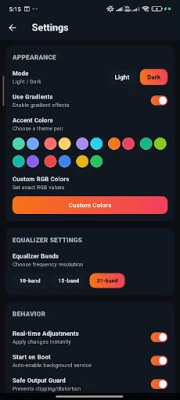
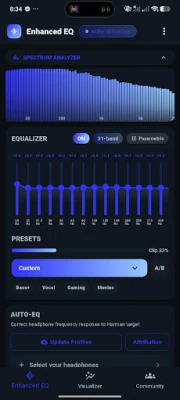
• 10-band, 15-band, and 31-band graphic equalizer
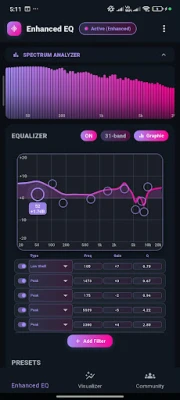
• Parametric EQ with 8 filter types (Peak, Shelves, Notch, LR2/LR4, All Pass, Tilt)
• Smooth FlowEQ-style live frequency curve overlay
• VU-meter band sliders with wide touch targets
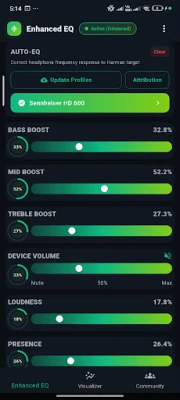
• Bass, Treble, Mid Boost, Loudness, Presence, Brilliance
• Master Gain final-stage volume slider
• Subwoofer Crossover for paired sub setups
• L/R Balance for asymmetric hearing
• Stereo Width, Dynamic Compressor with 7 tuned modes
• A/B compare and Safe Output Guard
AUTO-EQ PROFILES
• 8,850+ built-in headphone correction profiles (Sony, Bose, Apple, Samsung, Sennheiser & more)
• Harman target curve correction
• Search and filter by brand and type (IEM, over-ear, on-ear)
• IR Loader for custom .wav impulse response files
PER-APP PROFILES
• Auto-switch EQ profile based on the foreground app
8D & 10D SPATIAL AUDIO
• 8D Spatial Motion
• 10D Cinematic — Cinema, Concert, Surround, Meditation
• Rumble, Punch, Air Enhancement
• Reverb: Room, Hall, Cathedral, Studio, Spring, Shimmer, Gated
SPECTRUM VISUALIZER
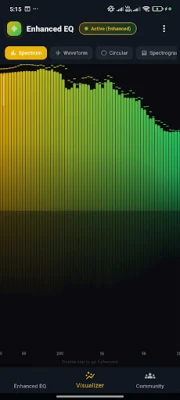
• Real-time spectrum analyzer with 7 visual styles
• Bars, Waveform, Circular, Spectrogram, Terrain, Particle
• Custom gradient colors with HSV spectrum picker
• Save your own palettes and apply with one tap
• Double-tap for fullscreen view
COMMUNITY PRESETS
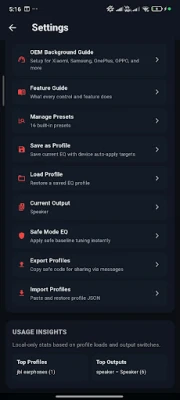
• Browse EQ presets shared by users worldwide
• Share your own presets
• Like and download the best-sounding profiles
• Filter by tags: Bass, Vocal, EDM, Gaming, Movies & more
PROFILES & PRESETS
• Save unlimited custom EQ profiles
• Auto-apply per output device (headphones, speaker, Bluetooth)
• Export and import via shareable code (EQ64)
• 29 built-in presets including Bass+, Vocal, Gaming, Movies, Classical
• Cloud sync — profiles + palettes follow you when signed in
PRO TOOLS
• Test Tones — pink noise + sine sweep for room calibration
• Compressor Modes (Auto, Light, Punchy, Aggressive, Brick Wall, Voice, Mastering)
• Per-App Profiles
• IR Loader
FULLY CUSTOMIZABLE
• Light and Dark mode
• 16+ gradient accent themes plus user-saved palettes
• HSV spectrum colour picker
• Compact density mode
• Start on Boot — EQ stays active automatically
ENHANCED EQ PRO
• Remove all ads permanently
• Unlock all advanced processing (8D, 10D, Compressor Modes, Reverb, Per-App, Test Tones, IR Loader, AutoEQ)
• One-time purchase — no subscription
ACCESSIBILITY SERVICE — WHY ENHANCED EQ ASKS FOR IT
The Per-App Profiles feature uses Android's Accessibility Service to detect which app is currently in the foreground so it can auto-apply the EQ profile you assigned to that app.
What it reads:
• Only the foreground app's package name (e.g. "com.spotify.music").
What it does NOT read:
• No audio is recorded, stored, or transmitted.
• No screen content, on-screen text, keystrokes, or passwords are accessed.
• No personal data is collected, shared, or sold.
The package name is processed locally on your device only. The service is opt-in — enable it from the Per-App Profiles screen, and disable it anytime in Android Settings → Accessibility to stop Per-App Profiles instantly without affecting any other feature.
Enhanced EQ runs as a persistent foreground service so your sound stays tuned no matter what app you're in.
Download Enhanced EQ and hear the difference.
Unlike basic equalizers that only work inside one app, Enhanced EQ processes audio in real time across every app — music, videos, games, calls — all at once. No root required.
PROFESSIONAL EQUALIZER
• 10-band, 15-band, and 31-band graphic equalizer
• Parametric EQ with 8 filter types (Peak, Shelves, Notch, LR2/LR4, All Pass, Tilt)
• Smooth FlowEQ-style live frequency curve overlay
• VU-meter band sliders with wide touch targets
• Bass, Treble, Mid Boost, Loudness, Presence, Brilliance
• Master Gain final-stage volume slider
• Subwoofer Crossover for paired sub setups
• L/R Balance for asymmetric hearing
• Stereo Width, Dynamic Compressor with 7 tuned modes
• A/B compare and Safe Output Guard
AUTO-EQ PROFILES
• 8,850+ built-in headphone correction profiles (Sony, Bose, Apple, Samsung, Sennheiser & more)
• Harman target curve correction
• Search and filter by brand and type (IEM, over-ear, on-ear)
• IR Loader for custom .wav impulse response files
PER-APP PROFILES
• Auto-switch EQ profile based on the foreground app
8D & 10D SPATIAL AUDIO
• 8D Spatial Motion
• 10D Cinematic — Cinema, Concert, Surround, Meditation
• Rumble, Punch, Air Enhancement
• Reverb: Room, Hall, Cathedral, Studio, Spring, Shimmer, Gated
SPECTRUM VISUALIZER
• Real-time spectrum analyzer with 7 visual styles
• Bars, Waveform, Circular, Spectrogram, Terrain, Particle
• Custom gradient colors with HSV spectrum picker
• Save your own palettes and apply with one tap
• Double-tap for fullscreen view
COMMUNITY PRESETS
• Browse EQ presets shared by users worldwide
• Share your own presets
• Like and download the best-sounding profiles
• Filter by tags: Bass, Vocal, EDM, Gaming, Movies & more
PROFILES & PRESETS
• Save unlimited custom EQ profiles
• Auto-apply per output device (headphones, speaker, Bluetooth)
• Export and import via shareable code (EQ64)
• 29 built-in presets including Bass+, Vocal, Gaming, Movies, Classical
• Cloud sync — profiles + palettes follow you when signed in
PRO TOOLS
• Test Tones — pink noise + sine sweep for room calibration
• Compressor Modes (Auto, Light, Punchy, Aggressive, Brick Wall, Voice, Mastering)
• Per-App Profiles
• IR Loader
FULLY CUSTOMIZABLE
• Light and Dark mode
• 16+ gradient accent themes plus user-saved palettes
• HSV spectrum colour picker
• Compact density mode
• Start on Boot — EQ stays active automatically
ENHANCED EQ PRO
• Remove all ads permanently
• Unlock all advanced processing (8D, 10D, Compressor Modes, Reverb, Per-App, Test Tones, IR Loader, AutoEQ)
• One-time purchase — no subscription
ACCESSIBILITY SERVICE — WHY ENHANCED EQ ASKS FOR IT
The Per-App Profiles feature uses Android's Accessibility Service to detect which app is currently in the foreground so it can auto-apply the EQ profile you assigned to that app.
What it reads:
• Only the foreground app's package name (e.g. "com.spotify.music").
What it does NOT read:
• No audio is recorded, stored, or transmitted.
• No screen content, on-screen text, keystrokes, or passwords are accessed.
• No personal data is collected, shared, or sold.
The package name is processed locally on your device only. The service is opt-in — enable it from the Per-App Profiles screen, and disable it anytime in Android Settings → Accessibility to stop Per-App Profiles instantly without affecting any other feature.
Enhanced EQ runs as a persistent foreground service so your sound stays tuned no matter what app you're in.
Download Enhanced EQ and hear the difference.
Rate the App
Add Comment & Review
User Reviews
Based on 0 reviews
No reviews added yet.
Comments will not be approved to be posted if they are SPAM, abusive, off-topic, use profanity, contain a personal attack, or promote hate of any kind.













More »

Popular Apps

phpFoxPHPFOX LLC

Moon Chai StoryOlha Dobel

World War Heroes — WW2 PvP FPSAzur Interactive Games Limited

Govee LiteGovee

AvSeaAvionics Electronics Geeks!

Viking Clan: RagnarokKano Games

Build World AdventureExplore city in cube world

Vikings: War of ClansPlarium LLC

Asphalt 9: LegendsGameloft SE

Dawn of Zombies: Survival GameRoyal Ark
More »
Editor's Choice

Grim Soul: Dark Survival RPGBrickworks Games Ltd

Craft of Survival - Gladiators101XP LIMITED

Last Shelter: SurvivalLong Tech Network Limited
Dawn of Zombies: Survival GameRoyal Ark

Merge Survival : WastelandStickyHands Inc.

AoD Vikings: Valhalla GameRoboBot Studio
Viking Clan: RagnarokKano Games
Vikings: War of ClansPlarium LLC
Asphalt 9: LegendsGameloft SE

Modern Tanks: War Tank GamesXDEVS LTD