

Latest Version
Update
November 08, 2026
November 08, 2026
Developer
Sense Wave
Sense Wave
Categories
Tools
Tools
Platforms
Android
Android
Downloads
0
0
License
Free
Free
Package Name
com.sw.translate.english.spanish.language
com.sw.translate.english.spanish.language
Report
Report a Problem
Report a Problem
More About English To Spanish Translator
English To Spanish Translator: Auto Translate, Voice, Camera And Dictionary
Need to translate between English and Spanish? English To Spanish Translator brings auto translation, voice, camera, conversation, dictionary, and phrasebook tools together in one simple app. Use it for travel, school, work, or everyday conversations.
✅ Key Features
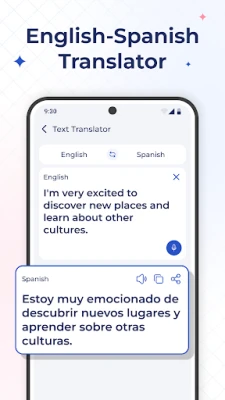
🔤 Text Translator With Auto Translation
Type or paste text to translate English to Spanish or Spanish to English. The translation appears automatically as you type, so there is no need to tap a translate button. Tap the swap button to change direction. Listen to the translation with audio playback, copy it, or share it with others.
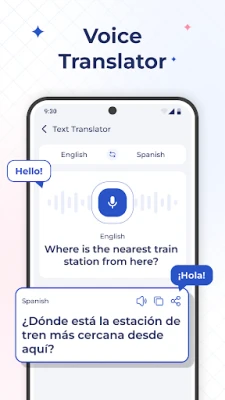
🎤 Voice Translator
Tap the microphone and speak instead of typing. Your speech is converted to text and translated, which is useful when you are on the go.
💬 Conversation Mode
Talk with English or Spanish speakers using two separate microphones, one for each language. Tap "Speak in English" or "Speak in Spanish" and follow the conversation on screen. Your chats are saved in Chat History.
📷 Camera Translator
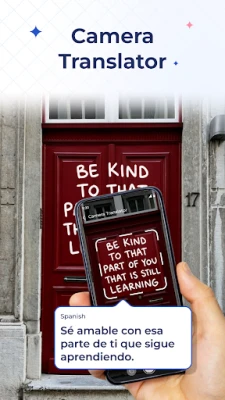
Point your camera at signs, menus, labels, or printed text to scan and translate it. Switch between the Original and Translated views to compare the text, and share the result.
📖 Spanish English Dictionary
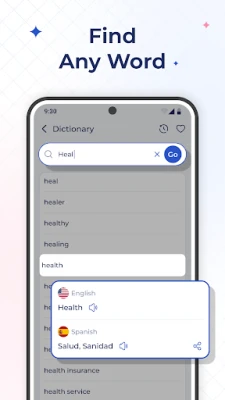
Look up a word to see its Spanish translation and English meaning. Explore synonyms, antonyms, example sentences, and similar words, and listen to the pronunciation with audio.
📚 Spanish Phrasebook
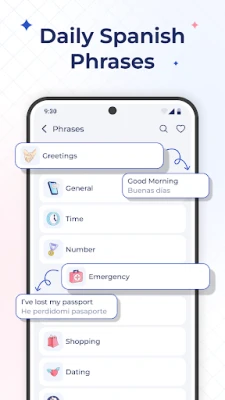
Browse ready-to-use English and Spanish phrases organized by topic: Greetings, General, Time, Numbers, Emergency, Eating, Accommodation, Transport, Shopping, Tourist, Directions, Family, Feelings, Colors, Body, Dating, Occasions, and more.
❤️ Favorites And History
Tap the heart icon to save useful phrases and dictionary entries. Return to your past translations, dictionary searches, and conversations from History whenever you need them.
👥 Who Can Use This App?
- Travelers: read menus and signs, ask for directions, and use common travel phrases.
- Students: check word meanings, examples, and pronunciation while studying.
- Language Learners: practice Spanish vocabulary and everyday phrases.
- Professionals: communicate with Spanish-speaking colleagues and clients.
- Everyday Users: translate messages, notes, and short texts.
❓ Quick Guide
How Do I Translate Spanish To English?
Type or paste your Spanish text, then tap the swap button to set Spanish as the source language. The translation appears automatically as you type.
How Do I Translate English To Spanish?
Enter your English text and the Spanish translation appears automatically below it. There is no translate button to tap.
Do I Need To Tap A Button To Translate?
No. Just start typing and the translation updates automatically as you type.
Can I Translate By Speaking?
Yes. Tap the microphone icon, speak your sentence, and the app translates it.
Can I Translate Text From A Photo Or Sign?
Yes. Open the camera scanner, point it at the text, and view the translation on screen.
How Do I Have A Two-Way Conversation?
Open Conversation mode and tap the microphone for the language being spoken.
Can I Look Up A Single Word?
Yes. Use the dictionary to see meanings, synonyms, antonyms, examples, and pronunciation.
Can I Use This App To Learn Spanish?
Yes. The phrasebook, dictionary, and audio playback can help you practice everyday Spanish words and phrases.
ℹ️ Good To Know
Translations are generated automatically and may not suit every context, so please review important text before relying on it. An internet connection may be required for translation. Microphone and camera permissions are required to use the voice and camera features.
Install English To Spanish Translator and start translating between English and Spanish with text, voice, and camera tools in one place.
Questions or suggestions? Contact us at [email protected]. We would love to hear from you.
✅ Key Features
🔤 Text Translator With Auto Translation
Type or paste text to translate English to Spanish or Spanish to English. The translation appears automatically as you type, so there is no need to tap a translate button. Tap the swap button to change direction. Listen to the translation with audio playback, copy it, or share it with others.
🎤 Voice Translator
Tap the microphone and speak instead of typing. Your speech is converted to text and translated, which is useful when you are on the go.
💬 Conversation Mode
Talk with English or Spanish speakers using two separate microphones, one for each language. Tap "Speak in English" or "Speak in Spanish" and follow the conversation on screen. Your chats are saved in Chat History.
📷 Camera Translator
Point your camera at signs, menus, labels, or printed text to scan and translate it. Switch between the Original and Translated views to compare the text, and share the result.
📖 Spanish English Dictionary
Look up a word to see its Spanish translation and English meaning. Explore synonyms, antonyms, example sentences, and similar words, and listen to the pronunciation with audio.
📚 Spanish Phrasebook
Browse ready-to-use English and Spanish phrases organized by topic: Greetings, General, Time, Numbers, Emergency, Eating, Accommodation, Transport, Shopping, Tourist, Directions, Family, Feelings, Colors, Body, Dating, Occasions, and more.
❤️ Favorites And History
Tap the heart icon to save useful phrases and dictionary entries. Return to your past translations, dictionary searches, and conversations from History whenever you need them.
👥 Who Can Use This App?
- Travelers: read menus and signs, ask for directions, and use common travel phrases.
- Students: check word meanings, examples, and pronunciation while studying.
- Language Learners: practice Spanish vocabulary and everyday phrases.
- Professionals: communicate with Spanish-speaking colleagues and clients.
- Everyday Users: translate messages, notes, and short texts.
❓ Quick Guide
How Do I Translate Spanish To English?
Type or paste your Spanish text, then tap the swap button to set Spanish as the source language. The translation appears automatically as you type.
How Do I Translate English To Spanish?
Enter your English text and the Spanish translation appears automatically below it. There is no translate button to tap.
Do I Need To Tap A Button To Translate?
No. Just start typing and the translation updates automatically as you type.
Can I Translate By Speaking?
Yes. Tap the microphone icon, speak your sentence, and the app translates it.
Can I Translate Text From A Photo Or Sign?
Yes. Open the camera scanner, point it at the text, and view the translation on screen.
How Do I Have A Two-Way Conversation?
Open Conversation mode and tap the microphone for the language being spoken.
Can I Look Up A Single Word?
Yes. Use the dictionary to see meanings, synonyms, antonyms, examples, and pronunciation.
Can I Use This App To Learn Spanish?
Yes. The phrasebook, dictionary, and audio playback can help you practice everyday Spanish words and phrases.
ℹ️ Good To Know
Translations are generated automatically and may not suit every context, so please review important text before relying on it. An internet connection may be required for translation. Microphone and camera permissions are required to use the voice and camera features.
Install English To Spanish Translator and start translating between English and Spanish with text, voice, and camera tools in one place.
Questions or suggestions? Contact us at [email protected]. We would love to hear from you.
Rate the App
Add Comment & Review
User Reviews
Based on 0 reviews
No reviews added yet.
Comments will not be approved to be posted if they are SPAM, abusive, off-topic, use profanity, contain a personal attack, or promote hate of any kind.











More »

Popular Apps

phpFoxPHPFOX LLC

Moon Chai StoryOlha Dobel

World War Heroes — WW2 PvP FPSAzur Interactive Games Limited

Govee LiteGovee

AvSeaAvionics Electronics Geeks!

Viking Clan: RagnarokKano Games

Vikings: War of ClansPlarium LLC

Build World AdventureExplore city in cube world

Asphalt 9: LegendsGameloft SE

Dawn of Zombies: Survival GameRoyal Ark
More »
Editor's Choice

Grim Soul: Dark Survival RPGBrickworks Games Ltd

Craft of Survival - Gladiators101XP LIMITED

Last Shelter: SurvivalLong Tech Network Limited
Dawn of Zombies: Survival GameRoyal Ark

Merge Survival : WastelandStickyHands Inc.

AoD Vikings: Valhalla GameRoboBot Studio
Viking Clan: RagnarokKano Games
Vikings: War of ClansPlarium LLC
Asphalt 9: LegendsGameloft SE

Modern Tanks: War Tank GamesXDEVS LTD