

Latest Version
Update
March 13, 2026
March 13, 2026
Developer
IslamicApps.Org
IslamicApps.Org
Categories
Tools
Tools
Platforms
Android
Android
Downloads
0
0
License
Free
Free
Package Name
com.ai.ease.freeup
com.ai.ease.freeup
Report
Report a Problem
Report a Problem
More About EaseAI: File Recovery, Remover
Struggling with low storage on your Android phone?
Our app can help you find, clean and manage your device storage efficiently.
Main features of EaseAI - File Recovery, Duplicate Photo Remover:
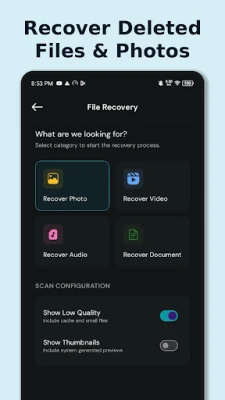
♻️ File Recovery: Recover your deleted photos, videos, and files. Our file recovery scanner scans your device storage to locate and restore recently deleted files across all types.
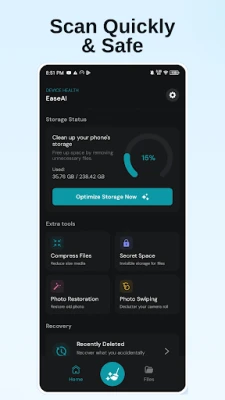
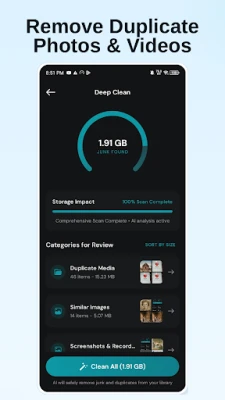
✨ Free up space – Reclaim Your Storage: Scan and find unnecessary data, including Duplicate Media, Screenshots, Blurry Photos, and more. Your decision is to review each category and decide what to remove — safely and quickly.
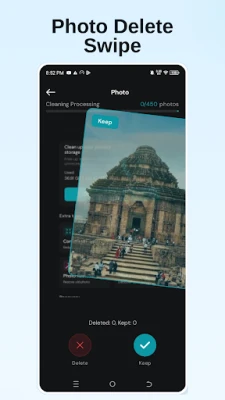
👆 Photo Delete Swipe – Declutter Your Camera Roll: Swipe through your photos one by one to quickly keep or remove them. The fastest way to clean up a messy camera roll without missing a single shot.
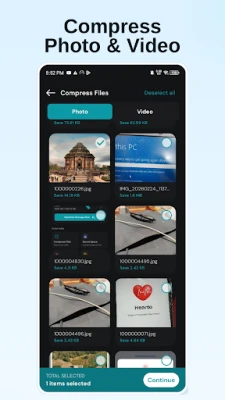
🗜️ Compress Photos Pictures & Videos: Reduce file sizes without significant quality loss using our built-in image compressor. A reliable jpg size reducer and jpeg image compressor — free up space while keeping your memories intact.
🖼️ AI Photo Restoration: Enhance old or low-quality photos using AI-powered restoration. Improve clarity, fix faded colors, and sharpen details automatically with just one tap.
🔐 Secret Space – Private Vault: Keep your sensitive photos, videos, audio, and documents completely private. Import files into Secret Space and protect them with a PIN. Files stored here are hidden from your regular gallery.
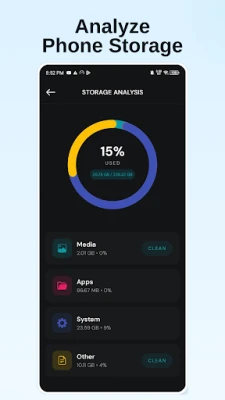
📊 Storage Analysis: Get a clear breakdown of how your storage is used across Media, Apps, System, and Other categories — so you always know where your space is going.
DISCLAIMER
- Deleted Photo Scanner results may vary by device model and Android version. Recovery is not guaranteed.
- AI Photo Restoration results may vary based on original photo condition.
- Duplicate Cleaner requires manual review before deletion. No files are removed without user confirmation.
- Secret Space content may be lost if the app is uninstalled or app data is cleared.
Note: Permission for Core Functionality: File Recovery requires All Files Access (MANAGE_EXTERNAL_STORAGE) to scan for deleted files. This permission is used for recovery which is essential for the feature to work.
Main features of EaseAI - File Recovery, Duplicate Photo Remover:
♻️ File Recovery: Recover your deleted photos, videos, and files. Our file recovery scanner scans your device storage to locate and restore recently deleted files across all types.
✨ Free up space – Reclaim Your Storage: Scan and find unnecessary data, including Duplicate Media, Screenshots, Blurry Photos, and more. Your decision is to review each category and decide what to remove — safely and quickly.
👆 Photo Delete Swipe – Declutter Your Camera Roll: Swipe through your photos one by one to quickly keep or remove them. The fastest way to clean up a messy camera roll without missing a single shot.
🗜️ Compress Photos Pictures & Videos: Reduce file sizes without significant quality loss using our built-in image compressor. A reliable jpg size reducer and jpeg image compressor — free up space while keeping your memories intact.
🖼️ AI Photo Restoration: Enhance old or low-quality photos using AI-powered restoration. Improve clarity, fix faded colors, and sharpen details automatically with just one tap.
🔐 Secret Space – Private Vault: Keep your sensitive photos, videos, audio, and documents completely private. Import files into Secret Space and protect them with a PIN. Files stored here are hidden from your regular gallery.
📊 Storage Analysis: Get a clear breakdown of how your storage is used across Media, Apps, System, and Other categories — so you always know where your space is going.
DISCLAIMER
- Deleted Photo Scanner results may vary by device model and Android version. Recovery is not guaranteed.
- AI Photo Restoration results may vary based on original photo condition.
- Duplicate Cleaner requires manual review before deletion. No files are removed without user confirmation.
- Secret Space content may be lost if the app is uninstalled or app data is cleared.
Note: Permission for Core Functionality: File Recovery requires All Files Access (MANAGE_EXTERNAL_STORAGE) to scan for deleted files. This permission is used for recovery which is essential for the feature to work.
Rate the App
Add Comment & Review
User Reviews
Based on 0 reviews
No reviews added yet.
Comments will not be approved to be posted if they are SPAM, abusive, off-topic, use profanity, contain a personal attack, or promote hate of any kind.













More »

Popular Apps

phpFoxPHPFOX LLC

Moon Chai StoryOlha Dobel

World War Heroes — WW2 PvP FPSAzur Interactive Games Limited

Govee LiteGovee

Build World AdventureExplore city in cube world

Viking Clan: RagnarokKano Games

Vikings: War of ClansPlarium LLC

Submarine Car Diving SimulatorSwim with dolphins & penguins

Asphalt 9: LegendsGameloft SE

Dawn of Zombies: Survival GameRoyal Ark
More »
Editor's Choice

Grim Soul: Dark Survival RPGBrickworks Games Ltd

Craft of Survival - Gladiators101XP LIMITED

Last Shelter: SurvivalLong Tech Network Limited
Dawn of Zombies: Survival GameRoyal Ark

Merge Survival : WastelandStickyHands Inc.

AoD Vikings: Valhalla GameRoboBot Studio
Viking Clan: RagnarokKano Games
Vikings: War of ClansPlarium LLC
Asphalt 9: LegendsGameloft SE

Modern Tanks: War Tank GamesXDEVS LTD