

Latest Version
Update
April 10, 2026
April 10, 2026
Developer
illMatic
illMatic
Categories
Personalization
Personalization
Platforms
Android
Android
Downloads
0
0
License
Free
Free
Package Name
com.ronald.yellow.fold.iconpack
com.ronald.yellow.fold.iconpack
Report
Report a Problem
Report a Problem
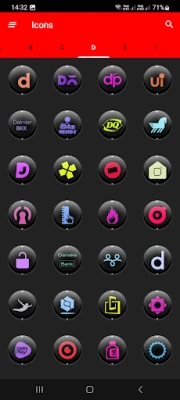
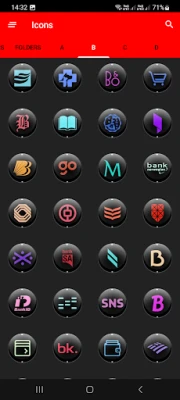
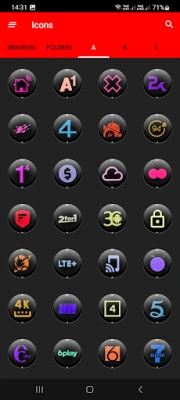
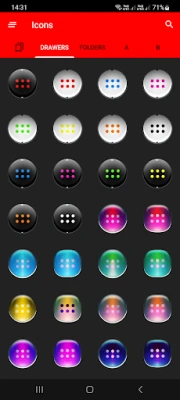
More About Dx Black Colorful Icon Pack
Website:✨✨✨
https://ronalddwk.com
Install Notes:
• Install and open the app.
• Tap on 'Apply' and select your launcher, Done.
• Navigate to app drawer to preview icons, wallpaper, icon request, faqs and app settings.
Features:
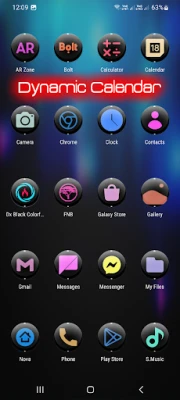
• Icon Masking
• 28 Folder Icons
• 218 App Drawers
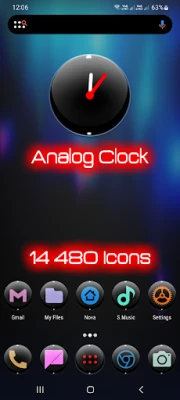
• 14 400+ HD Icons
• Analog Clock (Widget)
• 31 Dynamic Calendars
• Wallpaper save location
• App Light and Dark theme
• FAQs with search function
• Option To Bookmark Icons
• Option To Search Wallpapers
• 350 HD cloud based wallpapers
• Icon previews with search function
• Localization: Supports 19 languages
• Quick apply for your default launcher
• Regular & Premium Icon Request Options
• Firebase Cloud Messaging (Update Notifications)
• EXTRAS-Lots of alternatives to mix and match eg...System, WhatsApp etc...
• Supports 42 launchers, there might be more supported launchers which I haven't tested yet.
👍Compatible with the following Launchers:👍
Action, ADW, Apex, Blackberry, CM Theme Engine, Flick, GO, Holo, Holo HD, Hyperion, Kiss, Lawnchair, Lg Home, Lucid, Microsoft, Neo, Niagara, Nougat, Nova, One UI, Pixel, Poco, Posidon, Smart , Solo, Square & ZenUI.
Fully Compatible but not Included in Apply Section: 👍Apply via your Launcher👍
ABC, Arrow, ASAP, Apolo, Atom, Aviate, Cobo, Computer Launcher Win 10 Gold, Evie, GO-EX, Launch by Quixey Launcher, Line, M, Mesh, Mini, Next, Novel, Open, Peek, V, Windows Launcher X Prime, Z & Zero.
N.B: I have tested on the above launchers, there might be more supported launchers which hasn't been tested yet.
STOCK PHONE LAUNCHERS 🤷♂️DO NOT SUPPORT custom Icon Packs🤷♂️ , you can try 👌Awesome Icons👌 or 👌Unicon-Icon Themer👌 to change icons manually on your stock launcher.
How To Change Icons Manually:
Youtube tutorial:
https://www.youtube.com/watch?v=meRNXf0QB9A
1.Tap and Hold down on the icon then release it, then a small pop-up will appear.
2.It will allow you to change the icon and the name.
3.Select the icon, this will show your icon packs, select Dx Black Colorful and choose your icon (Built-in Search Feature within the App), select it then tap Done.
• Launcher used in screenshots: Nova Launcher
Install Notes:
• Install and open the app.
• Tap on 'Apply' and select your launcher, Done.
• Navigate to app drawer to preview icons, wallpaper, icon request, faqs and app settings.
Features:
• Icon Masking
• 28 Folder Icons
• 218 App Drawers
• 14 400+ HD Icons
• Analog Clock (Widget)
• 31 Dynamic Calendars
• Wallpaper save location
• App Light and Dark theme
• FAQs with search function
• Option To Bookmark Icons
• Option To Search Wallpapers
• 350 HD cloud based wallpapers
• Icon previews with search function
• Localization: Supports 19 languages
• Quick apply for your default launcher
• Regular & Premium Icon Request Options
• Firebase Cloud Messaging (Update Notifications)
• EXTRAS-Lots of alternatives to mix and match eg...System, WhatsApp etc...
• Supports 42 launchers, there might be more supported launchers which I haven't tested yet.
👍Compatible with the following Launchers:👍
Action, ADW, Apex, Blackberry, CM Theme Engine, Flick, GO, Holo, Holo HD, Hyperion, Kiss, Lawnchair, Lg Home, Lucid, Microsoft, Neo, Niagara, Nougat, Nova, One UI, Pixel, Poco, Posidon, Smart , Solo, Square & ZenUI.
Fully Compatible but not Included in Apply Section: 👍Apply via your Launcher👍
ABC, Arrow, ASAP, Apolo, Atom, Aviate, Cobo, Computer Launcher Win 10 Gold, Evie, GO-EX, Launch by Quixey Launcher, Line, M, Mesh, Mini, Next, Novel, Open, Peek, V, Windows Launcher X Prime, Z & Zero.
N.B: I have tested on the above launchers, there might be more supported launchers which hasn't been tested yet.
STOCK PHONE LAUNCHERS 🤷♂️DO NOT SUPPORT custom Icon Packs🤷♂️ , you can try 👌Awesome Icons👌 or 👌Unicon-Icon Themer👌 to change icons manually on your stock launcher.
How To Change Icons Manually:
Youtube tutorial:
https://www.youtube.com/watch?v=meRNXf0QB9A
1.Tap and Hold down on the icon then release it, then a small pop-up will appear.
2.It will allow you to change the icon and the name.
3.Select the icon, this will show your icon packs, select Dx Black Colorful and choose your icon (Built-in Search Feature within the App), select it then tap Done.
• Launcher used in screenshots: Nova Launcher
Rate the App
Add Comment & Review
User Reviews
Based on 0 reviews
No reviews added yet.
Comments will not be approved to be posted if they are SPAM, abusive, off-topic, use profanity, contain a personal attack, or promote hate of any kind.


![[WISH] 해변길 카톡 테마](https://apkstore.app/images/17777538121927615.webp)





More »

Popular Apps

phpFoxPHPFOX LLC

Moon Chai StoryOlha Dobel

World War Heroes — WW2 PvP FPSAzur Interactive Games Limited

Govee LiteGovee

Build World AdventureExplore city in cube world

Viking Clan: RagnarokKano Games

Vikings: War of ClansPlarium LLC

Submarine Car Diving SimulatorSwim with dolphins & penguins

Asphalt 9: LegendsGameloft SE

Modern Tanks: War Tank GamesXDEVS LTD
More »
Editor's Choice

Grim Soul: Dark Survival RPGBrickworks Games Ltd

Craft of Survival - Gladiators101XP LIMITED

Last Shelter: SurvivalLong Tech Network Limited

Dawn of Zombies: Survival GameRoyal Ark

Merge Survival : WastelandStickyHands Inc.

AoD Vikings: Valhalla GameRoboBot Studio
Viking Clan: RagnarokKano Games
Vikings: War of ClansPlarium LLC
Asphalt 9: LegendsGameloft SE
Modern Tanks: War Tank GamesXDEVS LTD