
Latest Version
Update
July 13, 2026
July 13, 2026
Developer
TechTenStein Services Pvt Ltd
TechTenStein Services Pvt Ltd
Categories
Tools
Tools
Platforms
Android
Android
Downloads
0
0
License
Free
Free
Package Name
com.secure.dns
com.secure.dns
Report
Report a Problem
Report a Problem
More About DNS Changer: Safe & Private
Your default DNS can be slow and it can quietly log what you browse. Safe DNS is a DNS changer that switches your connection to a faster, more private DNS provider in one tap, no root required.
DNS is what translates a web address into a connection every time you open an app or a site. Switching to a private DNS provider instead of your carrier's default can mean a faster connection and one less party watching what you browse.
PRE-CONFIGURED, TRUSTED PROVIDERS
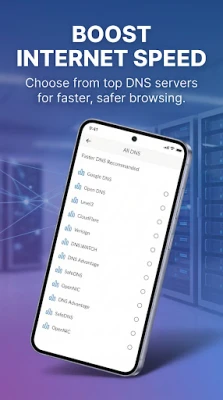
Pick from well-known DNS providers already set up and ready to use: Google DNS, Cloudflare DNS, AdGuard DNS, OpenDNS, Level3, and Quad9. No manual IP entry needed unless you want it, custom DNS support is there if you prefer to set your own.
BUILT FOR GAMING, NOT JUST BROWSING
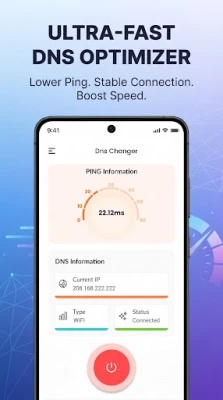
A slow or congested default DNS adds real latency before a connection even starts. Switch to a faster DNS provider and the built-in ping monitor shows you the difference, useful for competitive gaming where every millisecond of ping matters, not just everyday browsing.
WHAT YOU GET
- One-tap connect to a private DNS provider, no root required
- Six pre-configured, trusted DNS providers to choose from
- Custom DNS support if you want to set your own server
- Built-in ping monitor to see your connection speed change in real time
- Works over WiFi and mobile data
HOW IT WORKS
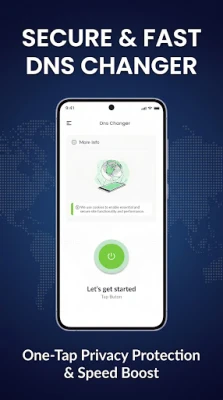
Open the app, pick a DNS provider or enter a custom one, and connect. Android's Private DNS setting is confusing to configure manually for most people and easy to get wrong. This DNS changer turns that into a single tap, with a ping monitor so you can actually see whether the switch helped.
PRIVACY, NOT JUST SPEED
This is not a full VPN and it will not hide your IP address or encrypt all your traffic. What it changes is one specific setting, which DNS server your phone asks first, so that setting works for your privacy instead of against it. We do not log your browsing data or personal information.
WHO THIS IS FOR
Gamers chasing lower ping, anyone who wants a faster everyday connection, and anyone who has been meaning to switch to a private DNS provider but found Android's manual settings menu too confusing to bother with.
WHY THE DEFAULT DNS ISN'T ALWAYS BEST
Most carriers point your phone at their own DNS servers by default, and those servers are not always the fastest or the most private option available. A public DNS provider like Cloudflare or Google DNS is often built for lower latency and higher uptime than a typical carrier's own infrastructure, and switching does not require a new SIM, a new plan, or any change to your mobile data itself, just the one setting this app controls.
CHOOSING BETWEEN PROVIDERS
Each of the six built-in providers has a different focus. Cloudflare DNS and Google DNS are generally tuned for raw speed. AdGuard DNS adds ad and tracker filtering at the DNS level. OpenDNS and Quad9 lean toward security-focused filtering. Level3 is a long-standing, widely used public resolver. Try a couple with the built-in ping monitor and keep whichever tests fastest and most reliable from your location, results vary by network and region.
COMMON QUESTIONS
Is this a VPN? No. A DNS changer only changes which server resolves web addresses, it does not encrypt your traffic or hide your IP address the way a VPN does.
Will this fix all connection problems? A better DNS provider can reduce lookup latency and improve reliability, but your overall speed still depends on your internet connection and the DNS provider's own performance.
Do I need to root my device? No, root is not required to use any of the pre-configured providers or a custom DNS entry.
Does switching DNS providers cost anything ongoing? No subscription is required to use the app's DNS switching feature.
Switch to a faster, more private DNS in under a minute. Download Safe DNS and connect to your first provider now.
PRE-CONFIGURED, TRUSTED PROVIDERS
Pick from well-known DNS providers already set up and ready to use: Google DNS, Cloudflare DNS, AdGuard DNS, OpenDNS, Level3, and Quad9. No manual IP entry needed unless you want it, custom DNS support is there if you prefer to set your own.
BUILT FOR GAMING, NOT JUST BROWSING
A slow or congested default DNS adds real latency before a connection even starts. Switch to a faster DNS provider and the built-in ping monitor shows you the difference, useful for competitive gaming where every millisecond of ping matters, not just everyday browsing.
WHAT YOU GET
- One-tap connect to a private DNS provider, no root required
- Six pre-configured, trusted DNS providers to choose from
- Custom DNS support if you want to set your own server
- Built-in ping monitor to see your connection speed change in real time
- Works over WiFi and mobile data
HOW IT WORKS
Open the app, pick a DNS provider or enter a custom one, and connect. Android's Private DNS setting is confusing to configure manually for most people and easy to get wrong. This DNS changer turns that into a single tap, with a ping monitor so you can actually see whether the switch helped.
PRIVACY, NOT JUST SPEED
This is not a full VPN and it will not hide your IP address or encrypt all your traffic. What it changes is one specific setting, which DNS server your phone asks first, so that setting works for your privacy instead of against it. We do not log your browsing data or personal information.
WHO THIS IS FOR
Gamers chasing lower ping, anyone who wants a faster everyday connection, and anyone who has been meaning to switch to a private DNS provider but found Android's manual settings menu too confusing to bother with.
WHY THE DEFAULT DNS ISN'T ALWAYS BEST
Most carriers point your phone at their own DNS servers by default, and those servers are not always the fastest or the most private option available. A public DNS provider like Cloudflare or Google DNS is often built for lower latency and higher uptime than a typical carrier's own infrastructure, and switching does not require a new SIM, a new plan, or any change to your mobile data itself, just the one setting this app controls.
CHOOSING BETWEEN PROVIDERS
Each of the six built-in providers has a different focus. Cloudflare DNS and Google DNS are generally tuned for raw speed. AdGuard DNS adds ad and tracker filtering at the DNS level. OpenDNS and Quad9 lean toward security-focused filtering. Level3 is a long-standing, widely used public resolver. Try a couple with the built-in ping monitor and keep whichever tests fastest and most reliable from your location, results vary by network and region.
COMMON QUESTIONS
Is this a VPN? No. A DNS changer only changes which server resolves web addresses, it does not encrypt your traffic or hide your IP address the way a VPN does.
Will this fix all connection problems? A better DNS provider can reduce lookup latency and improve reliability, but your overall speed still depends on your internet connection and the DNS provider's own performance.
Do I need to root my device? No, root is not required to use any of the pre-configured providers or a custom DNS entry.
Does switching DNS providers cost anything ongoing? No subscription is required to use the app's DNS switching feature.
Switch to a faster, more private DNS in under a minute. Download Safe DNS and connect to your first provider now.
Rate the App
Add Comment & Review
User Reviews
Based on 0 reviews
No reviews added yet.
Comments will not be approved to be posted if they are SPAM, abusive, off-topic, use profanity, contain a personal attack, or promote hate of any kind.













More »

Popular Apps

phpFoxPHPFOX LLC

Moon Chai StoryOlha Dobel

World War Heroes — WW2 PvP FPSAzur Interactive Games Limited

Govee LiteGovee

Build World AdventureExplore city in cube world

Viking Clan: RagnarokKano Games

Vikings: War of ClansPlarium LLC

Asphalt 9: LegendsGameloft SE

Submarine Car Diving SimulatorSwim with dolphins & penguins

Dawn of Zombies: Survival GameRoyal Ark
More »
Editor's Choice

Grim Soul: Dark Survival RPGBrickworks Games Ltd

Craft of Survival - Gladiators101XP LIMITED

Last Shelter: SurvivalLong Tech Network Limited
Dawn of Zombies: Survival GameRoyal Ark

Merge Survival : WastelandStickyHands Inc.

AoD Vikings: Valhalla GameRoboBot Studio
Viking Clan: RagnarokKano Games
Vikings: War of ClansPlarium LLC
Asphalt 9: LegendsGameloft SE

Modern Tanks: War Tank GamesXDEVS LTD