Latest Version
Update
November 03, 2026
November 03, 2026
Developer
(주)데드락
(주)데드락
Categories
Lifestyle
Lifestyle
Platforms
Android
Android
Downloads
0
0
License
Free
Free
Package Name
studio.deadlock.apps.livewallpaper.digitalrain
studio.deadlock.apps.livewallpaper.digitalrain
Report
Report a Problem
Report a Problem
More About Digital Rain Live Wallpaper
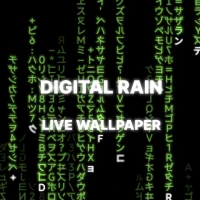
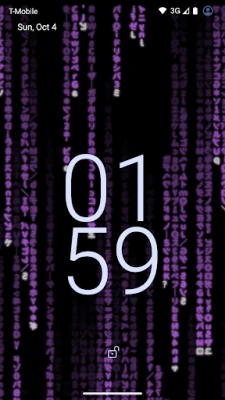
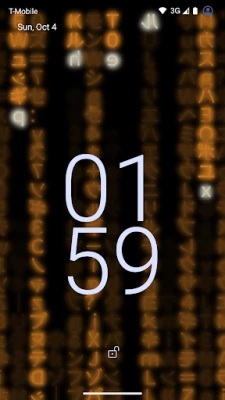
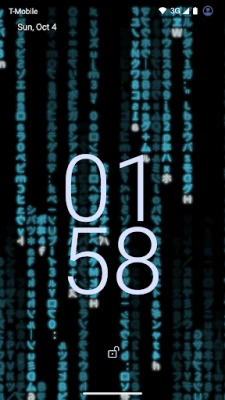
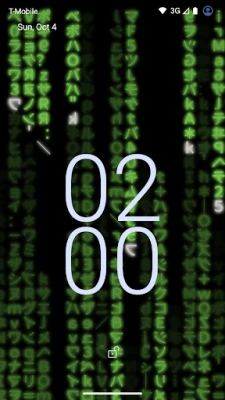
Turn your home screen and lock screen into a wall of falling code.
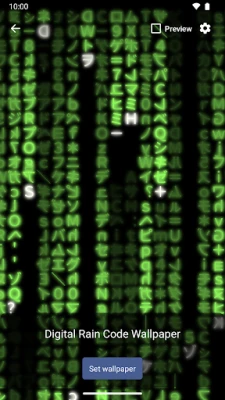
Digital Rain Live Wallpaper fills your display with streams of glowing characters — katakana, letters, numbers and symbols — that fall, flicker and fade like rain. Every stream has its own speed and length, so the screen never looks the same twice.
FREE
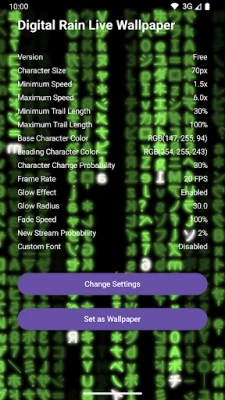
The classic green rain is free, with the controls that shape it:
• Character size — from a dense fine rain to large, bold glyphs.
• Speed — set the minimum and maximum fall speed to make the rain calm or frantic.
• Frame rate — choose anything from 1 to 120 fps.
PRO (ONE-TIME PURCHASE)
Buy Pro once and make the rain entirely your own:
• Your own font — pick any TTF, OTF or TTC font file on your device and the rain is drawn with it.
• Character sets — katakana, letters and digits, binary 0 and 1, or type the exact characters you want. Choose whether characters may appear mirrored. Hangul rain or your own name: anything your font can draw.
• Colors — pick the trail color and the leading character color with a color picker or RGB values.
• Glow — turn the glow on or off and set its radius for a soft neon look.
• Trail length — choose how long each stream stays on screen.
• Fade speed — control how quickly the trails disappear.
• Density — set how often new streams appear.
• Flicker — set how often characters change after they land.
TRY BEFORE YOU BUY
Every Pro setting can be changed freely in the live preview inside the app, so you can see exactly what you would get. Pro is only needed to apply those settings to your actual wallpaper. Anything you set up while trying is kept and applied the moment you buy.
SMOOTH AND LIGHT
• Rendered with OpenGL ES for smooth animation.
• The animation stops while the wallpaper is not visible.
• Each setting has its own reset button, so you can always go back to the default.
PRIVATE BY DESIGN
• No ads.
• No account, no sign-up.
• The app collects no data. Purchases are handled by Google Play.
HOW TO USE
1. Open the app and tap "Change Settings" to tune the look.
2. Tap "Set as Wallpaper" and choose Digital Rain Code Wallpaper.
3. Apply it to your home screen, your lock screen, or both.
Available in English and Korean.
FREE
The classic green rain is free, with the controls that shape it:
• Character size — from a dense fine rain to large, bold glyphs.
• Speed — set the minimum and maximum fall speed to make the rain calm or frantic.
• Frame rate — choose anything from 1 to 120 fps.
PRO (ONE-TIME PURCHASE)
Buy Pro once and make the rain entirely your own:
• Your own font — pick any TTF, OTF or TTC font file on your device and the rain is drawn with it.
• Character sets — katakana, letters and digits, binary 0 and 1, or type the exact characters you want. Choose whether characters may appear mirrored. Hangul rain or your own name: anything your font can draw.
• Colors — pick the trail color and the leading character color with a color picker or RGB values.
• Glow — turn the glow on or off and set its radius for a soft neon look.
• Trail length — choose how long each stream stays on screen.
• Fade speed — control how quickly the trails disappear.
• Density — set how often new streams appear.
• Flicker — set how often characters change after they land.
TRY BEFORE YOU BUY
Every Pro setting can be changed freely in the live preview inside the app, so you can see exactly what you would get. Pro is only needed to apply those settings to your actual wallpaper. Anything you set up while trying is kept and applied the moment you buy.
SMOOTH AND LIGHT
• Rendered with OpenGL ES for smooth animation.
• The animation stops while the wallpaper is not visible.
• Each setting has its own reset button, so you can always go back to the default.
PRIVATE BY DESIGN
• No ads.
• No account, no sign-up.
• The app collects no data. Purchases are handled by Google Play.
HOW TO USE
1. Open the app and tap "Change Settings" to tune the look.
2. Tap "Set as Wallpaper" and choose Digital Rain Code Wallpaper.
3. Apply it to your home screen, your lock screen, or both.
Available in English and Korean.
Rate the App
Add Comment & Review
User Reviews
Based on 0 reviews
No reviews added yet.
Comments will not be approved to be posted if they are SPAM, abusive, off-topic, use profanity, contain a personal attack, or promote hate of any kind.












More »

Popular Apps
phpFoxPHPFOX LLC

Moon Chai StoryOlha Dobel

World War Heroes — WW2 PvP FPSAzur Interactive Games Limited
Govee LiteGovee

AvSeaAvionics Electronics Geeks!
Viking Clan: RagnarokKano Games

Vikings: War of ClansPlarium LLC

Build World AdventureExplore city in cube world

Asphalt 9: LegendsGameloft SE
Dawn of Zombies: Survival GameRoyal Ark
More »
Editor's Choice
Grim Soul: Dark Survival RPGBrickworks Games Ltd
Craft of Survival - Gladiators101XP LIMITED

Last Shelter: SurvivalLong Tech Network Limited
Dawn of Zombies: Survival GameRoyal Ark

Merge Survival : WastelandStickyHands Inc.

AoD Vikings: Valhalla GameRoboBot Studio
Viking Clan: RagnarokKano Games
Vikings: War of ClansPlarium LLC
Asphalt 9: LegendsGameloft SE
Modern Tanks: War Tank GamesXDEVS LTD