
Latest Version
Update
August 09, 2026
August 09, 2026
Developer
willowsoft
willowsoft
Categories
Tools
Tools
Platforms
Android
Android
Downloads
0
0
License
Free
Free
Package Name
com.bw.controllergateway
com.bw.controllergateway
Report
Report a Problem
Report a Problem
More About Controller Gateway: PC Gamepad
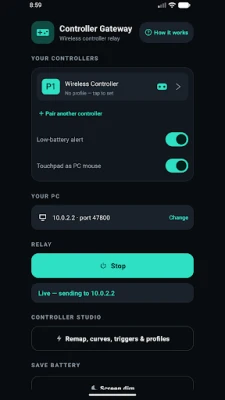
Controller Gateway turns your Android phone into a wireless Bluetooth adapter for your Windows PC, so the gamepad already in your hands works on your computer — no dongle, no cable.
Pair your controller to your phone over Bluetooth, and Controller Gateway relays its input over your local Wi-Fi to your PC, where it appears as a standard Xbox controller. Games, launchers and streaming apps like Moonlight, Steam Link and Sunshine pick it up automatically, with no per-game setup.
NO BLUETOOTH ON YOUR PC? YOUR PHONE ALREADY IS ONE
Most desktop PCs have no Bluetooth at all, and the built-in adapters that do exist are often unreliable and drop inputs. Rather than buying a USB Bluetooth dongle or a wireless controller adapter, use the phone in your pocket as the receiver your PC never had.
WORKS WITH THE CONTROLLER YOU ALREADY OWN
PS5 DualSense, PS4 DualShock 4, Xbox Wireless Controller, 8BitDo and most other Bluetooth gamepads. On the PC side it always presents as a standard Xbox pad, so virtually every PC game and launcher accepts it.
LOW LATENCY
Your pad connects to your phone over Bluetooth, then the phone hops it to your PC over Wi-Fi as tiny UDP packets on your own local network — typically 1-5 ms on 5 GHz Wi-Fi.
FEATURES (FREE)
- Use any Bluetooth gamepad on your PC wirelessly — no dongle, no cable
- Appears as a standard Xbox controller, compatible with virtually every PC game and launcher
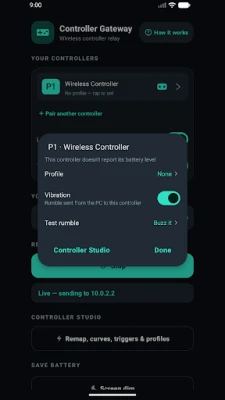
- Rumble / force feedback travels back to your controller's own motors
- Automatic PC discovery — tap Start and it finds the receiver on your network by itself
- Auto-recovery — if the connection drops for a moment it heals itself and the PC returns all pads to neutral, so you never get a stuck button
- Controller battery level shown in the app
- No account, no ads, no tracking
PREMIUM (one-time in-app purchase)
- Up to 4 controllers at once — local co-op on a single PC
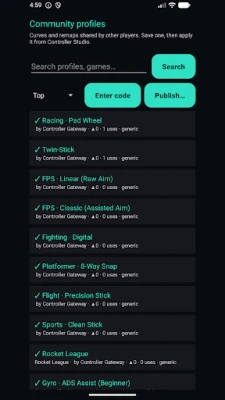
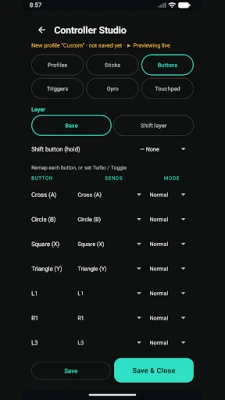
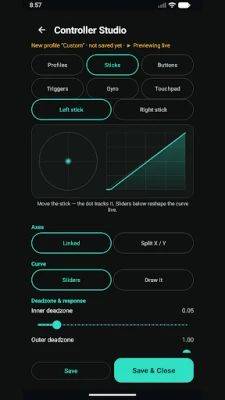
- Controller Studio — remap any button, reshape stick response curves, set deadzones, tune triggers, add turbo and gyro aiming, saved as a profile per controller
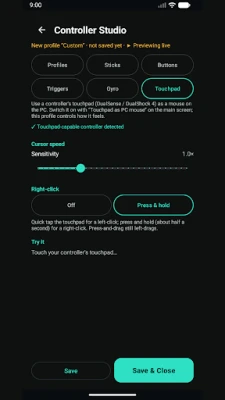
- Touchpad as a PC mouse — use a DualSense or DualShock 4 touchpad to move the Windows cursor, with tap to left-click and press-and-hold for right-click
- Screen dim — blacks out the phone screen while the controller keeps relaying, so a long session barely uses battery (double-tap to wake); on AMOLED screens black pixels draw no power
- Low-battery alerts for both your phone and your controllers
- A vibration on/off switch for each controller
FREE VS PREMIUM
One controller relayed to your PC is free, forever — no time limit, no account, no ads. A single one-time in-app purchase unlocks everything in the premium list above.
HOW IT WORKS
1. On your PC, install the free Controller Gateway receiver (a small Windows system-tray app). A one-time setup installs the virtual-controller driver and a firewall rule for you.
2. Pair your gamepad to your phone in Android's Bluetooth settings.
3. Open Controller Gateway on your phone and tap Start — it finds your PC by itself.
4. Play. Your games see a normal Xbox controller.
GREAT FOR
- Couch gaming and PC-to-TV streaming with Moonlight or Steam Link
- Desktop PCs with no Bluetooth adapter
- Emulators and retro games that expect a standard gamepad
- Local co-op with up to four controllers (premium)
WHAT YOU NEED
- An Android phone and a Bluetooth game controller (e.g. PS5 DualSense, Xbox Wireless Controller)
- A Windows PC on the same Wi-Fi network
- The free Controller Gateway PC receiver (download link in the app / on our website)
- A 5 GHz Wi-Fi network is strongly recommended for the lowest latency
PRIVACY
Controller Gateway collects no personal data and shows no ads. Controller input stays on your own local network and is sent only to the receiver you run on your own PC. Nothing is uploaded to us or any third party. See our privacy policy for details.
Note: the free Windows PC receiver is required for Controller Gateway to work.
NO BLUETOOTH ON YOUR PC? YOUR PHONE ALREADY IS ONE
Most desktop PCs have no Bluetooth at all, and the built-in adapters that do exist are often unreliable and drop inputs. Rather than buying a USB Bluetooth dongle or a wireless controller adapter, use the phone in your pocket as the receiver your PC never had.
WORKS WITH THE CONTROLLER YOU ALREADY OWN
PS5 DualSense, PS4 DualShock 4, Xbox Wireless Controller, 8BitDo and most other Bluetooth gamepads. On the PC side it always presents as a standard Xbox pad, so virtually every PC game and launcher accepts it.
LOW LATENCY
Your pad connects to your phone over Bluetooth, then the phone hops it to your PC over Wi-Fi as tiny UDP packets on your own local network — typically 1-5 ms on 5 GHz Wi-Fi.
FEATURES (FREE)
- Use any Bluetooth gamepad on your PC wirelessly — no dongle, no cable
- Appears as a standard Xbox controller, compatible with virtually every PC game and launcher
- Rumble / force feedback travels back to your controller's own motors
- Automatic PC discovery — tap Start and it finds the receiver on your network by itself
- Auto-recovery — if the connection drops for a moment it heals itself and the PC returns all pads to neutral, so you never get a stuck button
- Controller battery level shown in the app
- No account, no ads, no tracking
PREMIUM (one-time in-app purchase)
- Up to 4 controllers at once — local co-op on a single PC
- Controller Studio — remap any button, reshape stick response curves, set deadzones, tune triggers, add turbo and gyro aiming, saved as a profile per controller
- Touchpad as a PC mouse — use a DualSense or DualShock 4 touchpad to move the Windows cursor, with tap to left-click and press-and-hold for right-click
- Screen dim — blacks out the phone screen while the controller keeps relaying, so a long session barely uses battery (double-tap to wake); on AMOLED screens black pixels draw no power
- Low-battery alerts for both your phone and your controllers
- A vibration on/off switch for each controller
FREE VS PREMIUM
One controller relayed to your PC is free, forever — no time limit, no account, no ads. A single one-time in-app purchase unlocks everything in the premium list above.
HOW IT WORKS
1. On your PC, install the free Controller Gateway receiver (a small Windows system-tray app). A one-time setup installs the virtual-controller driver and a firewall rule for you.
2. Pair your gamepad to your phone in Android's Bluetooth settings.
3. Open Controller Gateway on your phone and tap Start — it finds your PC by itself.
4. Play. Your games see a normal Xbox controller.
GREAT FOR
- Couch gaming and PC-to-TV streaming with Moonlight or Steam Link
- Desktop PCs with no Bluetooth adapter
- Emulators and retro games that expect a standard gamepad
- Local co-op with up to four controllers (premium)
WHAT YOU NEED
- An Android phone and a Bluetooth game controller (e.g. PS5 DualSense, Xbox Wireless Controller)
- A Windows PC on the same Wi-Fi network
- The free Controller Gateway PC receiver (download link in the app / on our website)
- A 5 GHz Wi-Fi network is strongly recommended for the lowest latency
PRIVACY
Controller Gateway collects no personal data and shows no ads. Controller input stays on your own local network and is sent only to the receiver you run on your own PC. Nothing is uploaded to us or any third party. See our privacy policy for details.
Note: the free Windows PC receiver is required for Controller Gateway to work.
Rate the App
Add Comment & Review
User Reviews
Based on 0 reviews
No reviews added yet.
Comments will not be approved to be posted if they are SPAM, abusive, off-topic, use profanity, contain a personal attack, or promote hate of any kind.





More »

Popular Apps

phpFoxPHPFOX LLC

Moon Chai StoryOlha Dobel

World War Heroes — WW2 PvP FPSAzur Interactive Games Limited

Govee LiteGovee

Build World AdventureExplore city in cube world

Viking Clan: RagnarokKano Games

Vikings: War of ClansPlarium LLC

Asphalt 9: LegendsGameloft SE

Submarine Car Diving SimulatorSwim with dolphins & penguins

Dawn of Zombies: Survival GameRoyal Ark
More »
Editor's Choice

Grim Soul: Dark Survival RPGBrickworks Games Ltd

Craft of Survival - Gladiators101XP LIMITED

Last Shelter: SurvivalLong Tech Network Limited
Dawn of Zombies: Survival GameRoyal Ark

Merge Survival : WastelandStickyHands Inc.

AoD Vikings: Valhalla GameRoboBot Studio
Viking Clan: RagnarokKano Games
Vikings: War of ClansPlarium LLC
Asphalt 9: LegendsGameloft SE

Modern Tanks: War Tank GamesXDEVS LTD