Latest Version
Update
October 17, 2026
October 17, 2026
Developer
Krepel Studio
Krepel Studio
Categories
Tools
Tools
Platforms
Android
Android
Downloads
0
0
License
Free
Free
Package Name
com.krepelstudio.contactxls
com.krepelstudio.contactxls
Report
Report a Problem
Report a Problem
More About ContactXLS: Contacts & Excel
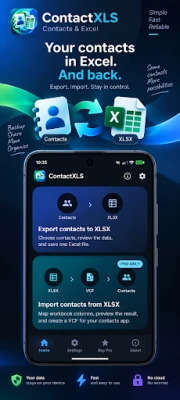
Export Android contacts to Excel (XLSX) or import contacts from XLSX to your phone. ContactXLS helps you move large contact lists, review data before conversion, create VCF files, and open them in a compatible contacts app or save them for later use.
Contacts → Excel / XLSX
Need your contacts in a clean spreadsheet?
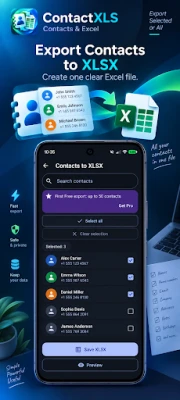
ContactXLS lets you:
• select all contacts or only the ones you need
• quickly find contacts with search
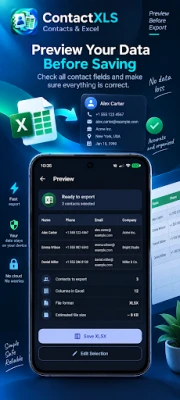
• preview data before export
• export contacts into one XLSX file
• preserve multiple phone numbers and email addresses
• export company, job title, address, notes, birthday, and other supported fields
• store phone numbers as text to preserve +, leading zeros, and long numbers
Get a structured Excel file that is easy to open, review, edit, or transfer to another device.
Excel / XLSX → Contacts
Have a list of customers, employees, partners, or other contacts in an Excel spreadsheet?
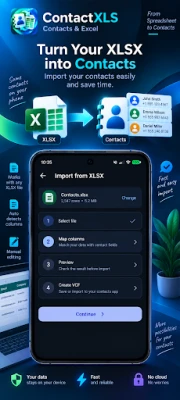
Choose an XLSX file and ContactXLS helps prepare it for contact import.
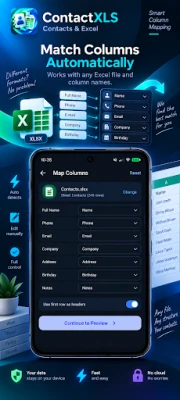
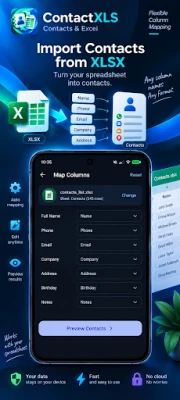
Easy column mapping:
• Name → contact name
• Phone → phone number
• Email → email address
• Company → company
• Address → address
• Notes → notes
• Birthday → birthday
Custom column names are supported. ContactXLS can suggest automatic mappings, while every field can also be reviewed and changed manually.
Before creating the result, use preview and validation to check how contacts will be created and identify problematic data before import.
Import Contacts or Save a VCF File
After converting XLSX, choose the result you need:
Import to Contacts
Create a VCF file and open it with a compatible contacts app installed on your device.
Save VCF
Save the generated .vcf file to transfer it to another phone, share it, or import it later.
ContactXLS is not tied to one specific contacts app.
Built for Large Contact Lists
ContactXLS is designed for more than just a few records. It can handle large contact lists and bulk conversion workflows.
During longer operations, you can view processing progress and cancel the operation when needed.
Local Conversion
Contacts, XLSX files, and VCF files are processed locally on your device.
No server, cloud contact database, or paid API is required for contact conversion.
Your contact data stays under your control.
A Simple Tool for One Clear Job
ContactXLS is built for users who need:
• export contacts to Excel
• contacts to XLSX
• import contacts from Excel
• XLSX to contacts
• XLSX to VCF
• VCF for contact import
No CRM, no contact manager, no duplicate cleaner, and no unnecessary features.
Need your contacts in a clean spreadsheet?
ContactXLS lets you:
• select all contacts or only the ones you need
• quickly find contacts with search
• preview data before export
• export contacts into one XLSX file
• preserve multiple phone numbers and email addresses
• export company, job title, address, notes, birthday, and other supported fields
• store phone numbers as text to preserve +, leading zeros, and long numbers
Get a structured Excel file that is easy to open, review, edit, or transfer to another device.
Excel / XLSX → Contacts
Have a list of customers, employees, partners, or other contacts in an Excel spreadsheet?
Choose an XLSX file and ContactXLS helps prepare it for contact import.
Easy column mapping:
• Name → contact name
• Phone → phone number
• Email → email address
• Company → company
• Address → address
• Notes → notes
• Birthday → birthday
Custom column names are supported. ContactXLS can suggest automatic mappings, while every field can also be reviewed and changed manually.
Before creating the result, use preview and validation to check how contacts will be created and identify problematic data before import.
Import Contacts or Save a VCF File
After converting XLSX, choose the result you need:
Import to Contacts
Create a VCF file and open it with a compatible contacts app installed on your device.
Save VCF
Save the generated .vcf file to transfer it to another phone, share it, or import it later.
ContactXLS is not tied to one specific contacts app.
Built for Large Contact Lists
ContactXLS is designed for more than just a few records. It can handle large contact lists and bulk conversion workflows.
During longer operations, you can view processing progress and cancel the operation when needed.
Local Conversion
Contacts, XLSX files, and VCF files are processed locally on your device.
No server, cloud contact database, or paid API is required for contact conversion.
Your contact data stays under your control.
A Simple Tool for One Clear Job
ContactXLS is built for users who need:
• export contacts to Excel
• contacts to XLSX
• import contacts from Excel
• XLSX to contacts
• XLSX to VCF
• VCF for contact import
No CRM, no contact manager, no duplicate cleaner, and no unnecessary features.
Rate the App
Add Comment & Review
User Reviews
Based on 0 reviews
No reviews added yet.
Comments will not be approved to be posted if they are SPAM, abusive, off-topic, use profanity, contain a personal attack, or promote hate of any kind.













More »

Popular Apps

phpFoxPHPFOX LLC

Moon Chai StoryOlha Dobel

World War Heroes — WW2 PvP FPSAzur Interactive Games Limited

Govee LiteGovee

AvSeaAvionics Electronics Geeks!

Viking Clan: RagnarokKano Games

Build World AdventureExplore city in cube world

Vikings: War of ClansPlarium LLC

Asphalt 9: LegendsGameloft SE

Dawn of Zombies: Survival GameRoyal Ark
More »
Editor's Choice

Grim Soul: Dark Survival RPGBrickworks Games Ltd

Craft of Survival - Gladiators101XP LIMITED

Last Shelter: SurvivalLong Tech Network Limited
Dawn of Zombies: Survival GameRoyal Ark

Merge Survival : WastelandStickyHands Inc.

AoD Vikings: Valhalla GameRoboBot Studio
Viking Clan: RagnarokKano Games
Vikings: War of ClansPlarium LLC
Asphalt 9: LegendsGameloft SE

Modern Tanks: War Tank GamesXDEVS LTD