
Latest Version
Update
October 03, 2026
October 03, 2026
Developer
ByteTrail Labs
ByteTrail Labs
Categories
Productivity
Productivity
Platforms
Android
Android
Downloads
0
0
License
Free
Free
Package Name
com.vinayismd.contactsync
com.vinayismd.contactsync
Report
Report a Problem
Report a Problem
More About ContactSync-Import•Manage•Call
Transform the way you handle data! ContactSync is a powerful, all-in-one utility designed to bridge the gap between raw data files and your phone’s contact list. Whether you are a business professional, an IT administrator, or someone looking to restore a backup, our app makes contact management seamless and secure.
🚀 SUPPORTED FILE FORMATS
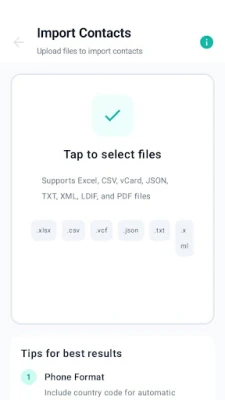
Our advanced FileParser engine handles a wide range of industry-standard formats. Simply select a file from your storage, and the app will instantly extract names, emails, and phone numbers:
CSV (.csv): Import spreadsheets and lead lists with ease.
VCF (.vcf): The standard vCard format for seamless contact migration.
JSON (.json): Structured data support for modern backups and developers.
XML (.xml): Comprehensive support for complex hierarchical data.
LDIF (.ldif): Professional-grade support for LDAP directory service exports.
TXT (.txt): Simple plain-text parsing for quick data extraction.
🛠️ CORE FEATURES
Smart Data Extraction: Automatically identify and organize contact details from messy files.
Local Room Database: All imported data is saved in a secure, high-performance internal database. Your data is persistent, organized, and lightning-fast.
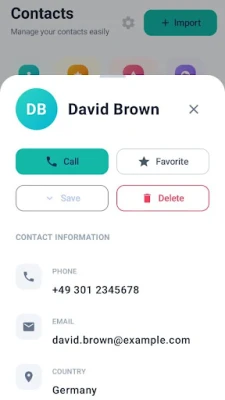
One-Tap Save to Contacts: Found a lead you need? Save imported details directly to your phone’s native contact list with one click.
Direct Dialing: No need to switch apps. Call any imported phone number directly from the app interface.
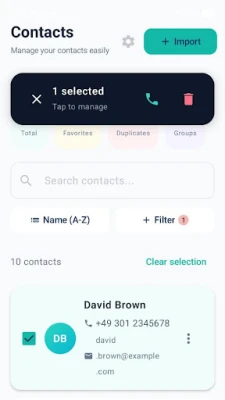
Data Management: Search, filter, and edit your imported records within the app's clean UI.
🔒 PRIVACY & SECURITY
We believe your data should stay yours.ContactSync is built with a "Privacy-First" architecture:
100% Offline Processing: Your files are parsed locally on your device. We never upload your sensitive contact information to external servers or the cloud.
Secure Storage: We use Android’s native Room persistence library to ensure your data is stored safely within the app’s private storage.
Transparency: No hidden tracking or data sharing. We only request the permissions necessary to read your files and manage your contacts.
WHO IS THIS APP FOR?
Sales Professionals: Import large client lists from CSV or Excel exports.
IT Admins: Manage and view LDIF or XML directory backups on the go.
Switching Phones: Easily restore your VCF (vCard) or JSON backups without using third-party cloud services.
Developers: Quickly preview and manage JSON or XML contact structures.
How to get started:
Grant Permissions: Allow the app to access your files and contacts.
Import: Pick a file (CSV, VCF, JSON, XML, LDIF, or TXT).
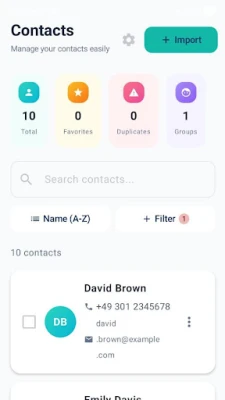
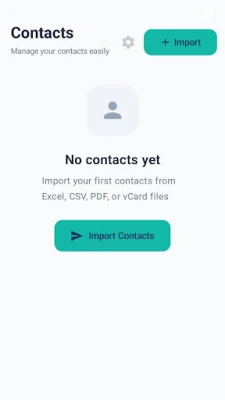
Manage: View your parsed data in the local dashboard.
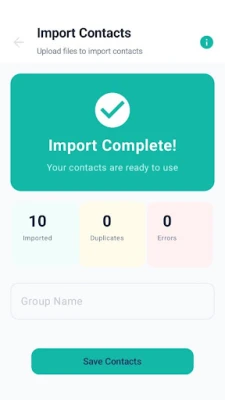
Action: Save the data to your contacts or make a call immediately!
Our advanced FileParser engine handles a wide range of industry-standard formats. Simply select a file from your storage, and the app will instantly extract names, emails, and phone numbers:
CSV (.csv): Import spreadsheets and lead lists with ease.
VCF (.vcf): The standard vCard format for seamless contact migration.
JSON (.json): Structured data support for modern backups and developers.
XML (.xml): Comprehensive support for complex hierarchical data.
LDIF (.ldif): Professional-grade support for LDAP directory service exports.
TXT (.txt): Simple plain-text parsing for quick data extraction.
🛠️ CORE FEATURES
Smart Data Extraction: Automatically identify and organize contact details from messy files.
Local Room Database: All imported data is saved in a secure, high-performance internal database. Your data is persistent, organized, and lightning-fast.
One-Tap Save to Contacts: Found a lead you need? Save imported details directly to your phone’s native contact list with one click.
Direct Dialing: No need to switch apps. Call any imported phone number directly from the app interface.
Data Management: Search, filter, and edit your imported records within the app's clean UI.
🔒 PRIVACY & SECURITY
We believe your data should stay yours.ContactSync is built with a "Privacy-First" architecture:
100% Offline Processing: Your files are parsed locally on your device. We never upload your sensitive contact information to external servers or the cloud.
Secure Storage: We use Android’s native Room persistence library to ensure your data is stored safely within the app’s private storage.
Transparency: No hidden tracking or data sharing. We only request the permissions necessary to read your files and manage your contacts.
WHO IS THIS APP FOR?
Sales Professionals: Import large client lists from CSV or Excel exports.
IT Admins: Manage and view LDIF or XML directory backups on the go.
Switching Phones: Easily restore your VCF (vCard) or JSON backups without using third-party cloud services.
Developers: Quickly preview and manage JSON or XML contact structures.
How to get started:
Grant Permissions: Allow the app to access your files and contacts.
Import: Pick a file (CSV, VCF, JSON, XML, LDIF, or TXT).
Manage: View your parsed data in the local dashboard.
Action: Save the data to your contacts or make a call immediately!
Rate the App
Add Comment & Review
User Reviews
Based on 0 reviews
No reviews added yet.
Comments will not be approved to be posted if they are SPAM, abusive, off-topic, use profanity, contain a personal attack, or promote hate of any kind.












More »

Popular Apps

phpFoxPHPFOX LLC

Moon Chai StoryOlha Dobel

World War Heroes — WW2 PvP FPSAzur Interactive Games Limited

Govee LiteGovee

AvSeaAvionics Electronics Geeks!

Viking Clan: RagnarokKano Games

Vikings: War of ClansPlarium LLC

Build World AdventureExplore city in cube world

Asphalt 9: LegendsGameloft SE

Dawn of Zombies: Survival GameRoyal Ark
More »
Editor's Choice

Grim Soul: Dark Survival RPGBrickworks Games Ltd

Craft of Survival - Gladiators101XP LIMITED

Last Shelter: SurvivalLong Tech Network Limited
Dawn of Zombies: Survival GameRoyal Ark

Merge Survival : WastelandStickyHands Inc.

AoD Vikings: Valhalla GameRoboBot Studio
Viking Clan: RagnarokKano Games
Vikings: War of ClansPlarium LLC
Asphalt 9: LegendsGameloft SE

Modern Tanks: War Tank GamesXDEVS LTD