
Latest Version
Update
April 26, 2026
April 26, 2026
Developer
ibbie
ibbie
Categories
Tools
Tools
Platforms
Android
Android
Downloads
1
1
License
Free
Free
Package Name
com.ibbie.catrec_screenrecorder
com.ibbie.catrec_screenrecorder
Report
Report a Problem
Report a Problem
More About CatRec - Screen Recorder
CatRec – Screen Recorder
Record your screen, grab screenshots, and save clips — free to download and use, with your videos and images kept on your device. CatRec is built for everyday recording: quick controls, clear options, and optional tools when you want more than a simple capture.
Screen recording
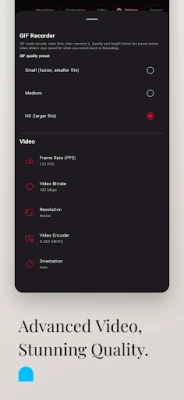
• Record in high quality with settings you can adjust (resolution, frame rate, bitrate, encoder where supported).
• Optional countdown before recording starts.
• Keep the screen awake while recording (optional).
• Orientation handling so recordings stay sensible when you rotate the device.
• Rolling “Clipper” style buffer on supported setups — capture the last stretch of action and save a clip without planning ahead.
• GIF mode — record and export as GIF with sensible presets for file size and quality.
Audio
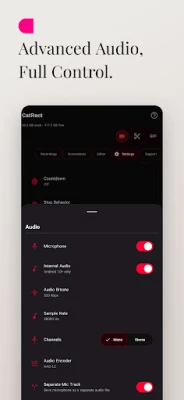
• Record microphone, device / internal audio (where the system allows), or a mix — depending on your Android version and what the app you’re recording permits.
• Optional separate microphone file so you can keep voice and game/app sound apart when supported.
Floating controls & overlay
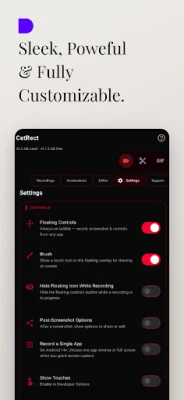
• Floating bubble for start/stop, pause, screenshot, and more — from inside other apps when you allow overlay access.
• Brush on the overlay for quick on-screen markup.
• Face cam overlay with adjustable size, position, and opacity (when you enable camera).
• Watermark — optional branding on the recording, with placement and look you can tune.
Screenshots
• Capture from the overlay or while recording.
• Choose format and quality in settings.
• Optional flow after a screenshot to share or edit.
Library & playback
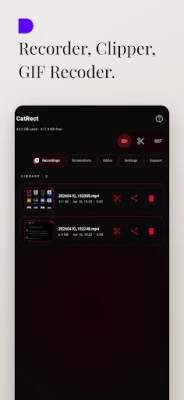
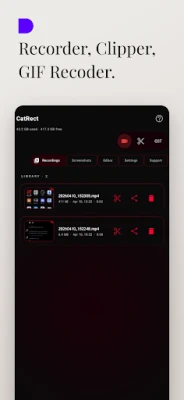
• Recordings and Screenshots in one place with thumbnails.
• In-app video player for quick review.
• Trim recordings in the app.
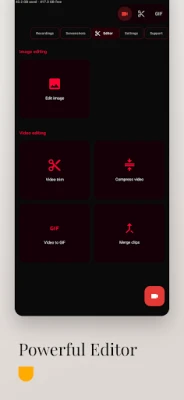
• Tools: compress video, merge clips, video to GIF, and image editing / crop helpers — handy follow-ups without leaving CatRec for every step.
Quick Settings
• Tiles for Record and Clipper so you can jump in from the notification shade on supported devices.
Look & language
• Light / dark / system theme.
• Accent colors and optional gradient accents.
• Many languages so the UI matches how you use your phone.
Free to use
CatRec is free to install and use. Some advanced or convenience options may be offered with short ads or a small Remove ads purchase — you stay in control in the app and in Play billing.
Privacy, in plain words
• Your recordings, screenshots, and GIFs are saved locally on your phone (under folders like Movies/CatRec and Pictures/CatRec unless you point saves elsewhere where the system allows).
• CatRec is a screen recorder, not a cloud vault — we’re not designed to upload your screen content as part of normal use.
• Notifications are used so Android can show the ongoing recording / controls — that’s required for foreground recording on modern versions.
• Optional usage / crash analytics may be offered so we can fix bugs and improve stability — you can turn that off in settings if you don’t want it.
• Ad personalization is separate from basic analytics where we surface that choice — adjust what you’re comfortable with in Settings.
• Permissions (screen capture, microphone when you use mic audio, overlay when you use the bubble, camera when you use face cam, storage / media access to show and save files) are asked for those features — grant only what you need.
Who it’s for
Tutorials, gameplay, app demos, support clips, class notes, quick bugs to report, family moments on screen — CatRec aims to be straightforward: start when you need it, tweak quality when you care, and keep files where you can find them.
Download CatRec and try a short test recording to confirm audio and quality on your device — every phone and Android version behaves a little differently, and CatRec exposes the choices so you can match your setup.
Screen recording
• Record in high quality with settings you can adjust (resolution, frame rate, bitrate, encoder where supported).
• Optional countdown before recording starts.
• Keep the screen awake while recording (optional).
• Orientation handling so recordings stay sensible when you rotate the device.
• Rolling “Clipper” style buffer on supported setups — capture the last stretch of action and save a clip without planning ahead.
• GIF mode — record and export as GIF with sensible presets for file size and quality.
Audio
• Record microphone, device / internal audio (where the system allows), or a mix — depending on your Android version and what the app you’re recording permits.
• Optional separate microphone file so you can keep voice and game/app sound apart when supported.
Floating controls & overlay
• Floating bubble for start/stop, pause, screenshot, and more — from inside other apps when you allow overlay access.
• Brush on the overlay for quick on-screen markup.
• Face cam overlay with adjustable size, position, and opacity (when you enable camera).
• Watermark — optional branding on the recording, with placement and look you can tune.
Screenshots
• Capture from the overlay or while recording.
• Choose format and quality in settings.
• Optional flow after a screenshot to share or edit.
Library & playback
• Recordings and Screenshots in one place with thumbnails.
• In-app video player for quick review.
• Trim recordings in the app.
• Tools: compress video, merge clips, video to GIF, and image editing / crop helpers — handy follow-ups without leaving CatRec for every step.
Quick Settings
• Tiles for Record and Clipper so you can jump in from the notification shade on supported devices.
Look & language
• Light / dark / system theme.
• Accent colors and optional gradient accents.
• Many languages so the UI matches how you use your phone.
Free to use
CatRec is free to install and use. Some advanced or convenience options may be offered with short ads or a small Remove ads purchase — you stay in control in the app and in Play billing.
Privacy, in plain words
• Your recordings, screenshots, and GIFs are saved locally on your phone (under folders like Movies/CatRec and Pictures/CatRec unless you point saves elsewhere where the system allows).
• CatRec is a screen recorder, not a cloud vault — we’re not designed to upload your screen content as part of normal use.
• Notifications are used so Android can show the ongoing recording / controls — that’s required for foreground recording on modern versions.
• Optional usage / crash analytics may be offered so we can fix bugs and improve stability — you can turn that off in settings if you don’t want it.
• Ad personalization is separate from basic analytics where we surface that choice — adjust what you’re comfortable with in Settings.
• Permissions (screen capture, microphone when you use mic audio, overlay when you use the bubble, camera when you use face cam, storage / media access to show and save files) are asked for those features — grant only what you need.
Who it’s for
Tutorials, gameplay, app demos, support clips, class notes, quick bugs to report, family moments on screen — CatRec aims to be straightforward: start when you need it, tweak quality when you care, and keep files where you can find them.
Download CatRec and try a short test recording to confirm audio and quality on your device — every phone and Android version behaves a little differently, and CatRec exposes the choices so you can match your setup.
Rate the App
Add Comment & Review
User Reviews
Based on 0 reviews
No reviews added yet.
Comments will not be approved to be posted if they are SPAM, abusive, off-topic, use profanity, contain a personal attack, or promote hate of any kind.







More »

Popular Apps

phpFoxPHPFOX LLC

Moon Chai StoryOlha Dobel

World War Heroes — WW2 PvP FPSAzur Interactive Games Limited

Govee LiteGovee

Build World AdventureExplore city in cube world

Viking Clan: RagnarokKano Games

Vikings: War of ClansPlarium LLC

Submarine Car Diving SimulatorSwim with dolphins & penguins

Asphalt 9: LegendsGameloft SE

Dawn of Zombies: Survival GameRoyal Ark
More »
Editor's Choice

Grim Soul: Dark Survival RPGBrickworks Games Ltd

Craft of Survival - Gladiators101XP LIMITED

Last Shelter: SurvivalLong Tech Network Limited
Dawn of Zombies: Survival GameRoyal Ark

Merge Survival : WastelandStickyHands Inc.

AoD Vikings: Valhalla GameRoboBot Studio
Viking Clan: RagnarokKano Games
Vikings: War of ClansPlarium LLC
Asphalt 9: LegendsGameloft SE

Modern Tanks: War Tank GamesXDEVS LTD