

Latest Version
Update
September 12, 2026
September 12, 2026
Developer
softwex
softwex
Categories
Business
Business
Platforms
Android
Android
Downloads
0
0
License
Free
Free
Package Name
com.softwex.apps.deadsimple_pos
com.softwex.apps.deadsimple_pos
Report
Report a Problem
Report a Problem
More About Cashier App: Offline POS
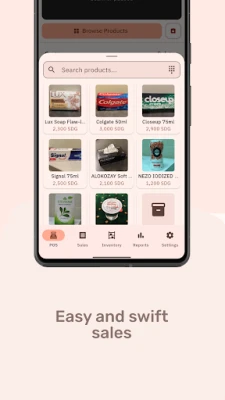
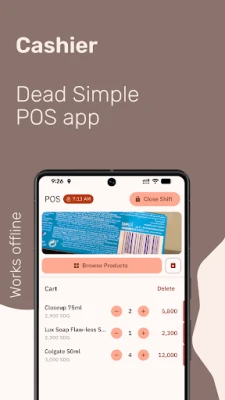
Point of Sale
- Scan barcodes with your phone camera or any HID barcode scanner
- Sell by unit or by weight (kg, g)
- Cash sales or credit sales with a debt ledger for each customer
- Configurable tax support (VAT, GST, KDV, MwSt) with country-aware defaults
- Per-product tax override or exemption
- Tax-inclusive or tax-exclusive pricing
- Apply per-sale discounts as a percentage or fixed amount
- Auto-kick connected cash drawer after each cash sale
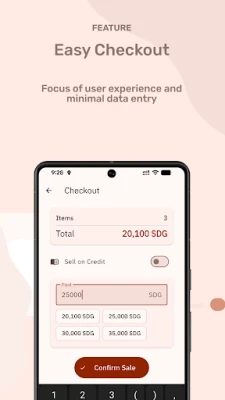
- Print customer and store-copy receipts
Printer Support
- Bluetooth thermal printers (ESC/POS, 58mm or 80mm paper)
- Network / Wi-Fi thermal printers (ESC/POS over TCP/IP, 58mm or 80mm)
- Built-in printers on Sunmi devices (V1, V2, V2 Pro, T2, and others)
- Built-in printers on iMin devices (M2, D1, D3, D4, Falcon series)
- Automatic Wi-Fi printer discovery on the local network (mDNS / Bonjour)
- Manage multiple printers from one Devices hub
- Test print and reconnect with a tap
Inventory Management
- Add products by barcode or manually
- Automatic local currency pricing based on the exchange rate
- Low stock alerts
- Register shipments with automatic cost allocation and profit margin calculation
- Capture vendor name, invoice number, and invoice date per shipment
- Price change log
Shifts & Reports
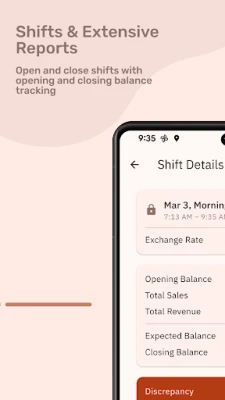
- Open and close shifts with opening and closing balance tracking
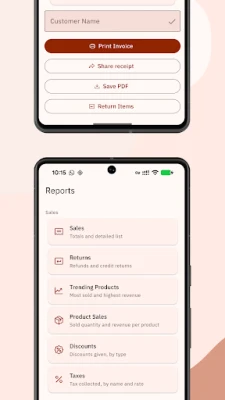
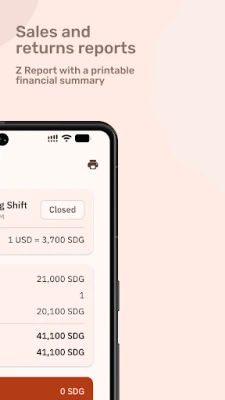
- Z Report with a printable financial summary including tax collected
- Sales and returns reports for any time period
- Track daily expenses (drawings, transport, payouts)
- Share or save any report as a PDF
Credit Book
- Sell on credit and record payments per customer
- Monitor outstanding balances
- Customer statements as PDF
Security & Backup
- Lock the app with a PIN or fingerprint
- Encrypted backup and one-tap restore
Tablet Layout
- Three-panel POS: product grid, cart, and checkout side by side
- On-screen keypad with T9 letter labels
- Master-detail views for Sales History, Credit Book, Inventory, and Shipments
- Side-by-side reports showing Most Sold and Highest Revenue simultaneously
- Inline return mode — register returns without leaving the POS screen
- Collapsible navigation rail
- Optional scan and cart sound effects
- Full hardware keyboard support for fast operation by professional cashiers — every action mapped to a key, with on-screen shortcut overlay (press F12)
Available in multiple languages — full interface and printed receipts
- Sell by unit or by weight (kg, g)
- Cash sales or credit sales with a debt ledger for each customer
- Configurable tax support (VAT, GST, KDV, MwSt) with country-aware defaults
- Per-product tax override or exemption
- Tax-inclusive or tax-exclusive pricing
- Apply per-sale discounts as a percentage or fixed amount
- Auto-kick connected cash drawer after each cash sale
- Print customer and store-copy receipts
Printer Support
- Bluetooth thermal printers (ESC/POS, 58mm or 80mm paper)
- Network / Wi-Fi thermal printers (ESC/POS over TCP/IP, 58mm or 80mm)
- Built-in printers on Sunmi devices (V1, V2, V2 Pro, T2, and others)
- Built-in printers on iMin devices (M2, D1, D3, D4, Falcon series)
- Automatic Wi-Fi printer discovery on the local network (mDNS / Bonjour)
- Manage multiple printers from one Devices hub
- Test print and reconnect with a tap
Inventory Management
- Add products by barcode or manually
- Automatic local currency pricing based on the exchange rate
- Low stock alerts
- Register shipments with automatic cost allocation and profit margin calculation
- Capture vendor name, invoice number, and invoice date per shipment
- Price change log
Shifts & Reports
- Open and close shifts with opening and closing balance tracking
- Z Report with a printable financial summary including tax collected
- Sales and returns reports for any time period
- Track daily expenses (drawings, transport, payouts)
- Share or save any report as a PDF
Credit Book
- Sell on credit and record payments per customer
- Monitor outstanding balances
- Customer statements as PDF
Security & Backup
- Lock the app with a PIN or fingerprint
- Encrypted backup and one-tap restore
Tablet Layout
- Three-panel POS: product grid, cart, and checkout side by side
- On-screen keypad with T9 letter labels
- Master-detail views for Sales History, Credit Book, Inventory, and Shipments
- Side-by-side reports showing Most Sold and Highest Revenue simultaneously
- Inline return mode — register returns without leaving the POS screen
- Collapsible navigation rail
- Optional scan and cart sound effects
- Full hardware keyboard support for fast operation by professional cashiers — every action mapped to a key, with on-screen shortcut overlay (press F12)
Available in multiple languages — full interface and printed receipts
Rate the App
Add Comment & Review
User Reviews
Based on 0 reviews
No reviews added yet.
Comments will not be approved to be posted if they are SPAM, abusive, off-topic, use profanity, contain a personal attack, or promote hate of any kind.














More »

Popular Apps

phpFoxPHPFOX LLC

Moon Chai StoryOlha Dobel

World War Heroes — WW2 PvP FPSAzur Interactive Games Limited

Govee LiteGovee

AvSeaAvionics Electronics Geeks!

Viking Clan: RagnarokKano Games

Vikings: War of ClansPlarium LLC

Build World AdventureExplore city in cube world

Asphalt 9: LegendsGameloft SE

Dawn of Zombies: Survival GameRoyal Ark
More »
Editor's Choice

Grim Soul: Dark Survival RPGBrickworks Games Ltd

Craft of Survival - Gladiators101XP LIMITED

Last Shelter: SurvivalLong Tech Network Limited
Dawn of Zombies: Survival GameRoyal Ark

Merge Survival : WastelandStickyHands Inc.

AoD Vikings: Valhalla GameRoboBot Studio
Viking Clan: RagnarokKano Games
Vikings: War of ClansPlarium LLC
Asphalt 9: LegendsGameloft SE

Modern Tanks: War Tank GamesXDEVS LTD