


Latest Version
Update
May 12, 2026
May 12, 2026
Developer
Five Plus
Five Plus
Categories
Tools
Tools
Platforms
Android
Android
Downloads
0
0
License
Free
Free
Package Name
com.fiveplus.slidy
com.fiveplus.slidy
Report
Report a Problem
Report a Problem
More About Carousel & Story Maker: Slidy
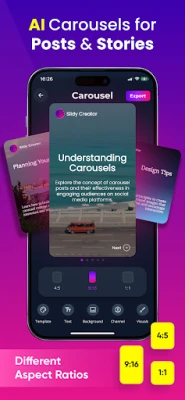
Slidy Creator is an AI app for creating social media carousels and stories.
Speak your idea or paste your text — and in just a few steps you’ll get polished, ready-to-share slides without complex design work.
Create content for Instagram*, Threads*, LinkedIn* and more: carousels, stories, mini guides, checklists, collections, step-by-step posts, promos, and educational content.
Perfect for
• creators and bloggers who need consistent content
• social media managers running multiple accounts
• founders and experts building a personal brand
• marketers who care about speed, style, and clarity
Why Slidy Creator
• Start fast with voice or text: less busywork, more posting.
• Stay on-brand: templates and settings keep your content consistent.
• Edit with confidence: fine-tune every slide until it looks exactly right.
Key features
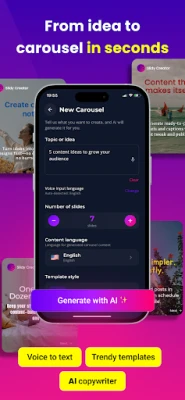
• Voice → AI carousel: we transcribe your voice and generate 1–15 slides. 20+ languages for transcription and content generation.
• Smart copy generation: AI creates headlines, key points, and a clear slide-by-slide flow for your topic, style, and language.
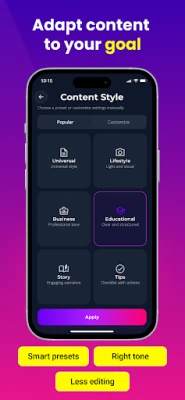
• Templates & design: dozens of themes (light, dark, creative), gradients, photos from your gallery or Pexels, plus overlay controls.
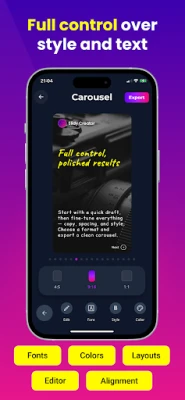
• Advanced editor: fonts, colors, sizes, spacing and alignment; CTA icons and visual badges; author avatar and handle; duplicate/delete/reorder slides; apply settings to all slides.
• Formats for every platform: 4:5 (feed), 1:1 (square — great for LinkedIn), 9:16 (stories).
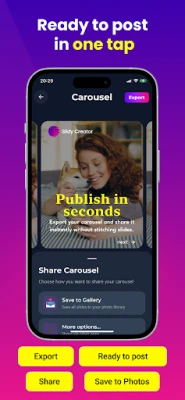
• Export: save to your gallery or share via the system Share menu.
• Project library: keep everything in one place — duplicate projects and edit in a couple taps.
What you can create with Slidy Creator
• “5 tips”, “mistakes & fixes”, FAQs, step-by-step how-tos
• a product or service breakdown across multiple slides
• collections of ideas, quotes, or key takeaways
• a cohesive content series (multiple carousels in the same style)
How it works
Speak your idea or paste your text
Pick a language and a template
Edit your slides if needed
Export and share
Download Slidy Creator and build your first carousel today.
*Instagram, Threads and LinkedIn are trademarks of their respective owners.
Create content for Instagram*, Threads*, LinkedIn* and more: carousels, stories, mini guides, checklists, collections, step-by-step posts, promos, and educational content.
Perfect for
• creators and bloggers who need consistent content
• social media managers running multiple accounts
• founders and experts building a personal brand
• marketers who care about speed, style, and clarity
Why Slidy Creator
• Start fast with voice or text: less busywork, more posting.
• Stay on-brand: templates and settings keep your content consistent.
• Edit with confidence: fine-tune every slide until it looks exactly right.
Key features
• Voice → AI carousel: we transcribe your voice and generate 1–15 slides. 20+ languages for transcription and content generation.
• Smart copy generation: AI creates headlines, key points, and a clear slide-by-slide flow for your topic, style, and language.
• Templates & design: dozens of themes (light, dark, creative), gradients, photos from your gallery or Pexels, plus overlay controls.
• Advanced editor: fonts, colors, sizes, spacing and alignment; CTA icons and visual badges; author avatar and handle; duplicate/delete/reorder slides; apply settings to all slides.
• Formats for every platform: 4:5 (feed), 1:1 (square — great for LinkedIn), 9:16 (stories).
• Export: save to your gallery or share via the system Share menu.
• Project library: keep everything in one place — duplicate projects and edit in a couple taps.
What you can create with Slidy Creator
• “5 tips”, “mistakes & fixes”, FAQs, step-by-step how-tos
• a product or service breakdown across multiple slides
• collections of ideas, quotes, or key takeaways
• a cohesive content series (multiple carousels in the same style)
How it works
Speak your idea or paste your text
Pick a language and a template
Edit your slides if needed
Export and share
Download Slidy Creator and build your first carousel today.
*Instagram, Threads and LinkedIn are trademarks of their respective owners.
Rate the App
Add Comment & Review
User Reviews
Based on 0 reviews
No reviews added yet.
Comments will not be approved to be posted if they are SPAM, abusive, off-topic, use profanity, contain a personal attack, or promote hate of any kind.














More »

Popular Apps

phpFoxPHPFOX LLC

Moon Chai StoryOlha Dobel

World War Heroes — WW2 PvP FPSAzur Interactive Games Limited

Govee LiteGovee

Build World AdventureExplore city in cube world

Viking Clan: RagnarokKano Games

Vikings: War of ClansPlarium LLC

Submarine Car Diving SimulatorSwim with dolphins & penguins

Asphalt 9: LegendsGameloft SE

Dawn of Zombies: Survival GameRoyal Ark
More »
Editor's Choice

Grim Soul: Dark Survival RPGBrickworks Games Ltd

Craft of Survival - Gladiators101XP LIMITED

Last Shelter: SurvivalLong Tech Network Limited
Dawn of Zombies: Survival GameRoyal Ark

Merge Survival : WastelandStickyHands Inc.

AoD Vikings: Valhalla GameRoboBot Studio
Viking Clan: RagnarokKano Games
Vikings: War of ClansPlarium LLC
Asphalt 9: LegendsGameloft SE

Modern Tanks: War Tank GamesXDEVS LTD