Latest Version
Update
November 01, 2026
November 01, 2026
Developer
Alexey Rogulin
Alexey Rogulin
Categories
Tools
Tools
Platforms
Android
Android
Downloads
0
0
License
Free
Free
Package Name
com.arogulin.brightness
com.arogulin.brightness
Report
Report a Problem
Report a Problem
More About Brightness
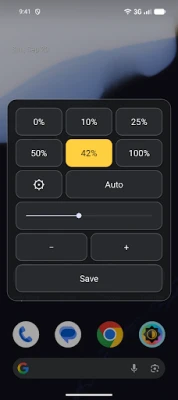
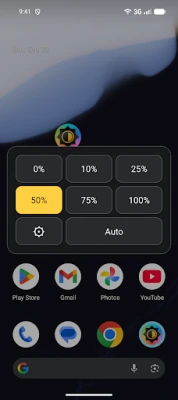
Change your screen brightness with one tap. Choose a preset level, or use Auto mode if your device has a light sensor.
Brightness too dim or not matching your phone’s slider?
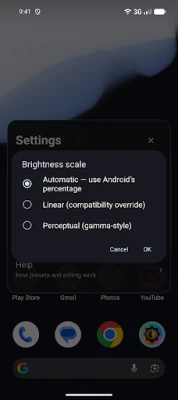
On some devices, including some Samsung models, try the Linear brightness scale:
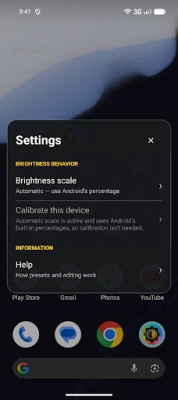
1. Open Brightness and tap the gear icon to open Settings.
2. Tap “Brightness scale”.
3. Select “Linear (compatibility override)” and tap “OK”.
4. Try the brightness buttons again.
Adapt Brightness to your device
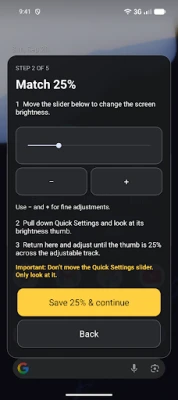
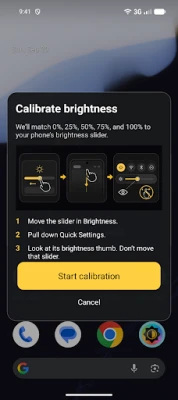
The Brightness scale setting offers Automatic, Linear, and Perceptual (gamma-style) options. Custom calibration is also available when needed to help match your presets to your device’s Quick Settings brightness slider. The scale setting is separate from Auto mode, which adjusts brightness to ambient light.
Customize your presets
Press and hold any brightness button to change its value.
Simple and focused
The app requires only one permission: to modify system settings. No ads and no other permissions. Brightness does one thing: it changes your screen brightness.
On some devices, including some Samsung models, try the Linear brightness scale:
1. Open Brightness and tap the gear icon to open Settings.
2. Tap “Brightness scale”.
3. Select “Linear (compatibility override)” and tap “OK”.
4. Try the brightness buttons again.
Adapt Brightness to your device
The Brightness scale setting offers Automatic, Linear, and Perceptual (gamma-style) options. Custom calibration is also available when needed to help match your presets to your device’s Quick Settings brightness slider. The scale setting is separate from Auto mode, which adjusts brightness to ambient light.
Customize your presets
Press and hold any brightness button to change its value.
Simple and focused
The app requires only one permission: to modify system settings. No ads and no other permissions. Brightness does one thing: it changes your screen brightness.
Rate the App
Add Comment & Review
User Reviews
Based on 0 reviews
No reviews added yet.
Comments will not be approved to be posted if they are SPAM, abusive, off-topic, use profanity, contain a personal attack, or promote hate of any kind.







More »

Popular Apps

phpFoxPHPFOX LLC

Moon Chai StoryOlha Dobel

World War Heroes — WW2 PvP FPSAzur Interactive Games Limited

Govee LiteGovee

AvSeaAvionics Electronics Geeks!

Viking Clan: RagnarokKano Games

Vikings: War of ClansPlarium LLC

Build World AdventureExplore city in cube world

Asphalt 9: LegendsGameloft SE

Dawn of Zombies: Survival GameRoyal Ark
More »
Editor's Choice

Grim Soul: Dark Survival RPGBrickworks Games Ltd

Craft of Survival - Gladiators101XP LIMITED

Last Shelter: SurvivalLong Tech Network Limited
Dawn of Zombies: Survival GameRoyal Ark

Merge Survival : WastelandStickyHands Inc.

AoD Vikings: Valhalla GameRoboBot Studio
Viking Clan: RagnarokKano Games
Vikings: War of ClansPlarium LLC
Asphalt 9: LegendsGameloft SE

Modern Tanks: War Tank GamesXDEVS LTD