

Latest Version
Update
April 08, 2026
April 08, 2026
Developer
AvinashHQ
AvinashHQ
Categories
Tools
Tools
Platforms
Android
Android
Downloads
0
0
License
Free
Free
Package Name
com.kumarav1nash.airmouse
com.kumarav1nash.airmouse
Report
Report a Problem
Report a Problem
More About Bluetooth Mouse & TV Remote
Turn your Android phone into a powerful Bluetooth mouse for your TV, Mac and PC.
AirMouse lets you use your phone as a wireless Bluetooth mouse, keyboard, and remote control for your TV, PC, Mac, tablet, or laptop. It connects using native Bluetooth HID, so it works instantly — no receiver, no WiFi, and no desktop software required.
Use your phone as a Bluetooth mouse or phone as mouse for TV, a wireless mouse for PC, or a remote control for Android TV.
No receiver.
No desktop server.
Just connect and control.
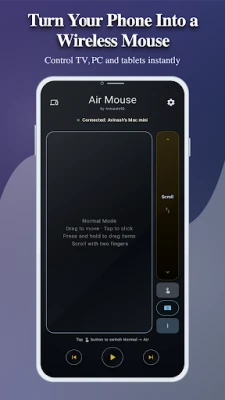
🖱 Bluetooth Mouse & Trackpad
Use your phone as a Bluetooth mouse and control the cursor on any device.
• Smooth touchpad navigation
• Left and right click
• Scrolling support
• Precise cursor movement
Perfect as a wireless mouse for TV, PC, Mac, and tablets.
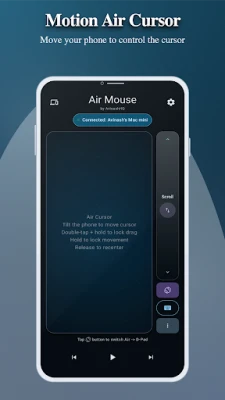
🎯 Air Cursor (Motion Control)
Turn your phone into an air mouse for Android TV and PC.
Move your phone to control the cursor using motion sensors — just like a motion remote.
Great for:
• Smart TV navigation
• Media browsing
• Presentations
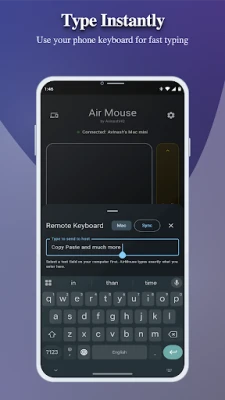
⌨ Bluetooth Keyboard Input
Use your phone as a keyboard and mouse for TV and PC.
Type instantly on your TV, PC, or tablet using your phone keyboard.
• Fast typing on Smart TV
• Easy text input on PC
• Works as a Bluetooth keyboard remote
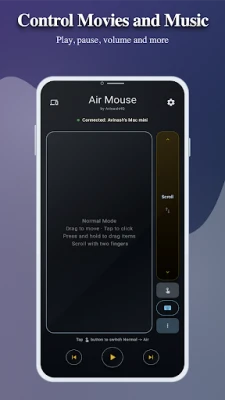
🎵 Media Remote Control
Control your device like a TV remote.
• Play / Pause
• Volume control
• Next / Previous
Perfect for streaming apps and media players.
🎮 D-Pad Navigation
Use your phone as an Android TV remote mouse for easy navigation.
• Navigate menus easily
• Control apps and settings
• Ideal for Smart TV interfaces
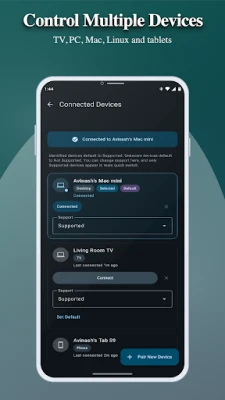
🔄 Multi-Device Control
Control multiple devices using one phone.
• Switch between TV, PC, or tablet
• Works as a universal remote control
📱 Works As:
• Bluetooth mouse for TV
• Wireless mouse for PC
• Phone as mouse and keyboard
• Android TV remote mouse
• Remote control without receiver
• Wireless mouse for TV
🔗 Works With
AirMouse lets you use your phone as mouse for TV and PC without receiver or WiFi.
AirMouse works with devices that support Bluetooth HID input devices, including:
• Smart TVs
• Android TV / Google TV
• Windows PCs
• macOS computers
• Linux systems
• Tablets
⭐ Why AirMouse?
Perfect if you are looking for a mouse without receiver or a remote mouse without WiFi.
Most remote apps require:
❌ WiFi connection
❌ Desktop software
❌ Same network setup
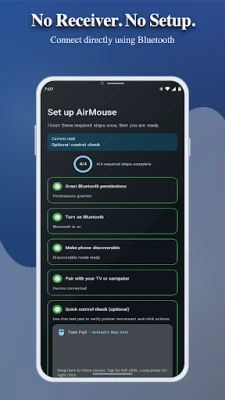
AirMouse works differently:
✔ Direct Bluetooth connection
✔ No receiver required
✔ No setup needed
✔ Works instantly
Use your phone as a Bluetooth mouse without receiver and control any device easily.
💰 Free & Premium Plans
Standard (Free)
• Basic touchpad
• Single device connection
Pro
• Air cursor (motion control)
• Keyboard support
• Media controls
• Enhanced gestures
• Reduced ads
Ultra
• Multi-device control
• Full media controls
• Ad-free experience
• All Pro features included
🔒 Privacy Friendly
AirMouse connects directly through Bluetooth and does not require unnecessary permissions. Your data stays on your device.
📱 Common Use Cases
• Phone as mouse for TV and PC
• Bluetooth mouse for TV without receiver
• Wireless mouse for PC and laptop
• Phone as keyboard and mouse
• Android TV remote mouse
• Remote mouse without WiFi
• Bluetooth mouse without receiver
Use your phone as a Bluetooth mouse or phone as mouse for TV, a wireless mouse for PC, or a remote control for Android TV.
No receiver.
No desktop server.
Just connect and control.
🖱 Bluetooth Mouse & Trackpad
Use your phone as a Bluetooth mouse and control the cursor on any device.
• Smooth touchpad navigation
• Left and right click
• Scrolling support
• Precise cursor movement
Perfect as a wireless mouse for TV, PC, Mac, and tablets.
🎯 Air Cursor (Motion Control)
Turn your phone into an air mouse for Android TV and PC.
Move your phone to control the cursor using motion sensors — just like a motion remote.
Great for:
• Smart TV navigation
• Media browsing
• Presentations
⌨ Bluetooth Keyboard Input
Use your phone as a keyboard and mouse for TV and PC.
Type instantly on your TV, PC, or tablet using your phone keyboard.
• Fast typing on Smart TV
• Easy text input on PC
• Works as a Bluetooth keyboard remote
🎵 Media Remote Control
Control your device like a TV remote.
• Play / Pause
• Volume control
• Next / Previous
Perfect for streaming apps and media players.
🎮 D-Pad Navigation
Use your phone as an Android TV remote mouse for easy navigation.
• Navigate menus easily
• Control apps and settings
• Ideal for Smart TV interfaces
🔄 Multi-Device Control
Control multiple devices using one phone.
• Switch between TV, PC, or tablet
• Works as a universal remote control
📱 Works As:
• Bluetooth mouse for TV
• Wireless mouse for PC
• Phone as mouse and keyboard
• Android TV remote mouse
• Remote control without receiver
• Wireless mouse for TV
🔗 Works With
AirMouse lets you use your phone as mouse for TV and PC without receiver or WiFi.
AirMouse works with devices that support Bluetooth HID input devices, including:
• Smart TVs
• Android TV / Google TV
• Windows PCs
• macOS computers
• Linux systems
• Tablets
⭐ Why AirMouse?
Perfect if you are looking for a mouse without receiver or a remote mouse without WiFi.
Most remote apps require:
❌ WiFi connection
❌ Desktop software
❌ Same network setup
AirMouse works differently:
✔ Direct Bluetooth connection
✔ No receiver required
✔ No setup needed
✔ Works instantly
Use your phone as a Bluetooth mouse without receiver and control any device easily.
💰 Free & Premium Plans
Standard (Free)
• Basic touchpad
• Single device connection
Pro
• Air cursor (motion control)
• Keyboard support
• Media controls
• Enhanced gestures
• Reduced ads
Ultra
• Multi-device control
• Full media controls
• Ad-free experience
• All Pro features included
🔒 Privacy Friendly
AirMouse connects directly through Bluetooth and does not require unnecessary permissions. Your data stays on your device.
📱 Common Use Cases
• Phone as mouse for TV and PC
• Bluetooth mouse for TV without receiver
• Wireless mouse for PC and laptop
• Phone as keyboard and mouse
• Android TV remote mouse
• Remote mouse without WiFi
• Bluetooth mouse without receiver
Rate the App
Add Comment & Review
User Reviews
Based on 0 reviews
No reviews added yet.
Comments will not be approved to be posted if they are SPAM, abusive, off-topic, use profanity, contain a personal attack, or promote hate of any kind.











More »

Popular Apps

phpFoxPHPFOX LLC

Moon Chai StoryOlha Dobel

World War Heroes — WW2 PvP FPSAzur Interactive Games Limited

Govee LiteGovee

Build World AdventureExplore city in cube world

Viking Clan: RagnarokKano Games

Vikings: War of ClansPlarium LLC

Submarine Car Diving SimulatorSwim with dolphins & penguins

Asphalt 9: LegendsGameloft SE

Dawn of Zombies: Survival GameRoyal Ark
More »
Editor's Choice

Grim Soul: Dark Survival RPGBrickworks Games Ltd

Craft of Survival - Gladiators101XP LIMITED

Last Shelter: SurvivalLong Tech Network Limited
Dawn of Zombies: Survival GameRoyal Ark

Merge Survival : WastelandStickyHands Inc.

AoD Vikings: Valhalla GameRoboBot Studio
Viking Clan: RagnarokKano Games
Vikings: War of ClansPlarium LLC
Asphalt 9: LegendsGameloft SE

Modern Tanks: War Tank GamesXDEVS LTD