Latest Version
Update
February 14, 2026
February 14, 2026
Developer
ProxiOS Technology
ProxiOS Technology
Categories
Productivity
Productivity
Platforms
Android
Android
Downloads
0
0
License
Free
Free
Package Name
com.proxios.bluetooth.keyboardtrackpad
com.proxios.bluetooth.keyboardtrackpad
Report
Report a Problem
Report a Problem
More About Bluetooth Keyboard & Mouse
Turn your Android phone into a Bluetooth keyboard, mouse, trackpad and PC remote for your computer. Control your laptop, Mac or desktop from the sofa, your desk or when your regular keyboard and mouse are out of reach.
Bluetooth Keyboard & Mouse works as a real Bluetooth HID device – just like a hardware wireless keyboard and computer mouse. No Wi-Fi, no extra PC software, no cables.
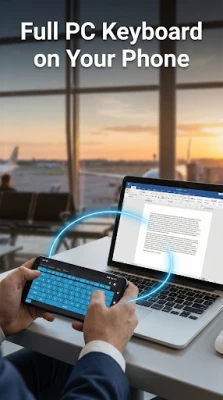
Use your phone as a Bluetooth keyboard
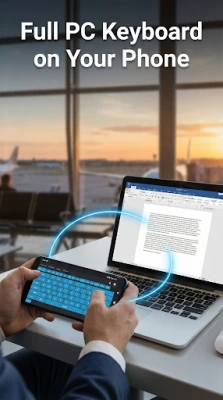
- Type on your computer with a full virtual keypad / QWERTY keyboard
- Works with Windows PC, MacBook, Mac mini, iMac, Linux laptops and more
- Send letters, numbers, symbols, shortcuts and function keys
- Supports common combos like Ctrl+C, Ctrl+V, Ctrl+Z, Alt+Tab etc.
- Switch to numpad mode for quick numbers and calculator-style input
- Great when your normal keyboard stops working or you just want a free keyboard app for your computer
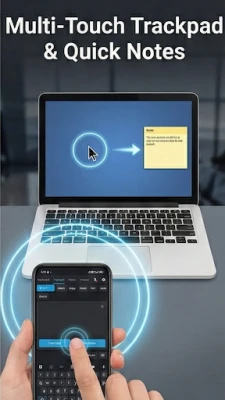
Remote mouse, trackpad & touchpad
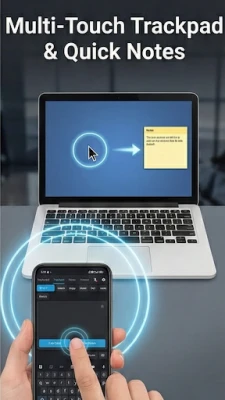
- Smooth remote mouse control with your finger as a touchpad / track pad
- Single tap to click, double tap to double-click, tap-and-hold to drag
- Two-finger scroll in documents, web pages and code
- Use as a PC remote from the sofa with your laptop plugged into a TV or monitor
- Works anywhere that accepts a standard Bluetooth keyboard and mouse
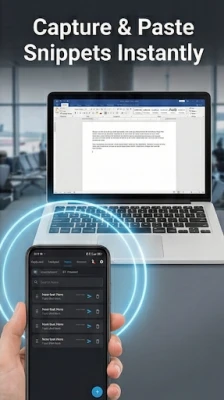
Notes, snippets & one-tap paste to laptop
- Save multiple notes, snippets and templates inside the app
- Perfect for email replies, intros, links, code samples and repeated text
- Draft offline on your phone, then send the text to your computer later
- One tap to paste: the app types the full note into the active window on your PC or Mac
- Use it as a lightweight text expander and snippet manager for your computer
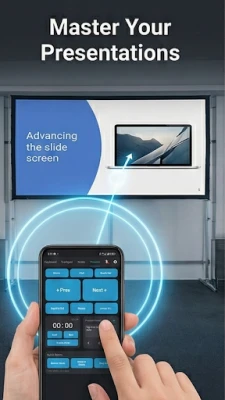
Presentation & meeting remote
- Turn your phone into a slide clicker and presenter remote
- Next / previous slide, start / end slideshow and black screen
- Optional meeting buttons for mute, camera, share screen and end call
- Ideal for PowerPoint, Google Slides, Keynote and other presentation apps
- Great for travelling professionals, trainers, teachers and sales meetings
Why this app?
Many keyboard apps only type on your phone. Many remote mouse apps need a Wi-Fi connection or extra server software on your computer. This app is different:
- Real Bluetooth keyboard and mouse – recognised by your computer like normal hardware
- Simple connection screen – pair once, reconnect quickly
- Designed for laptops and desktop computers, not just phones and tablets
- Focused on productivity: remote keyboard, remote mouse, notes, snippets and presentations in one place
Perfect for:
- Using your laptop from the sofa or bed as a PC remote
- Controlling a media PC or home theatre connected to a TV
- Travelling with a lightweight “spare” keyboard and mouse in your pocket
- Developers, writers and power users who want snippets and macros
- Presenters who want a clean slide clicker plus keyboard & trackpad
If your computer, smart TV or device supports a standard Bluetooth keyboard and mouse, Bluetooth Keyboard & Mouse can usually work as a remote keyboard, mouse, touchpad and virtual keypad – all from your Android phone.
Need support? Email us at [email protected]!
Use your phone as a Bluetooth keyboard
- Type on your computer with a full virtual keypad / QWERTY keyboard
- Works with Windows PC, MacBook, Mac mini, iMac, Linux laptops and more
- Send letters, numbers, symbols, shortcuts and function keys
- Supports common combos like Ctrl+C, Ctrl+V, Ctrl+Z, Alt+Tab etc.
- Switch to numpad mode for quick numbers and calculator-style input
- Great when your normal keyboard stops working or you just want a free keyboard app for your computer
Remote mouse, trackpad & touchpad
- Smooth remote mouse control with your finger as a touchpad / track pad
- Single tap to click, double tap to double-click, tap-and-hold to drag
- Two-finger scroll in documents, web pages and code
- Use as a PC remote from the sofa with your laptop plugged into a TV or monitor
- Works anywhere that accepts a standard Bluetooth keyboard and mouse
Notes, snippets & one-tap paste to laptop
- Save multiple notes, snippets and templates inside the app
- Perfect for email replies, intros, links, code samples and repeated text
- Draft offline on your phone, then send the text to your computer later
- One tap to paste: the app types the full note into the active window on your PC or Mac
- Use it as a lightweight text expander and snippet manager for your computer
Presentation & meeting remote
- Turn your phone into a slide clicker and presenter remote
- Next / previous slide, start / end slideshow and black screen
- Optional meeting buttons for mute, camera, share screen and end call
- Ideal for PowerPoint, Google Slides, Keynote and other presentation apps
- Great for travelling professionals, trainers, teachers and sales meetings
Why this app?
Many keyboard apps only type on your phone. Many remote mouse apps need a Wi-Fi connection or extra server software on your computer. This app is different:
- Real Bluetooth keyboard and mouse – recognised by your computer like normal hardware
- Simple connection screen – pair once, reconnect quickly
- Designed for laptops and desktop computers, not just phones and tablets
- Focused on productivity: remote keyboard, remote mouse, notes, snippets and presentations in one place
Perfect for:
- Using your laptop from the sofa or bed as a PC remote
- Controlling a media PC or home theatre connected to a TV
- Travelling with a lightweight “spare” keyboard and mouse in your pocket
- Developers, writers and power users who want snippets and macros
- Presenters who want a clean slide clicker plus keyboard & trackpad
If your computer, smart TV or device supports a standard Bluetooth keyboard and mouse, Bluetooth Keyboard & Mouse can usually work as a remote keyboard, mouse, touchpad and virtual keypad – all from your Android phone.
Need support? Email us at [email protected]!
Rate the App
Add Comment & Review
User Reviews
Based on 0 reviews
No reviews added yet.
Comments will not be approved to be posted if they are SPAM, abusive, off-topic, use profanity, contain a personal attack, or promote hate of any kind.










More »

Popular Apps

phpFoxPHPFOX LLC

Moon Chai StoryOlha Dobel

World War Heroes — WW2 PvP FPSAzur Interactive Games Limited

Govee LiteGovee

Viking Clan: RagnarokKano Games

Build World AdventureExplore city in cube world

Vikings: War of ClansPlarium LLC

AvSeaAvionics Electronics Geeks!

Asphalt 9: LegendsGameloft SE

Dawn of Zombies: Survival GameRoyal Ark
More »
Editor's Choice

Grim Soul: Dark Survival RPGBrickworks Games Ltd

Craft of Survival - Gladiators101XP LIMITED

Last Shelter: SurvivalLong Tech Network Limited
Dawn of Zombies: Survival GameRoyal Ark

Merge Survival : WastelandStickyHands Inc.

AoD Vikings: Valhalla GameRoboBot Studio
Viking Clan: RagnarokKano Games
Vikings: War of ClansPlarium LLC
Asphalt 9: LegendsGameloft SE

Modern Tanks: War Tank GamesXDEVS LTD