


Latest Version
Version
4.0
4.0
Update
January 04, 2024
January 04, 2024
Developer
Axis Bank Ltd.
Axis Bank Ltd.
Categories
Productivity
Productivity
Platforms
Android
Android
Downloads
2
2
License
Free
Free
Package Name
com.ezmcom.softtoken.netsecure
com.ezmcom.softtoken.netsecure
Report
Report a Problem
Report a Problem
More About Axis NETSECURE
NETSECURE is a two factor authentication mechanism to provide added security to your online banking transactions.
Axis Bank NETSECURE with Mobile Token is an application through which you will be able to generate your NETSECURE code using your sim-enabled handheld device.
Steps of Registration
1. Login to Axis Bank Internet Banking and choose NETSECURE with Mobile Token
2. Enter your Passport Number and Email ID registered with Axis Bank (for NRI Account Holders)
3. Download the application on your mobile phone.
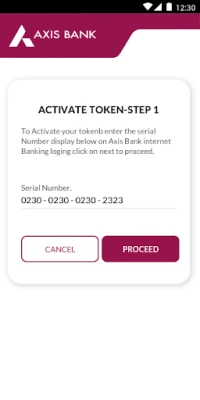
4. Enter the serial number displayed on the Mobile Token application in the relevant field provided on Axis Bank Internet Banking.
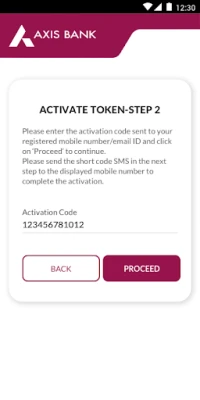
5. Enter the activation code on your mobile number and send activation sms for authentication.
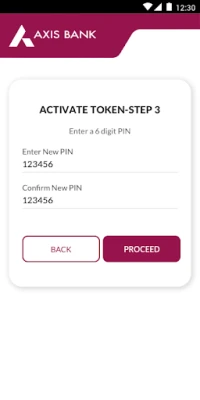
6. Set your security pin.
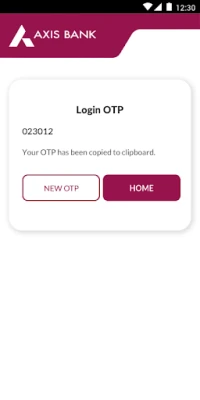
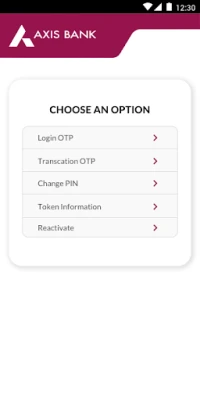
7. Generate the Login One Time Password (OTP) to login to Internet Banking and generate Transaction OTP to complete any payment transaction.
Benefits
1. Generate NETSECURE Code instantly through your sim-enabled handheld device.
2. Easy access to Internet Banking since NETSECURE code can be generated without the need for the registered mobile number being on the network.
Note:
1. Currently available for Android phone (version 4.3) and above.
2. App requires Internet Access for registration. Please ensure your mobile data or WIFI is on for the same.
3. App requires SMS verification for registration. Please ensure your device has a SIM card for the same. SMS charges will be applicable by your mobile network operator for the same.
For any feedback, queries or issues pertaining to NETSECURE with Mobile Token app, please write to [email protected] . NRI Account Holders can write to [email protected] .
Steps of Registration
1. Login to Axis Bank Internet Banking and choose NETSECURE with Mobile Token
2. Enter your Passport Number and Email ID registered with Axis Bank (for NRI Account Holders)
3. Download the application on your mobile phone.
4. Enter the serial number displayed on the Mobile Token application in the relevant field provided on Axis Bank Internet Banking.
5. Enter the activation code on your mobile number and send activation sms for authentication.
6. Set your security pin.
7. Generate the Login One Time Password (OTP) to login to Internet Banking and generate Transaction OTP to complete any payment transaction.
Benefits
1. Generate NETSECURE Code instantly through your sim-enabled handheld device.
2. Easy access to Internet Banking since NETSECURE code can be generated without the need for the registered mobile number being on the network.
Note:
1. Currently available for Android phone (version 4.3) and above.
2. App requires Internet Access for registration. Please ensure your mobile data or WIFI is on for the same.
3. App requires SMS verification for registration. Please ensure your device has a SIM card for the same. SMS charges will be applicable by your mobile network operator for the same.
For any feedback, queries or issues pertaining to NETSECURE with Mobile Token app, please write to [email protected] . NRI Account Holders can write to [email protected] .
Rate the App
Add Comment & Review
User Reviews
Based on 0 reviews
No reviews added yet.
Comments will not be approved to be posted if they are SPAM, abusive, off-topic, use profanity, contain a personal attack, or promote hate of any kind.















More »

Popular Apps

phpFoxPHPFOX LLC

Moon Chai StoryOlha Dobel

World War Heroes — WW2 PvP FPSAzur Interactive Games Limited

Govee LiteGovee

AvSeaAvionics Electronics Geeks!

Viking Clan: RagnarokKano Games

Build World AdventureExplore city in cube world

Vikings: War of ClansPlarium LLC

Asphalt 9: LegendsGameloft SE

Dawn of Zombies: Survival GameRoyal Ark
More »
Editor's Choice

Grim Soul: Dark Survival RPGBrickworks Games Ltd

Craft of Survival - Gladiators101XP LIMITED

Last Shelter: SurvivalLong Tech Network Limited
Dawn of Zombies: Survival GameRoyal Ark

Merge Survival : WastelandStickyHands Inc.

AoD Vikings: Valhalla GameRoboBot Studio
Viking Clan: RagnarokKano Games
Vikings: War of ClansPlarium LLC
Asphalt 9: LegendsGameloft SE

Modern Tanks: War Tank GamesXDEVS LTD