Latest Version
Update
June 11, 2026
June 11, 2026
Developer
apps dk
apps dk
Categories
Tools
Tools
Platforms
Android
Android
Downloads
0
0
License
Free
Free
Package Name
com.applock.fingerprint.applocker.pro
com.applock.fingerprint.applocker.pro
Report
Report a Problem
Report a Problem
More About AppLock Pro: Fingerprint Lock
Protect your privacy with the most advanced and reliable AppLock! 🔒
AppLock Pro is the ultimate security tool to lock your apps and protect your private data from prying eyes. Whether it's your gallery, messages, or social media, AppLock Pro ensures that only YOU have access.
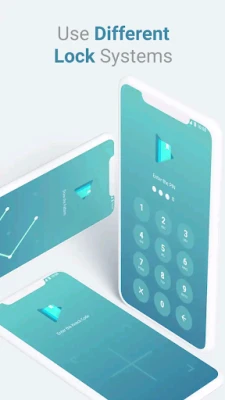
With support for Fingerprint, PIN, and Pattern (via device credentials), coupled with advanced Anti-Uninstall protection, you can rest easy knowing your privacy is secure.
🌟 Key Features:
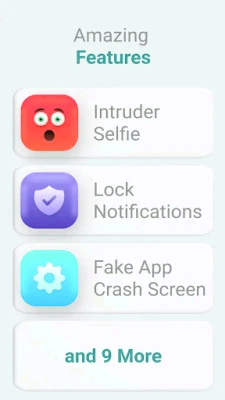
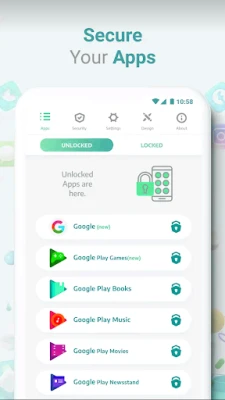
🔐 Lock Any App Secure your social apps like WhatsApp, Facebook, Instagram, Snapchat, and sensitive apps like Gallery, Gmail, and Settings. Never worry about parents or friends checking your private chats or photos again!
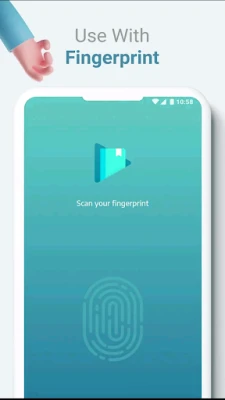
👆 Fingerprint Support Unlock apps instantly with your registered fingerprint. Fast, secure, and convenient. (Requires device hardware support).
🛡️ Anti-Uninstall Protection Unlike other app lockers, AppLock Pro uses strict security measures to prevent intruders from uninstalling the app to bypass the lock. Your security stays intact!
🚀 Advanced Technology (Shizuku & Accessibility) We use cutting-edge android technologies like Accessibility Services and Shizuku (optional) to detect locked apps instantly with minimal battery drain.
⚡ Lightweight & Fast Optimized for performance, AppLock Pro runs smoothly in the background without slowing down your phone.
🔋 Battery Friendly Efficient monitoring ensures your battery life is respected while maintaining high security.
⚙️ How it Works:
Choose Apps: Select the apps you want to lock from the list.
Set Security: Use your device's Fingerprint, PIN, or Pattern.
Enable Permissions: Grant necessary permissions (Overlay & Usage/Accessibility) for the app to function.
Stay Secure: That's it! Your selected apps are now protected.
📝 Transparency & Permissions:
Device Administrator: Required to prevent unauthorized uninstallation of the app.
Accessibility Service: Used solely to detect when locked apps are opened. No personal data is collected or shared.
Overlay Permission: Needed to display the lock screen over opened apps.
Download AppLock Pro today and take control of your privacy! 🛡️
With support for Fingerprint, PIN, and Pattern (via device credentials), coupled with advanced Anti-Uninstall protection, you can rest easy knowing your privacy is secure.
🌟 Key Features:
🔐 Lock Any App Secure your social apps like WhatsApp, Facebook, Instagram, Snapchat, and sensitive apps like Gallery, Gmail, and Settings. Never worry about parents or friends checking your private chats or photos again!
👆 Fingerprint Support Unlock apps instantly with your registered fingerprint. Fast, secure, and convenient. (Requires device hardware support).
🛡️ Anti-Uninstall Protection Unlike other app lockers, AppLock Pro uses strict security measures to prevent intruders from uninstalling the app to bypass the lock. Your security stays intact!
🚀 Advanced Technology (Shizuku & Accessibility) We use cutting-edge android technologies like Accessibility Services and Shizuku (optional) to detect locked apps instantly with minimal battery drain.
⚡ Lightweight & Fast Optimized for performance, AppLock Pro runs smoothly in the background without slowing down your phone.
🔋 Battery Friendly Efficient monitoring ensures your battery life is respected while maintaining high security.
⚙️ How it Works:
Choose Apps: Select the apps you want to lock from the list.
Set Security: Use your device's Fingerprint, PIN, or Pattern.
Enable Permissions: Grant necessary permissions (Overlay & Usage/Accessibility) for the app to function.
Stay Secure: That's it! Your selected apps are now protected.
📝 Transparency & Permissions:
Device Administrator: Required to prevent unauthorized uninstallation of the app.
Accessibility Service: Used solely to detect when locked apps are opened. No personal data is collected or shared.
Overlay Permission: Needed to display the lock screen over opened apps.
Download AppLock Pro today and take control of your privacy! 🛡️
Rate the App
Add Comment & Review
User Reviews
Based on 0 reviews
No reviews added yet.
Comments will not be approved to be posted if they are SPAM, abusive, off-topic, use profanity, contain a personal attack, or promote hate of any kind.









More »

Popular Apps

phpFoxPHPFOX LLC

Moon Chai StoryOlha Dobel

World War Heroes — WW2 PvP FPSAzur Interactive Games Limited

Govee LiteGovee

Build World AdventureExplore city in cube world

Viking Clan: RagnarokKano Games

Vikings: War of ClansPlarium LLC

Asphalt 9: LegendsGameloft SE

Submarine Car Diving SimulatorSwim with dolphins & penguins

Dawn of Zombies: Survival GameRoyal Ark
More »
Editor's Choice

Grim Soul: Dark Survival RPGBrickworks Games Ltd

Craft of Survival - Gladiators101XP LIMITED

Last Shelter: SurvivalLong Tech Network Limited
Dawn of Zombies: Survival GameRoyal Ark

Merge Survival : WastelandStickyHands Inc.

AoD Vikings: Valhalla GameRoboBot Studio
Viking Clan: RagnarokKano Games
Vikings: War of ClansPlarium LLC
Asphalt 9: LegendsGameloft SE

Modern Tanks: War Tank GamesXDEVS LTD