Latest Version
Update
November 17, 2026
November 17, 2026
Developer
AlgoTechApps
AlgoTechApps
Categories
Tools
Tools
Platforms
Android
Android
Downloads
0
0
License
Free
Free
Package Name
com.divinebarbany.antitheft.donttouchmyphone
com.divinebarbany.antitheft.donttouchmyphone
Report
Report a Problem
Report a Problem
More About Anti Theft Alarm & Find Phone
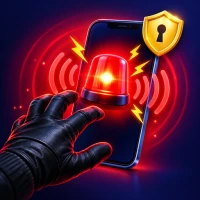
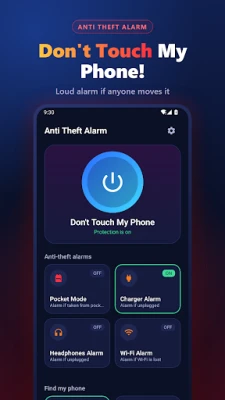
Anti Theft Alarm protects your phone from thieves, nosy friends and pickpockets. Put your phone down, tap Activate, and if anyone touches it, a loud siren rings with flashing light and vibration until you enter your PIN. Lost your phone at home? Clap or whistle and it answers.
🚨 DON'T TOUCH MY PHONE – MOTION ALARM
• Leave your phone on a table at a café, in class, at the library or while charging at the airport.
• If someone picks it up or moves it, the anti theft alarm starts at once.
• Choose the sensitivity (low, medium, high) and a 3–15 second activation delay.
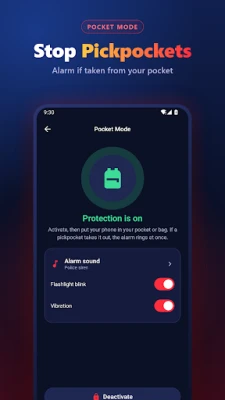
👖 POCKET MODE – PICKPOCKET ALARM
• Activate, put your phone in your pocket or bag.
• If a pickpocket takes it out, the phone alarm rings immediately. Perfect for buses, trains, markets and crowds.
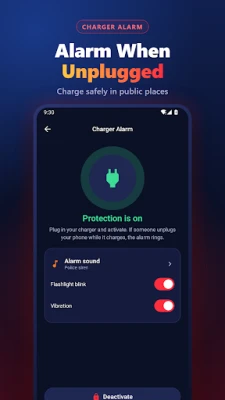
🔌 CHARGER ALARM
• Charging in a public place? The alarm rings as soon as someone unplugs your phone from the charger.
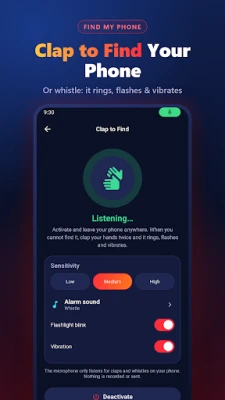
👏 FIND MY PHONE BY CLAP & WHISTLE
• Clap your hands twice or whistle and your phone rings, flashes and vibrates – even under a cushion or in a bag.
• Works with the screen off. The microphone only listens for claps and whistles on your phone: nothing is recorded or sent.
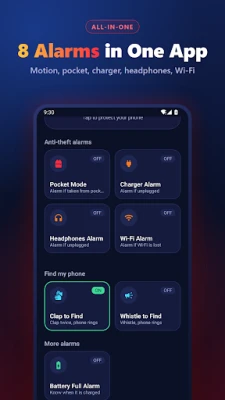
🎧 MORE ALARMS
• Headphones alarm: rings if your headphones are pulled out or disconnected.
• Wi-Fi alarm: rings if your phone leaves your Wi-Fi network.
• Battery full alarm: know when charging is done and unplug to save your battery.
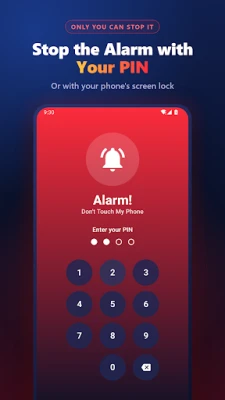
🔐 ONLY YOU CAN STOP IT
• Set a 4-digit PIN: a thief cannot turn the alarm off.
• You can also stop it with your phone's own screen lock (fingerprint, PIN or pattern).
• The alarm plays at full volume, even in silent mode, and comes back up if someone presses volume down.
🔊 LOUD ALARM SOUNDS
Police siren, burglar alarm, ambulance, alarm clock, whistle, car alarm, air raid siren, doorbell and laser alarm. Choose the alarm duration: 30 seconds to "until stopped".
✅ WHY THIS ANTI THEFT APP?
• All protection modes in one simple app: don't touch my phone, pocket alarm, charger alarm, clap to find.
• Works offline – no account, no sign-up.
• Free, with no in-app purchases. Watch a short video to remove ads for 24 hours.
• Light and private: no access to your photos, contacts or location.
❓ HOW TO USE THE PHONE ALARM
1. Choose a mode: Don't Touch My Phone, Pocket Mode, Charger Alarm or Clap to Find.
2. Tap Activate and put your phone down.
3. If someone touches your phone, the alarm rings. Enter your PIN to stop it.
❓ FAQ
• Does it work when the screen is off? Yes, protection keeps running in the background with a notification.
• Can a thief stop the alarm? Not without your PIN or your phone's screen lock.
• Does Clap to Find record me? No. Sound is analysed on your phone in real time and never saved.
Please note: Anti Theft Alarm makes your phone ring loudly to deter theft and help you find it nearby. It cannot track a phone's location or lock a stolen phone remotely.
Download Anti Theft Alarm & Find Phone and keep your phone safe wherever you go.
• Leave your phone on a table at a café, in class, at the library or while charging at the airport.
• If someone picks it up or moves it, the anti theft alarm starts at once.
• Choose the sensitivity (low, medium, high) and a 3–15 second activation delay.
👖 POCKET MODE – PICKPOCKET ALARM
• Activate, put your phone in your pocket or bag.
• If a pickpocket takes it out, the phone alarm rings immediately. Perfect for buses, trains, markets and crowds.
🔌 CHARGER ALARM
• Charging in a public place? The alarm rings as soon as someone unplugs your phone from the charger.
👏 FIND MY PHONE BY CLAP & WHISTLE
• Clap your hands twice or whistle and your phone rings, flashes and vibrates – even under a cushion or in a bag.
• Works with the screen off. The microphone only listens for claps and whistles on your phone: nothing is recorded or sent.
🎧 MORE ALARMS
• Headphones alarm: rings if your headphones are pulled out or disconnected.
• Wi-Fi alarm: rings if your phone leaves your Wi-Fi network.
• Battery full alarm: know when charging is done and unplug to save your battery.
🔐 ONLY YOU CAN STOP IT
• Set a 4-digit PIN: a thief cannot turn the alarm off.
• You can also stop it with your phone's own screen lock (fingerprint, PIN or pattern).
• The alarm plays at full volume, even in silent mode, and comes back up if someone presses volume down.
🔊 LOUD ALARM SOUNDS
Police siren, burglar alarm, ambulance, alarm clock, whistle, car alarm, air raid siren, doorbell and laser alarm. Choose the alarm duration: 30 seconds to "until stopped".
✅ WHY THIS ANTI THEFT APP?
• All protection modes in one simple app: don't touch my phone, pocket alarm, charger alarm, clap to find.
• Works offline – no account, no sign-up.
• Free, with no in-app purchases. Watch a short video to remove ads for 24 hours.
• Light and private: no access to your photos, contacts or location.
❓ HOW TO USE THE PHONE ALARM
1. Choose a mode: Don't Touch My Phone, Pocket Mode, Charger Alarm or Clap to Find.
2. Tap Activate and put your phone down.
3. If someone touches your phone, the alarm rings. Enter your PIN to stop it.
❓ FAQ
• Does it work when the screen is off? Yes, protection keeps running in the background with a notification.
• Can a thief stop the alarm? Not without your PIN or your phone's screen lock.
• Does Clap to Find record me? No. Sound is analysed on your phone in real time and never saved.
Please note: Anti Theft Alarm makes your phone ring loudly to deter theft and help you find it nearby. It cannot track a phone's location or lock a stolen phone remotely.
Download Anti Theft Alarm & Find Phone and keep your phone safe wherever you go.
Rate the App
Add Comment & Review
User Reviews
Based on 0 reviews
No reviews added yet.
Comments will not be approved to be posted if they are SPAM, abusive, off-topic, use profanity, contain a personal attack, or promote hate of any kind.











More »

Popular Apps

phpFoxPHPFOX LLC

Moon Chai StoryOlha Dobel

World War Heroes — WW2 PvP FPSAzur Interactive Games Limited

Govee LiteGovee

AvSeaAvionics Electronics Geeks!

Viking Clan: RagnarokKano Games

Vikings: War of ClansPlarium LLC

Build World AdventureExplore city in cube world

Asphalt 9: LegendsGameloft SE

Dawn of Zombies: Survival GameRoyal Ark
More »
Editor's Choice

Grim Soul: Dark Survival RPGBrickworks Games Ltd

Craft of Survival - Gladiators101XP LIMITED

Last Shelter: SurvivalLong Tech Network Limited
Dawn of Zombies: Survival GameRoyal Ark

Merge Survival : WastelandStickyHands Inc.

AoD Vikings: Valhalla GameRoboBot Studio
Viking Clan: RagnarokKano Games
Vikings: War of ClansPlarium LLC
Asphalt 9: LegendsGameloft SE

Modern Tanks: War Tank GamesXDEVS LTD