

Latest Version
Version
7.9.7
7.9.7
Update
October 08, 2025
October 08, 2025
Developer
Nicolás Torregiani
Nicolás Torregiani
Categories
Entertainment
Entertainment
Platforms
Android
Android
Downloads
0
0
License
Free
Free
Package Name
com.tuapp.aivoicecloner
com.tuapp.aivoicecloner
Report
Report a Problem
Report a Problem
More About AI Voice Cloner
AI Voice Cloner: Video dubbing from one language to another with voice cloning from the video itself or a reference audio. Clone voice-to-voice and text-to-speech, and translate audio to many languages with neural tech. Convert your own voice audio into any voice you choose. It’s multilingual—use audio in any language and apply any desired voice regardless of language. For example, if you have your voice in English and want to apply a French voice, it will clone the tone from any language to your target audio, and you can translate spoken audio too—even if source and destination are in different languages—thanks to our neural audio extraction tech. Turn a spoken video from one language into another.
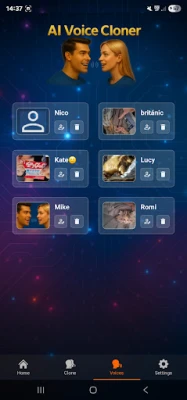
You can save voices to use later, either as Reference (tone extracted) or as Source Audio (tone applied).
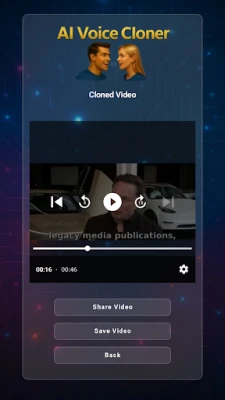
Once the cloned / translated video or audio is generated, you can share it in any app like Messenger, WhatsApp, etc.
How to use:
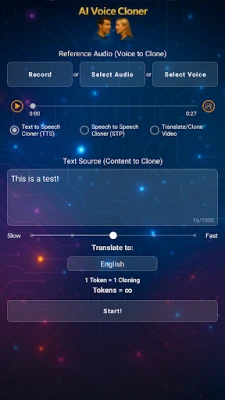
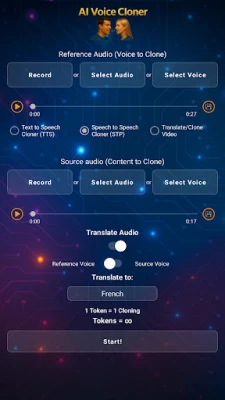
The Reference Audio is the audio from which the voice will be cloned. It must last at least 10 seconds and up to 2 minutes. If longer, the app will use the first 2 minutes.
The Source Audio is the audio to which the cloned voice tone will be applied.
The first mode is Text-to-Speech with optional cloning and translation. The second is Voice-to-Voice with cloning, and Voice Translation with optional cloning. The third is video dubbing mode: you can upload a video up to 2 minutes and it will be dubbed in the language you choose. You can now translate the audio of your videos, with voice cloning from the video or from Reference Audio.
Record, select an audio, choose a previously saved voice or share a voice audio from another app like WhatsApp, then select AI Voice Cloner and choose whether to use it for Reference or Source.
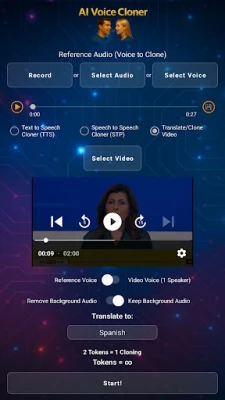
If for video dubbing to another language you can share videos from apps like WhatsApp or upload a video in Video mode; you can use a Reference Voice to clone or use the same voice from the video.
When you have a selected audio in Reference or Source, you can save the voice to reuse later in Reference or Source. (To save a voice as Source, it must last at least 10 seconds.) If you upload a video of more than 10 seconds you can enable the “Voice of Video” switch and it will load it as Reference Audio; once loaded, you can save the video’s voice to reuse in later clonings.
If you select Text-to-Speech mode, with Reference Audio loaded, enter text, choose target language, translate the text, and press Start to get a Text-to-Speech audio in the reference voice and translated to the selected language.
If you select Voice-to-Voice mode, once you have both audios selected, press Generate Cloned Audio. Or you can enable the “Translate” switch, pick a language, and it will generate translated audio from the Source Audio; if you enable “Voice of Source Audio” switch it’s not necessary to load Reference Audio because it will use the same Source Audio voice.
If you select Video mode, choose a video and you can enable the “Voice of Video” switch; it will use as Reference Voice the video’s voice (voice should be clear and without much background noise, and a single speaker in the video for best results), or you can disable the switch and upload your own Reference Voice. Then choose whether you want the translated video to retain the original background audio or remove it entirely and leave only the dubbing. Select the language to which you want to translate the video and press Start. You will get the dubbing of the video in that language.
Use responsibly; this is an entertainment app. We are not responsible for misuse. Do not use voices without prior consent.
Once the cloned / translated video or audio is generated, you can share it in any app like Messenger, WhatsApp, etc.
How to use:
The Reference Audio is the audio from which the voice will be cloned. It must last at least 10 seconds and up to 2 minutes. If longer, the app will use the first 2 minutes.
The Source Audio is the audio to which the cloned voice tone will be applied.
The first mode is Text-to-Speech with optional cloning and translation. The second is Voice-to-Voice with cloning, and Voice Translation with optional cloning. The third is video dubbing mode: you can upload a video up to 2 minutes and it will be dubbed in the language you choose. You can now translate the audio of your videos, with voice cloning from the video or from Reference Audio.
Record, select an audio, choose a previously saved voice or share a voice audio from another app like WhatsApp, then select AI Voice Cloner and choose whether to use it for Reference or Source.
If for video dubbing to another language you can share videos from apps like WhatsApp or upload a video in Video mode; you can use a Reference Voice to clone or use the same voice from the video.
When you have a selected audio in Reference or Source, you can save the voice to reuse later in Reference or Source. (To save a voice as Source, it must last at least 10 seconds.) If you upload a video of more than 10 seconds you can enable the “Voice of Video” switch and it will load it as Reference Audio; once loaded, you can save the video’s voice to reuse in later clonings.
If you select Text-to-Speech mode, with Reference Audio loaded, enter text, choose target language, translate the text, and press Start to get a Text-to-Speech audio in the reference voice and translated to the selected language.
If you select Voice-to-Voice mode, once you have both audios selected, press Generate Cloned Audio. Or you can enable the “Translate” switch, pick a language, and it will generate translated audio from the Source Audio; if you enable “Voice of Source Audio” switch it’s not necessary to load Reference Audio because it will use the same Source Audio voice.
If you select Video mode, choose a video and you can enable the “Voice of Video” switch; it will use as Reference Voice the video’s voice (voice should be clear and without much background noise, and a single speaker in the video for best results), or you can disable the switch and upload your own Reference Voice. Then choose whether you want the translated video to retain the original background audio or remove it entirely and leave only the dubbing. Select the language to which you want to translate the video and press Start. You will get the dubbing of the video in that language.
Use responsibly; this is an entertainment app. We are not responsible for misuse. Do not use voices without prior consent.
Rate the App
Add Comment & Review
User Reviews
Based on 0 reviews
No reviews added yet.
Comments will not be approved to be posted if they are SPAM, abusive, off-topic, use profanity, contain a personal attack, or promote hate of any kind.















More »

Popular Apps

phpFoxPHPFOX LLC

Moon Chai StoryOlha Dobel

World War Heroes — WW2 PvP FPSAzur Interactive Games Limited

Govee LiteGovee

Viking Clan: RagnarokKano Games

Build World AdventureExplore city in cube world

Vikings: War of ClansPlarium LLC

AvSeaAvionics Electronics Geeks!

Asphalt 9: LegendsGameloft SE

Dawn of Zombies: Survival GameRoyal Ark
More »
Editor's Choice

Grim Soul: Dark Survival RPGBrickworks Games Ltd

Craft of Survival - Gladiators101XP LIMITED

Last Shelter: SurvivalLong Tech Network Limited
Dawn of Zombies: Survival GameRoyal Ark

Merge Survival : WastelandStickyHands Inc.

AoD Vikings: Valhalla GameRoboBot Studio
Viking Clan: RagnarokKano Games
Vikings: War of ClansPlarium LLC
Asphalt 9: LegendsGameloft SE

Modern Tanks: War Tank GamesXDEVS LTD