

Latest Version
Update
October 03, 2026
October 03, 2026
Developer
Parismita Global Solutions
Parismita Global Solutions
Categories
Tools
Tools
Platforms
Android
Android
Downloads
0
0
License
Free
Free
Package Name
com.parismitaglobalsolutions.aisubtitlegenerator
com.parismitaglobalsolutions.aisubtitlegenerator
Report
Report a Problem
Report a Problem
More About AI Subtitles & Captions Maker
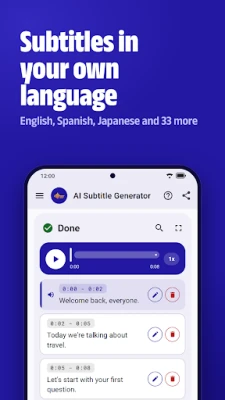
Typing subtitles by hand takes hours. AI Subtitle Generator is an auto caption and subtitle maker that turns the speech in your videos and recordings into text, in English, Spanish, Japanese and 33 more languages, right on your phone. Your files are never uploaded, and once a language is downloaded, you don't need internet.
No ads. No subscription. No sign-up.
How it works
1. Pick an audio or video file
2. Choose the language spoken in it
3. Check the captions, fix any line, and save
Why add subtitles and captions?
• Many people watch videos with the sound off
• Captions help viewers who are deaf or hard of hearing
• Viewers who can follow along are more likely to keep watching
Made for
• YouTubers, vloggers and content creators
• Journalists and interviewers
• Teachers, students and online classes
• Podcasters
• Meetings, talks and voice notes you want as text
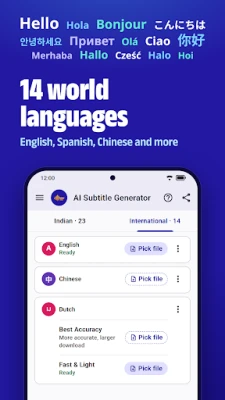
14 world languages
• English, Chinese, Dutch, French, German, Indonesian, Italian, Japanese, Korean, Polish, Portuguese, Russian, Spanish and Turkish
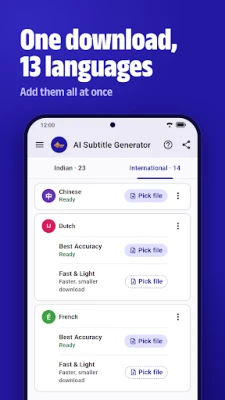
• One Best Accuracy download adds 13 world languages at once, so there's no downloading them one by one
Plus 22 Indian languages and Hinglish
• All 22 official Indian languages, captioned in their own scripts: Assamese, Bengali, Bodo, Dogri, Gujarati, Hindi, Kannada, Kashmiri, Konkani, Maithili, Malayalam, Manipuri, Marathi, Nepali, Odia, Punjabi, Sanskrit, Santali, Sindhi, Tamil, Telugu and Urdu
• Hinglish, for when people mix Hindi and English
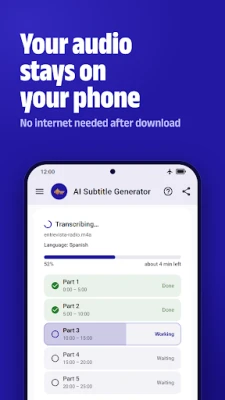
Your audio stays on your phone
Subtitles are made on your device. Your audio, video and transcripts are never uploaded, so your recordings stay yours.
No internet needed after download
Each language downloads once, which needs an internet connection. After that, you can make subtitles anywhere, even without a signal.
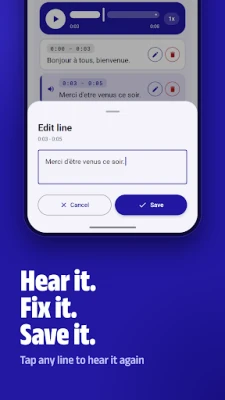
Hear it. Fix it. Save it.
• Tap any line to hear that moment again
• Fix a word or delete a line, with undo
• Search the transcript to find any word
• Slow playback down or speed it up, from 0.75× to 2×
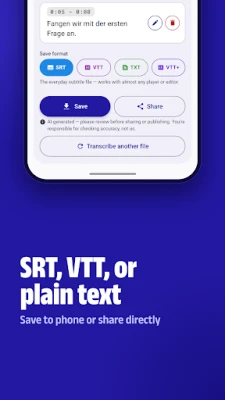
Real subtitle files: SRT, VTT or plain text
• SRT, the everyday subtitle file that most video editors and players accept
• WebVTT, for web video players
• WebVTT with word timing, for players that highlight each word
• Plain text transcript, when you just need the words
Save to your phone, share straight from the app, and find every past transcript in your history.
To show captions on your video, add the SRT file in your video editor, or upload it together with your video as its caption file.
Made for real recordings
Long recordings are split into parts automatically, so you can follow the progress. Many languages give you two choices: Best Accuracy, or Fast & Light for a smaller download and quicker results.
Light or dark
Pick light or dark, or let the app follow your phone.
Good to know
Subtitles are made by AI and can have mistakes, especially with background music, noise or people talking over each other. Give them a quick check before you publish.
Made by Parismita Global Solutions. Full details in our Privacy Policy.
Questions or feedback: [email protected]
How it works
1. Pick an audio or video file
2. Choose the language spoken in it
3. Check the captions, fix any line, and save
Why add subtitles and captions?
• Many people watch videos with the sound off
• Captions help viewers who are deaf or hard of hearing
• Viewers who can follow along are more likely to keep watching
Made for
• YouTubers, vloggers and content creators
• Journalists and interviewers
• Teachers, students and online classes
• Podcasters
• Meetings, talks and voice notes you want as text
14 world languages
• English, Chinese, Dutch, French, German, Indonesian, Italian, Japanese, Korean, Polish, Portuguese, Russian, Spanish and Turkish
• One Best Accuracy download adds 13 world languages at once, so there's no downloading them one by one
Plus 22 Indian languages and Hinglish
• All 22 official Indian languages, captioned in their own scripts: Assamese, Bengali, Bodo, Dogri, Gujarati, Hindi, Kannada, Kashmiri, Konkani, Maithili, Malayalam, Manipuri, Marathi, Nepali, Odia, Punjabi, Sanskrit, Santali, Sindhi, Tamil, Telugu and Urdu
• Hinglish, for when people mix Hindi and English
Your audio stays on your phone
Subtitles are made on your device. Your audio, video and transcripts are never uploaded, so your recordings stay yours.
No internet needed after download
Each language downloads once, which needs an internet connection. After that, you can make subtitles anywhere, even without a signal.
Hear it. Fix it. Save it.
• Tap any line to hear that moment again
• Fix a word or delete a line, with undo
• Search the transcript to find any word
• Slow playback down or speed it up, from 0.75× to 2×
Real subtitle files: SRT, VTT or plain text
• SRT, the everyday subtitle file that most video editors and players accept
• WebVTT, for web video players
• WebVTT with word timing, for players that highlight each word
• Plain text transcript, when you just need the words
Save to your phone, share straight from the app, and find every past transcript in your history.
To show captions on your video, add the SRT file in your video editor, or upload it together with your video as its caption file.
Made for real recordings
Long recordings are split into parts automatically, so you can follow the progress. Many languages give you two choices: Best Accuracy, or Fast & Light for a smaller download and quicker results.
Light or dark
Pick light or dark, or let the app follow your phone.
Good to know
Subtitles are made by AI and can have mistakes, especially with background music, noise or people talking over each other. Give them a quick check before you publish.
Made by Parismita Global Solutions. Full details in our Privacy Policy.
Questions or feedback: [email protected]
Rate the App
Add Comment & Review
User Reviews
Based on 0 reviews
No reviews added yet.
Comments will not be approved to be posted if they are SPAM, abusive, off-topic, use profanity, contain a personal attack, or promote hate of any kind.















More »

Popular Apps

phpFoxPHPFOX LLC

Moon Chai StoryOlha Dobel

World War Heroes — WW2 PvP FPSAzur Interactive Games Limited

Govee LiteGovee

Viking Clan: RagnarokKano Games

Build World AdventureExplore city in cube world

Vikings: War of ClansPlarium LLC

AvSeaAvionics Electronics Geeks!

Asphalt 9: LegendsGameloft SE

Dawn of Zombies: Survival GameRoyal Ark
More »
Editor's Choice

Grim Soul: Dark Survival RPGBrickworks Games Ltd

Craft of Survival - Gladiators101XP LIMITED

Last Shelter: SurvivalLong Tech Network Limited
Dawn of Zombies: Survival GameRoyal Ark

Merge Survival : WastelandStickyHands Inc.

AoD Vikings: Valhalla GameRoboBot Studio
Viking Clan: RagnarokKano Games
Vikings: War of ClansPlarium LLC
Asphalt 9: LegendsGameloft SE

Modern Tanks: War Tank GamesXDEVS LTD