

Latest Version
Update
January 22, 2026
January 22, 2026
Developer
yckeng
yckeng
Categories
Productivity
Productivity
Platforms
Android
Android
Downloads
0
0
License
Free
Free
Package Name
com.kengblog.aikeyboard
com.kengblog.aikeyboard
Report
Report a Problem
Report a Problem
More About AI Keyboard
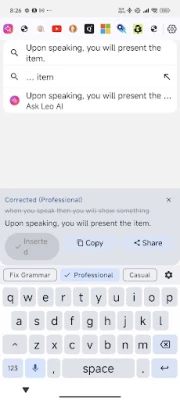
AI Keyboard is a privacy‑minded keyboard with built‑in voice dictation and AI-powered text polishing. Speak naturally to type faster, then use AI to fix grammar, rewrite professionally, make messages more casual, or shorten text—right from the keyboard.
Key features
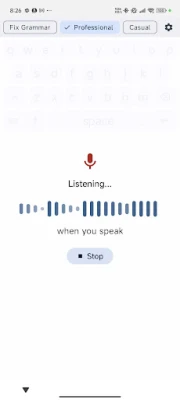
Voice Dictation: Tap the microphone and dictate in real time.
AI Text Improvement: Instantly correct grammar/spelling and improve clarity.
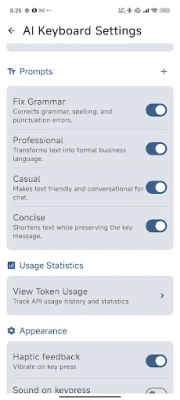
Rewrite Modes: Switch between writing styles like Fix Grammar, Professional, Casual, and Concise.
Preview & Control: Review AI suggestions before inserting, then Insert, Copy, or Share the result.
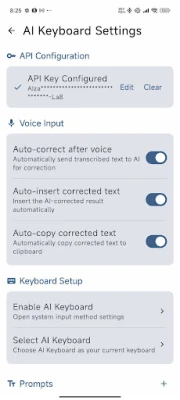
Customization: Choose your preferred prompt/style and adjust behavior in Settings (auto-correct after voice, auto-insert, auto-copy, haptics, sounds).
Simple Setup: Guided steps to enable and select the keyboard on Android.
How it works
Enable AI Keyboard in your device’s keyboard settings
Select AI Keyboard as your current input method
Tap the mic to dictate, and apply AI to refine the text
Important notes
AI features require an internet connection and a configured Gemini API key (only Gemini for ver1.0).
You stay in control: you can use the keyboard normally without AI, and you can turn features on/off in Settings.
Voice Dictation: Tap the microphone and dictate in real time.
AI Text Improvement: Instantly correct grammar/spelling and improve clarity.
Rewrite Modes: Switch between writing styles like Fix Grammar, Professional, Casual, and Concise.
Preview & Control: Review AI suggestions before inserting, then Insert, Copy, or Share the result.
Customization: Choose your preferred prompt/style and adjust behavior in Settings (auto-correct after voice, auto-insert, auto-copy, haptics, sounds).
Simple Setup: Guided steps to enable and select the keyboard on Android.
How it works
Enable AI Keyboard in your device’s keyboard settings
Select AI Keyboard as your current input method
Tap the mic to dictate, and apply AI to refine the text
Important notes
AI features require an internet connection and a configured Gemini API key (only Gemini for ver1.0).
You stay in control: you can use the keyboard normally without AI, and you can turn features on/off in Settings.
Rate the App
Add Comment & Review
User Reviews
Based on 0 reviews
No reviews added yet.
Comments will not be approved to be posted if they are SPAM, abusive, off-topic, use profanity, contain a personal attack, or promote hate of any kind.















More »

Popular Apps

phpFoxPHPFOX LLC

Moon Chai StoryOlha Dobel

World War Heroes — WW2 PvP FPSAzur Interactive Games Limited

Govee LiteGovee

Viking Clan: RagnarokKano Games

Build World AdventureExplore city in cube world

Vikings: War of ClansPlarium LLC

AvSeaAvionics Electronics Geeks!

Asphalt 9: LegendsGameloft SE

Dawn of Zombies: Survival GameRoyal Ark
More »
Editor's Choice

Grim Soul: Dark Survival RPGBrickworks Games Ltd

Craft of Survival - Gladiators101XP LIMITED

Last Shelter: SurvivalLong Tech Network Limited
Dawn of Zombies: Survival GameRoyal Ark

Merge Survival : WastelandStickyHands Inc.

AoD Vikings: Valhalla GameRoboBot Studio
Viking Clan: RagnarokKano Games
Vikings: War of ClansPlarium LLC
Asphalt 9: LegendsGameloft SE

Modern Tanks: War Tank GamesXDEVS LTD