

Latest Version
Update
June 04, 2026
June 04, 2026
Developer
IDCT Bartosz Pachołek
IDCT Bartosz Pachołek
Categories
Productivity
Productivity
Platforms
Android
Android
Downloads
0
0
License
Free
Free
Package Name
tech.idct.wingman
tech.idct.wingman
Report
Report a Problem
Report a Problem
More About Wingman AI
**Wingman — AI Chat for Power Users**
Take full control of your AI conversations. Wingman is a free, open-source chat app that connects directly to the world's best AI models using your own API keys — no subscriptions, no lock-in, no data sent anywhere except straight to the AI provider of your choice.
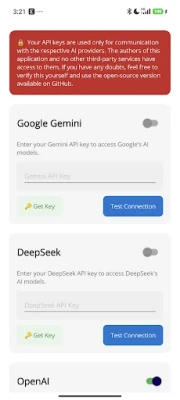
**🔌 Four AI Providers in One App**
Connect to Google Gemini, OpenAI (ChatGPT & DALL-E), Anthropic Claude, and DeepSeek from a single, unified interface. Switch between models mid-conversation and pick the right tool for every task.
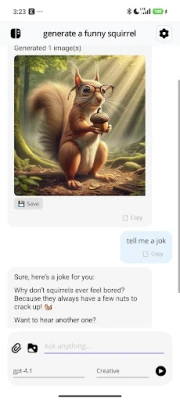
**🖼️ Multimodal — Not Just Text**
Attach images, PDFs, and documents to your messages. Generate images with DALL-E directly in the chat. Save generated images to your device with one tap.
**🌊 Real-Time Streaming**
Watch responses stream in token by token — just like the official apps — with a stop button to interrupt at any time.
**🌡️ Temperature Presets**
One tap to switch between six AI creativity levels: Coding, Strict, Analysis, Conversation, Translation, and Creative.
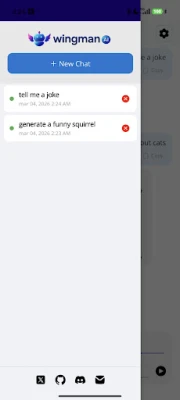
**💬 Full Chat History**
All your conversations are saved locally on your device. Browse, resume, or delete sessions from the sidebar. Crash-safe — your history survives even if the app closes unexpectedly mid-response.
**🎨 Beautiful, Adaptive UI**
A clean, modern interface that follows your system's dark or light theme. Markdown rendering with syntax-highlighted code blocks in assistant replies.
**🔒 Privacy First**
Your API keys never leave your device except to talk directly to the AI provider. No analytics, no tracking, no Wingman servers. The full source code is available on GitHub.
**✅ Free & Open Source**
Wingman is completely free — no ads, no in-app purchases, no premium tier. Built with .NET MAUI and published under the BSD 3-Clause License.
---
**What you need:**
An API key from at least one supported provider (Google AI Studio, OpenAI, Anthropic, or DeepSeek). All providers offer free tiers or pay-as-you-go pricing — you only pay for what you use.
---
**Known Limitations:**
- File attachments from earlier in a conversation are not re-sent to the AI in follow-up messages (current message only)
- Voice input UI is not available in this release
- iOS not supported yet
**🔌 Four AI Providers in One App**
Connect to Google Gemini, OpenAI (ChatGPT & DALL-E), Anthropic Claude, and DeepSeek from a single, unified interface. Switch between models mid-conversation and pick the right tool for every task.
**🖼️ Multimodal — Not Just Text**
Attach images, PDFs, and documents to your messages. Generate images with DALL-E directly in the chat. Save generated images to your device with one tap.
**🌊 Real-Time Streaming**
Watch responses stream in token by token — just like the official apps — with a stop button to interrupt at any time.
**🌡️ Temperature Presets**
One tap to switch between six AI creativity levels: Coding, Strict, Analysis, Conversation, Translation, and Creative.
**💬 Full Chat History**
All your conversations are saved locally on your device. Browse, resume, or delete sessions from the sidebar. Crash-safe — your history survives even if the app closes unexpectedly mid-response.
**🎨 Beautiful, Adaptive UI**
A clean, modern interface that follows your system's dark or light theme. Markdown rendering with syntax-highlighted code blocks in assistant replies.
**🔒 Privacy First**
Your API keys never leave your device except to talk directly to the AI provider. No analytics, no tracking, no Wingman servers. The full source code is available on GitHub.
**✅ Free & Open Source**
Wingman is completely free — no ads, no in-app purchases, no premium tier. Built with .NET MAUI and published under the BSD 3-Clause License.
---
**What you need:**
An API key from at least one supported provider (Google AI Studio, OpenAI, Anthropic, or DeepSeek). All providers offer free tiers or pay-as-you-go pricing — you only pay for what you use.
---
**Known Limitations:**
- File attachments from earlier in a conversation are not re-sent to the AI in follow-up messages (current message only)
- Voice input UI is not available in this release
- iOS not supported yet
Rate the App
Add Comment & Review
User Reviews
Based on 0 reviews
No reviews added yet.
Comments will not be approved to be posted if they are SPAM, abusive, off-topic, use profanity, contain a personal attack, or promote hate of any kind.









More »

Popular Apps

phpFoxPHPFOX LLC

Moon Chai StoryOlha Dobel

World War Heroes — WW2 PvP FPSAzur Interactive Games Limited

Govee LiteGovee

Build World AdventureExplore city in cube world

Viking Clan: RagnarokKano Games

Vikings: War of ClansPlarium LLC

Submarine Car Diving SimulatorSwim with dolphins & penguins

Asphalt 9: LegendsGameloft SE

Dawn of Zombies: Survival GameRoyal Ark
More »
Editor's Choice

Grim Soul: Dark Survival RPGBrickworks Games Ltd

Craft of Survival - Gladiators101XP LIMITED

Last Shelter: SurvivalLong Tech Network Limited
Dawn of Zombies: Survival GameRoyal Ark

Merge Survival : WastelandStickyHands Inc.

AoD Vikings: Valhalla GameRoboBot Studio
Viking Clan: RagnarokKano Games
Vikings: War of ClansPlarium LLC
Asphalt 9: LegendsGameloft SE

Modern Tanks: War Tank GamesXDEVS LTD