
Latest Version
Update
August 19, 2026
August 19, 2026
Developer
ITK Studio
ITK Studio
Categories
Productivity
Productivity
Platforms
Android
Android
Downloads
0
0
License
Free
Free
Package Name
com.texttospeech.tts.aivoice
com.texttospeech.tts.aivoice
Report
Report a Problem
Report a Problem
More About Text to Speech TTS: AI Voice
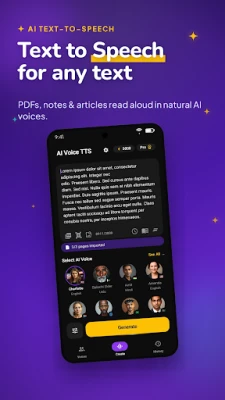
Text to Speech TTS: AI Voice turns text, PDFs, notes and articles into clear, natural AI voice audio in seconds. Paste text, import a PDF, scan a page with your camera, or open saved content and listen instead of reading.
How it works:
1. Paste text, import a PDF, scan a page or image, or open your notes
2. Choose a voice and set the speed that suits you
3. Press play to listen, or export it as an MP3
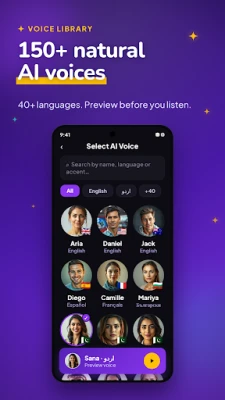
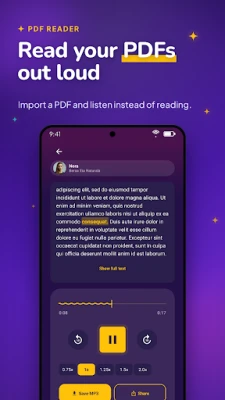
Use text to speech when you would rather listen than read. Read aloud PDF files, study notes, web articles, ebooks, stories, scripts, emails and daily reading while commuting, walking, studying, working out or resting your eyes. This TTS reader lets you read PDF aloud, choose from 150+ AI voices in 40+ languages, preview your audio, adjust speed and pitch, and continue right where you left off from your history.
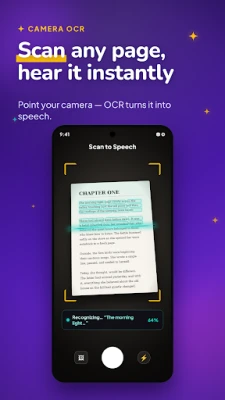
Scan and listen. Point your camera at a page, book, document or note and the built-in OCR scanner turns it into text instantly, then reads it aloud in a clear AI voice.
A faster way to get through reading. Listening to text can be quicker than reading it, so you cover more articles, documents and study material in less time. Many people also use a text to speech reader to proofread their own writing by ear, catching mistakes they would skim past on screen.
An easier way to take in text. If reading on screen feels tiring or hard to focus on, listening can be a simpler way to get through it. Hearing content read aloud in a clear, natural AI voice helps you follow along comfortably and stay focused, whether you're resting your eyes or just prefer audio over reading.
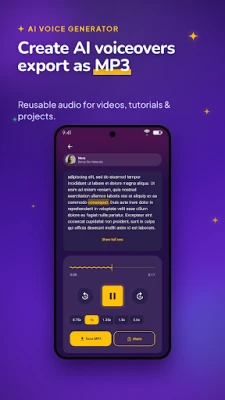
Create AI voice audio you can reuse. The AI voice generator makes voiceover for short videos, tutorials, faceless videos, training content, language practice and personal projects. Export MP3 voiceover whenever you need reusable audio.
Listen anywhere. Background playback keeps the reader going while you use other apps or lock your screen, and you can save, copy and share any result to come back to later.
Main features:
- Text to speech reader for any text
- TTS reader for PDFs, notes and articles
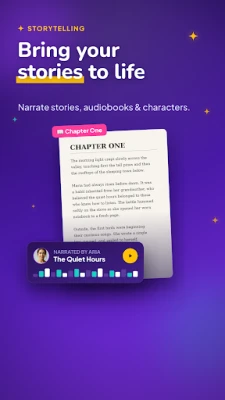
- Read PDF aloud, plus notes, articles and ebooks
- Scan to speech: camera OCR for pages, books and documents
- Image to text from gallery and files
- AI voice generator with MP3 voiceover export
- 150+ natural AI voices across 40+ languages
- Adjustable playback speed, pitch and volume
- Background playback while you use other apps
- Save, copy and share your audio
- History for text and audio
Text to Speech TTS: AI Voice is built for students, creators, commuters, language learners, and anyone who would rather listen than read. Turn text, PDFs, notes and articles into audio, create AI voiceover from written content, and save your results for later.
Upgrade to Pro for premium AI voices, longer text to speech generation, unlimited MP3 export, background playback and an ad-free experience.
1. Paste text, import a PDF, scan a page or image, or open your notes
2. Choose a voice and set the speed that suits you
3. Press play to listen, or export it as an MP3
Use text to speech when you would rather listen than read. Read aloud PDF files, study notes, web articles, ebooks, stories, scripts, emails and daily reading while commuting, walking, studying, working out or resting your eyes. This TTS reader lets you read PDF aloud, choose from 150+ AI voices in 40+ languages, preview your audio, adjust speed and pitch, and continue right where you left off from your history.
Scan and listen. Point your camera at a page, book, document or note and the built-in OCR scanner turns it into text instantly, then reads it aloud in a clear AI voice.
A faster way to get through reading. Listening to text can be quicker than reading it, so you cover more articles, documents and study material in less time. Many people also use a text to speech reader to proofread their own writing by ear, catching mistakes they would skim past on screen.
An easier way to take in text. If reading on screen feels tiring or hard to focus on, listening can be a simpler way to get through it. Hearing content read aloud in a clear, natural AI voice helps you follow along comfortably and stay focused, whether you're resting your eyes or just prefer audio over reading.
Create AI voice audio you can reuse. The AI voice generator makes voiceover for short videos, tutorials, faceless videos, training content, language practice and personal projects. Export MP3 voiceover whenever you need reusable audio.
Listen anywhere. Background playback keeps the reader going while you use other apps or lock your screen, and you can save, copy and share any result to come back to later.
Main features:
- Text to speech reader for any text
- TTS reader for PDFs, notes and articles
- Read PDF aloud, plus notes, articles and ebooks
- Scan to speech: camera OCR for pages, books and documents
- Image to text from gallery and files
- AI voice generator with MP3 voiceover export
- 150+ natural AI voices across 40+ languages
- Adjustable playback speed, pitch and volume
- Background playback while you use other apps
- Save, copy and share your audio
- History for text and audio
Text to Speech TTS: AI Voice is built for students, creators, commuters, language learners, and anyone who would rather listen than read. Turn text, PDFs, notes and articles into audio, create AI voiceover from written content, and save your results for later.
Upgrade to Pro for premium AI voices, longer text to speech generation, unlimited MP3 export, background playback and an ad-free experience.
Rate the App
Add Comment & Review
User Reviews
Based on 0 reviews
No reviews added yet.
Comments will not be approved to be posted if they are SPAM, abusive, off-topic, use profanity, contain a personal attack, or promote hate of any kind.





More »

Popular Apps

phpFoxPHPFOX LLC

Moon Chai StoryOlha Dobel

World War Heroes — WW2 PvP FPSAzur Interactive Games Limited

Govee LiteGovee

Build World AdventureExplore city in cube world

Viking Clan: RagnarokKano Games

Vikings: War of ClansPlarium LLC

Asphalt 9: LegendsGameloft SE

Submarine Car Diving SimulatorSwim with dolphins & penguins

Dawn of Zombies: Survival GameRoyal Ark
More »
Editor's Choice

Grim Soul: Dark Survival RPGBrickworks Games Ltd

Craft of Survival - Gladiators101XP LIMITED

Last Shelter: SurvivalLong Tech Network Limited
Dawn of Zombies: Survival GameRoyal Ark

Merge Survival : WastelandStickyHands Inc.

AoD Vikings: Valhalla GameRoboBot Studio
Viking Clan: RagnarokKano Games
Vikings: War of ClansPlarium LLC
Asphalt 9: LegendsGameloft SE

Modern Tanks: War Tank GamesXDEVS LTD