

Latest Version
Update
October 16, 2026
October 16, 2026
Developer
Kernel & Co.
Kernel & Co.
Categories
Productivity
Productivity
Platforms
Android
Android
Downloads
0
0
License
$20.99
$20.99
Package Name
studio.synqed
studio.synqed
Report
Report a Problem
Report a Problem
More About Synqed – SMS & Calls on Mac
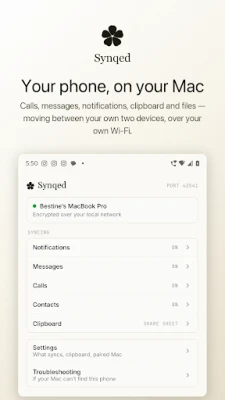
Synqed puts your Android phone on your Mac. Answer calls, read and reply to
texts, see your notifications, share your clipboard and move files — without
picking up your phone.
REQUIRES A MAC
Synqed is two apps: this one, and a free companion for macOS 14 or later.
Download the Mac app at https://synqed.studio. Without it, this app has nothing
to talk to.
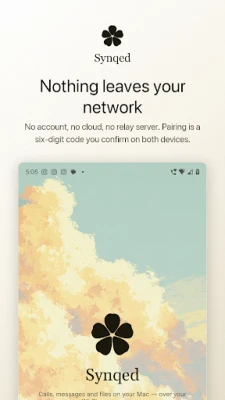
NOTHING GOES TO A SERVER
Your phone and your Mac talk directly over your own Wi-Fi. There is no account
to create, no cloud to sync through and no relay server in the middle. Pairing
is a six-digit code you confirm on both devices, and everything after it is
encrypted end to end.
WHAT IT DOES
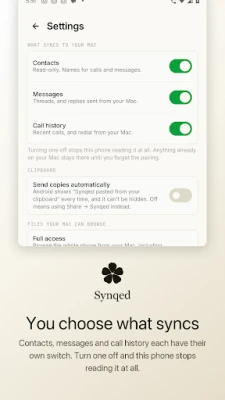
• Messages — read your SMS threads on the Mac and reply from the keyboard
you're already using. New texts arrive as they land.
• Calls — see who's calling on your Mac and answer, decline or mute from there.
Your call log syncs, and you can redial from it.
• Notifications — your phone's notifications appear in macOS Notification
Center, with real app icons and working action buttons. Mute apps you don't
want, individually or by profile.
• Clipboard — copy on the Mac and it's waiting on your phone, text or image.
Phone to Mac, share to Synqed — or turn on automatic capture, which uses
Android's Accessibility service (see below) and shows Android's paste
notice every time.
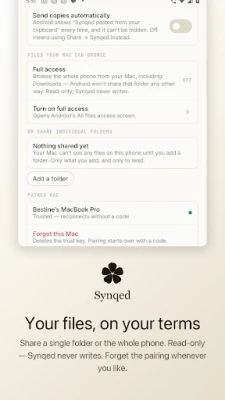
• Files — drag a file onto the Mac app to send it to your phone, or browse your
phone's files from the Mac and pull what you need. Transfers resume after a
dropped connection.
• Contacts — see names instead of numbers.
ACCESSIBILITY SERVICE (OPTIONAL, OFF BY DEFAULT)
Automatic clipboard capture uses Android's Accessibility API for one thing
only: noticing the moment you copy something, so it can be sent to your Mac
without an extra tap. It reads nothing else on your screen, stores nothing,
and sends nothing anywhere except to the Mac you've paired with. You're asked
to confirm this explicitly before it's turned on, and you can turn it off
again anytime in Settings. Without it, clipboard sync still works — just via
Share → Synqed instead of automatically.
BUILT TO STAY CONNECTED
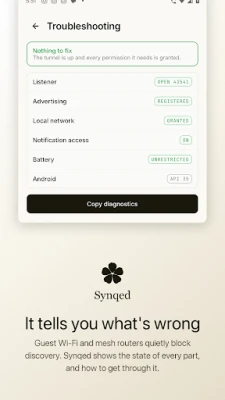
Synqed finds your Mac over the local network and reconnects on its own after
sleep, a network change or a dropped link. If your network blocks discovery —
guest Wi-Fi and mesh systems often do — it falls back to a direct address, and
you can enter one by hand.
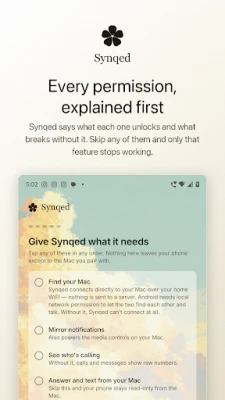
ABOUT PERMISSIONS
Synqed asks for a lot, because mirroring a phone means reading the things you
want mirrored. Every permission is optional except local network access, and
each one is explained in the app before it's requested. Skip any of them and
only that feature stops working. Nothing is collected, and nothing is sent
anywhere except the Mac you paired with.
Privacy policy: https://synqed.studio/privacy
picking up your phone.
REQUIRES A MAC
Synqed is two apps: this one, and a free companion for macOS 14 or later.
Download the Mac app at https://synqed.studio. Without it, this app has nothing
to talk to.
NOTHING GOES TO A SERVER
Your phone and your Mac talk directly over your own Wi-Fi. There is no account
to create, no cloud to sync through and no relay server in the middle. Pairing
is a six-digit code you confirm on both devices, and everything after it is
encrypted end to end.
WHAT IT DOES
• Messages — read your SMS threads on the Mac and reply from the keyboard
you're already using. New texts arrive as they land.
• Calls — see who's calling on your Mac and answer, decline or mute from there.
Your call log syncs, and you can redial from it.
• Notifications — your phone's notifications appear in macOS Notification
Center, with real app icons and working action buttons. Mute apps you don't
want, individually or by profile.
• Clipboard — copy on the Mac and it's waiting on your phone, text or image.
Phone to Mac, share to Synqed — or turn on automatic capture, which uses
Android's Accessibility service (see below) and shows Android's paste
notice every time.
• Files — drag a file onto the Mac app to send it to your phone, or browse your
phone's files from the Mac and pull what you need. Transfers resume after a
dropped connection.
• Contacts — see names instead of numbers.
ACCESSIBILITY SERVICE (OPTIONAL, OFF BY DEFAULT)
Automatic clipboard capture uses Android's Accessibility API for one thing
only: noticing the moment you copy something, so it can be sent to your Mac
without an extra tap. It reads nothing else on your screen, stores nothing,
and sends nothing anywhere except to the Mac you've paired with. You're asked
to confirm this explicitly before it's turned on, and you can turn it off
again anytime in Settings. Without it, clipboard sync still works — just via
Share → Synqed instead of automatically.
BUILT TO STAY CONNECTED
Synqed finds your Mac over the local network and reconnects on its own after
sleep, a network change or a dropped link. If your network blocks discovery —
guest Wi-Fi and mesh systems often do — it falls back to a direct address, and
you can enter one by hand.
ABOUT PERMISSIONS
Synqed asks for a lot, because mirroring a phone means reading the things you
want mirrored. Every permission is optional except local network access, and
each one is explained in the app before it's requested. Skip any of them and
only that feature stops working. Nothing is collected, and nothing is sent
anywhere except the Mac you paired with.
Privacy policy: https://synqed.studio/privacy
Rate the App
Add Comment & Review
User Reviews
Based on 0 reviews
No reviews added yet.
Comments will not be approved to be posted if they are SPAM, abusive, off-topic, use profanity, contain a personal attack, or promote hate of any kind.











More »

Popular Apps

phpFoxPHPFOX LLC

Moon Chai StoryOlha Dobel

World War Heroes — WW2 PvP FPSAzur Interactive Games Limited

Govee LiteGovee

AvSeaAvionics Electronics Geeks!

Viking Clan: RagnarokKano Games

Build World AdventureExplore city in cube world

Vikings: War of ClansPlarium LLC

Asphalt 9: LegendsGameloft SE

Dawn of Zombies: Survival GameRoyal Ark
More »
Editor's Choice

Grim Soul: Dark Survival RPGBrickworks Games Ltd

Craft of Survival - Gladiators101XP LIMITED

Last Shelter: SurvivalLong Tech Network Limited
Dawn of Zombies: Survival GameRoyal Ark

Merge Survival : WastelandStickyHands Inc.

AoD Vikings: Valhalla GameRoboBot Studio
Viking Clan: RagnarokKano Games
Vikings: War of ClansPlarium LLC
Asphalt 9: LegendsGameloft SE

Modern Tanks: War Tank GamesXDEVS LTD