
Latest Version
Update
September 09, 2026
September 09, 2026
Developer
SimpleCrafts Studio
SimpleCrafts Studio
Categories
Maps & Navigation
Maps & Navigation
Platforms
Android
Android
Downloads
0
0
License
Free
Free
Package Name
app.speedcompass
app.speedcompass
Report
Report a Problem
Report a Problem
More About SpeedCompass: GPS Speedometer
SpeedCompass is an instrument panel for your vehicle – speedometer, compass and tilt display on one screen, plus a trip log that records every journey.
No account and no cloud: your trips stay on the device. The app is free and funded by ads - you decide about personalised ads when you first start it, and you can change that any time in the settings.
INSTRUMENTS
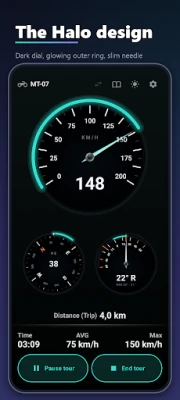
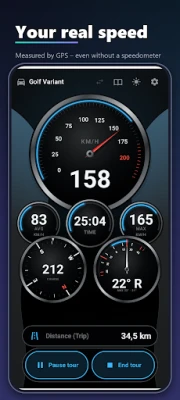
• GPS speedometer – analogue with a needle, digital, or both; tap to switch
• Compass with cardinal points, optional degree marks and a calibration helper
• Tilt display: heel, lean or roll angle – as a needle gauge or an artificial horizon, with maximum values for both sides
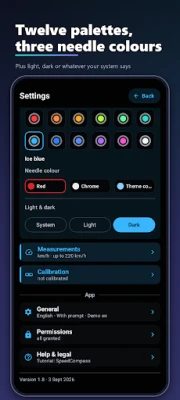
• Four instrument styles (Cockpit, Halo, Cabinet, Solitaire) × twelve colour worlds, free choice of needle colour, light and dark mode
• Portrait and landscape are laid out separately, not merely rotated
• On tablets, speedometer, tilt and compass sit side by side – a full-width instrument panel
TRIP LOG
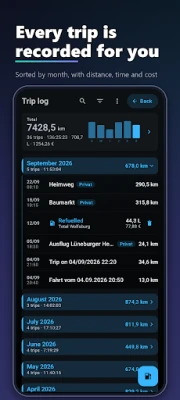
• Every trip with date, duration, distance, average and top speed, and max tilt
• Name your trips, add a note and a category, mark favourites
• Grouped by year, month or week, with search, filters and sorting
• Log refuelling and charging – litres or kWh, price per unit or receipt total
• Export as CSV or PDF, full backup as JSON
STATISTICS
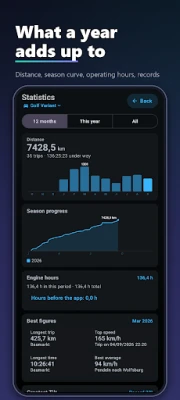
• Distance per month and year, season progress against the previous year
• Records, busiest month, category shares, costs and price trend
• Compare vehicles side by side in one shared unit
MULTIPLE VEHICLES
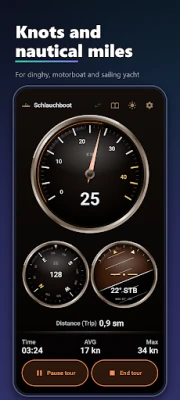
Each vehicle carries its own settings and its own trip log: symbol, unit (km/h, mph or knots), scale range, instrument style and colour world. Fifteen symbols, from yacht to motorcycle, tractor and paraglider.
ON THE ROAD
• Recording continues in the background, even with the screen locked
• Pause freezes time and distance and puts the app to sleep
• Sunlight boost: full brightness and stronger contrast in bright sunlight
• Eleven languages
For boats SpeedCompass is a logbook, for anything on wheels a trip log – the data model is vehicle-neutral and the wording follows the symbol you pick.
Note: speed and distance come from GPS and therefore depend on reception. Compass and tilt use the device sensors; the compass may need calibration (figure-of-eight motion). This app is not a substitute for certified instruments or for navigation.
INSTRUMENTS
• GPS speedometer – analogue with a needle, digital, or both; tap to switch
• Compass with cardinal points, optional degree marks and a calibration helper
• Tilt display: heel, lean or roll angle – as a needle gauge or an artificial horizon, with maximum values for both sides
• Four instrument styles (Cockpit, Halo, Cabinet, Solitaire) × twelve colour worlds, free choice of needle colour, light and dark mode
• Portrait and landscape are laid out separately, not merely rotated
• On tablets, speedometer, tilt and compass sit side by side – a full-width instrument panel
TRIP LOG
• Every trip with date, duration, distance, average and top speed, and max tilt
• Name your trips, add a note and a category, mark favourites
• Grouped by year, month or week, with search, filters and sorting
• Log refuelling and charging – litres or kWh, price per unit or receipt total
• Export as CSV or PDF, full backup as JSON
STATISTICS
• Distance per month and year, season progress against the previous year
• Records, busiest month, category shares, costs and price trend
• Compare vehicles side by side in one shared unit
MULTIPLE VEHICLES
Each vehicle carries its own settings and its own trip log: symbol, unit (km/h, mph or knots), scale range, instrument style and colour world. Fifteen symbols, from yacht to motorcycle, tractor and paraglider.
ON THE ROAD
• Recording continues in the background, even with the screen locked
• Pause freezes time and distance and puts the app to sleep
• Sunlight boost: full brightness and stronger contrast in bright sunlight
• Eleven languages
For boats SpeedCompass is a logbook, for anything on wheels a trip log – the data model is vehicle-neutral and the wording follows the symbol you pick.
Note: speed and distance come from GPS and therefore depend on reception. Compass and tilt use the device sensors; the compass may need calibration (figure-of-eight motion). This app is not a substitute for certified instruments or for navigation.
Rate the App
Add Comment & Review
User Reviews
Based on 0 reviews
No reviews added yet.
Comments will not be approved to be posted if they are SPAM, abusive, off-topic, use profanity, contain a personal attack, or promote hate of any kind.




More »

Popular Apps

phpFoxPHPFOX LLC

Moon Chai StoryOlha Dobel

World War Heroes — WW2 PvP FPSAzur Interactive Games Limited

Govee LiteGovee

Viking Clan: RagnarokKano Games

Build World AdventureExplore city in cube world

Vikings: War of ClansPlarium LLC

Asphalt 9: LegendsGameloft SE

Submarine Car Diving SimulatorSwim with dolphins & penguins

Dawn of Zombies: Survival GameRoyal Ark
More »
Editor's Choice

Grim Soul: Dark Survival RPGBrickworks Games Ltd

Craft of Survival - Gladiators101XP LIMITED

Last Shelter: SurvivalLong Tech Network Limited
Dawn of Zombies: Survival GameRoyal Ark

Merge Survival : WastelandStickyHands Inc.

AoD Vikings: Valhalla GameRoboBot Studio
Viking Clan: RagnarokKano Games
Vikings: War of ClansPlarium LLC
Asphalt 9: LegendsGameloft SE

Modern Tanks: War Tank GamesXDEVS LTD