Latest Version
Update
November 18, 2026
November 18, 2026
Developer
MHPartners
MHPartners
Categories
Personalization
Personalization
Platforms
Android
Android
Downloads
0
0
License
Free
Free
Package Name
net.vertexapps.neonkeyboard
net.vertexapps.neonkeyboard
Report
Report a Problem
Report a Problem
More About Smart LED Keyboard Neon Themes
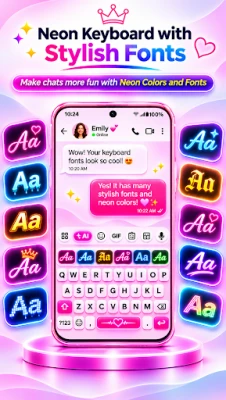
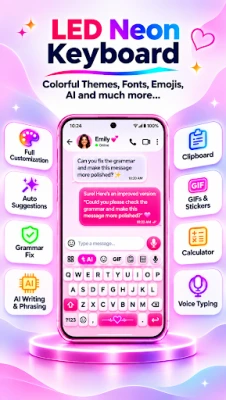
Neon Keyboard is an English keyboard for Android with colourful neon and RGB themes. Choose from ready-made designs with glowing keys, moving lights and animated backgrounds, or create your own theme with your favourite colours and photos. The keyboard also includes smart word suggestions, autocorrect, voice typing, AI writing tools, grammar checking and a built-in calculator to make everyday typing easier.
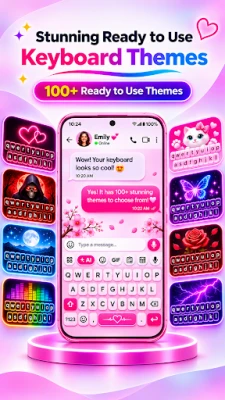
🌈 NEON & RGB KEYBOARD THEMES
Give your phone a fresh look with colorful neon keyboard designs.
✅ Neon red, pink, green, purple and rainbow themes
✅ RGB keyboard themes and glowing LED keys
✅ Gaming, dark, gradient and colorful styles
✅ Static and animated keyboard designs
✅ Preview themes before applying
✅ Save favorites and switch themes easily
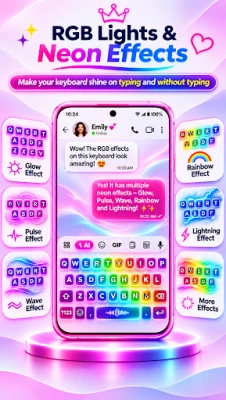
⚡ MOVING RGB LIGHTS & ANIMATED KEYS
Enjoy lighting effects that make your keyboard stand out.
✅ Moving rainbow waves and RGB color flow
✅ Lights moving around key borders
✅ Automatically changing key and border colors
✅ Breathing, pulsing and glowing keys
✅ Adjustable colors, brightness and animation speed
✅ Turn animations off whenever you want
✨ LIVE BACKGROUNDS & TOUCH EFFECTS
Make your keyboard more personal with motion and interactive effects.
✅ Moving lightning and electric effects
✅ Floating particles, sparkles and stars
✅ Animated gradients and colorful waves
✅ Neon ripple and glow effects when typing
✅ Photo backgrounds and custom images
✅ Background brightness and effect controls
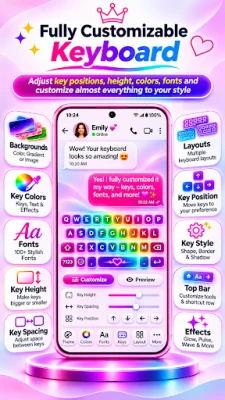
🎨 CREATE YOUR OWN KEYBOARD
Use the theme maker to build a keyboard that matches your style.
✅ Choose solid colors or gradients
✅ Set a photo as your keyboard background
✅ Change key shapes, borders and transparency
✅ Customize letter keys, spacebar and special keys
✅ Mix neon glow, RGB lighting and moving backgrounds
✅ Save your custom keyboard themes
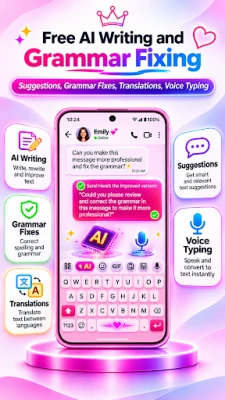
🤖 AI WRITING & GRAMMAR CHECKER
Need help with a message? Use AI writing tools from your keyboard to make your text clearer.
✅ Check English grammar and spelling
✅ Fix sentences and improve wording
✅ Rewrite or paraphrase text
✅ Change writing tone
✅ Shorten or summarize longer text
✅ Get writing help while chatting or working
⌨️ SMART ENGLISH TYPING
Neon Keyboard is more than a colorful keyboard. It also helps you type faster and more comfortably.
✅ English QWERTY keyboard
✅ Smart word suggestions and word completion
✅ Autocorrect and spelling suggestions
✅ Next-word predictions
✅ Voice typing
✅ Adjustable keyboard height and key size
✅ Typing sounds and vibration settings
🧮 BUILT-IN CALCULATOR & USEFUL TOOLS
Do quick calculations without leaving your conversation.
✅ Standard calculator for everyday math
✅ Scientific calculator for advanced calculations
✅ Insert results into messages
✅ Clipboard manager for copied text
✅ Quick access to useful keyboard tools
🔤 FONTS, EMOJIS, GIFS & STICKERS
Personalize messages and social media posts with stylish fonts, fancy text, emojis, GIFs and stickers. Express yourself in chats, captions and bios without switching keyboard apps.
🖤 YOUR KEYBOARD, YOUR STYLE
Prefer a simple black keyboard, glowing red borders, pink neon keys or moving rainbow lights? Find a theme you love, preview it and customize it your way.
HOW TO GET STARTED
1. Open Neon Keyboard.
2. Enable it in Android keyboard settings.
3. Select Neon Keyboard as your input method.
4. Choose a theme and tap Apply.
5. Start typing with your favorite design.
Explore neon LED keyboard themes, RGB animations, custom backgrounds and smart English typing in one app.
Make every tap glow!
Give your phone a fresh look with colorful neon keyboard designs.
✅ Neon red, pink, green, purple and rainbow themes
✅ RGB keyboard themes and glowing LED keys
✅ Gaming, dark, gradient and colorful styles
✅ Static and animated keyboard designs
✅ Preview themes before applying
✅ Save favorites and switch themes easily
⚡ MOVING RGB LIGHTS & ANIMATED KEYS
Enjoy lighting effects that make your keyboard stand out.
✅ Moving rainbow waves and RGB color flow
✅ Lights moving around key borders
✅ Automatically changing key and border colors
✅ Breathing, pulsing and glowing keys
✅ Adjustable colors, brightness and animation speed
✅ Turn animations off whenever you want
✨ LIVE BACKGROUNDS & TOUCH EFFECTS
Make your keyboard more personal with motion and interactive effects.
✅ Moving lightning and electric effects
✅ Floating particles, sparkles and stars
✅ Animated gradients and colorful waves
✅ Neon ripple and glow effects when typing
✅ Photo backgrounds and custom images
✅ Background brightness and effect controls
🎨 CREATE YOUR OWN KEYBOARD
Use the theme maker to build a keyboard that matches your style.
✅ Choose solid colors or gradients
✅ Set a photo as your keyboard background
✅ Change key shapes, borders and transparency
✅ Customize letter keys, spacebar and special keys
✅ Mix neon glow, RGB lighting and moving backgrounds
✅ Save your custom keyboard themes
🤖 AI WRITING & GRAMMAR CHECKER
Need help with a message? Use AI writing tools from your keyboard to make your text clearer.
✅ Check English grammar and spelling
✅ Fix sentences and improve wording
✅ Rewrite or paraphrase text
✅ Change writing tone
✅ Shorten or summarize longer text
✅ Get writing help while chatting or working
⌨️ SMART ENGLISH TYPING
Neon Keyboard is more than a colorful keyboard. It also helps you type faster and more comfortably.
✅ English QWERTY keyboard
✅ Smart word suggestions and word completion
✅ Autocorrect and spelling suggestions
✅ Next-word predictions
✅ Voice typing
✅ Adjustable keyboard height and key size
✅ Typing sounds and vibration settings
🧮 BUILT-IN CALCULATOR & USEFUL TOOLS
Do quick calculations without leaving your conversation.
✅ Standard calculator for everyday math
✅ Scientific calculator for advanced calculations
✅ Insert results into messages
✅ Clipboard manager for copied text
✅ Quick access to useful keyboard tools
🔤 FONTS, EMOJIS, GIFS & STICKERS
Personalize messages and social media posts with stylish fonts, fancy text, emojis, GIFs and stickers. Express yourself in chats, captions and bios without switching keyboard apps.
🖤 YOUR KEYBOARD, YOUR STYLE
Prefer a simple black keyboard, glowing red borders, pink neon keys or moving rainbow lights? Find a theme you love, preview it and customize it your way.
HOW TO GET STARTED
1. Open Neon Keyboard.
2. Enable it in Android keyboard settings.
3. Select Neon Keyboard as your input method.
4. Choose a theme and tap Apply.
5. Start typing with your favorite design.
Explore neon LED keyboard themes, RGB animations, custom backgrounds and smart English typing in one app.
Make every tap glow!
Rate the App
Add Comment & Review
User Reviews
Based on 0 reviews
No reviews added yet.
Comments will not be approved to be posted if they are SPAM, abusive, off-topic, use profanity, contain a personal attack, or promote hate of any kind.




More »

Popular Apps

phpFoxPHPFOX LLC

Moon Chai StoryOlha Dobel

World War Heroes — WW2 PvP FPSAzur Interactive Games Limited

Govee LiteGovee

AvSeaAvionics Electronics Geeks!

Viking Clan: RagnarokKano Games

Vikings: War of ClansPlarium LLC

Build World AdventureExplore city in cube world

Asphalt 9: LegendsGameloft SE

Dawn of Zombies: Survival GameRoyal Ark
More »
Editor's Choice

Grim Soul: Dark Survival RPGBrickworks Games Ltd

Craft of Survival - Gladiators101XP LIMITED

Last Shelter: SurvivalLong Tech Network Limited
Dawn of Zombies: Survival GameRoyal Ark

Merge Survival : WastelandStickyHands Inc.

AoD Vikings: Valhalla GameRoboBot Studio
Viking Clan: RagnarokKano Games
Vikings: War of ClansPlarium LLC
Asphalt 9: LegendsGameloft SE

Modern Tanks: War Tank GamesXDEVS LTD