
Latest Version
Update
September 16, 2026
September 16, 2026
Developer
Happy-verse
Happy-verse
Categories
Tools
Tools
Platforms
Android
Android
Downloads
0
0
License
Free
Free
Package Name
com.happyverse.tvremote
com.happyverse.tvremote
Report
Report a Problem
Report a Problem
More About Remote Control: all TV Remote
TV Remote turns your phone into a powerful remote control for your smart TV. Connect over WiFi in seconds — no setup, no account, no catches. Just a beautiful remote that works.
Unlike other apps that show "Connected" but ignore your commands, TV Remote uses real authentication protocols for every brand. When we say connected, your TV is actually listening.
━━━━━━━━━━━━━━━━━━━━━
📺 WORKS WITH 25+ BRANDS
Samsung Smart TV (2016 and newer)
Mi / Xiaomi TV, Mi Box, Mi TV Stick
OnePlus TV — all models
Realme Smart TV
TCL Smart TV and Google TV
VU Smart TV — all models
Haier Smart TV
Kodak Smart TV
Nokia Smart TV
Motorola Smart TV
Thomson Smart TV
BPL Smart TV
Sansui Smart TV
Panasonic Android TV
Toshiba Android TV
Hisense Smart TV
Any TV running Android TV or Google TV OS
━━━━━━━━━━━━━━━━━━━━━
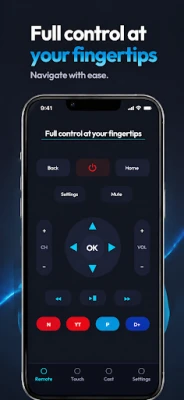
🎮 FULL REMOTE CONTROL
Everything you need when the physical remote is lost, broken, or across the room:
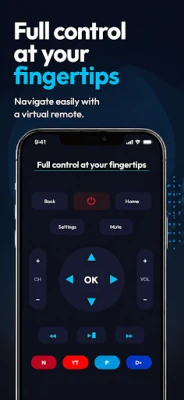
D-Pad navigation with OK button — move through menus smoothly
Back, Home, Menu, and Power buttons
Volume up, volume down, and mute
Channel up and channel down
Touchpad mode — swipe your phone screen to navigate like a laptop trackpad
Works instantly after connecting — no lag, no delay
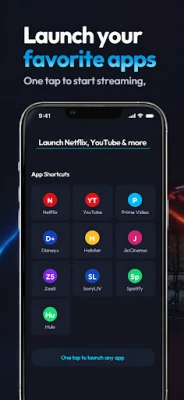
🚀 ONE-TAP APP LAUNCH
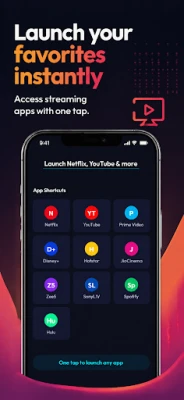
Open your favourite streaming apps directly from the remote:
Netflix, YouTube, Amazon Prime Video, Disney+
Hotstar, JioCinema, Zee5, SonyLIV
Voot, MX Player, and more
Correct deep links for both Samsung Tizen and Android TV. Apps open instantly, not through a slow home screen search.
😴 SLEEP TIMER
Set your TV to turn off automatically after 15, 30, 45, 60, or 90 minutes. No more waking up at 3 AM with the TV still blaring. The most requested feature in remote apps — and we actually built it.
📺 MULTIPLE TVs
Living room, bedroom, kitchen — switch between TVs instantly with a dropdown. No re-pairing needed. Each TV remembers its connection.
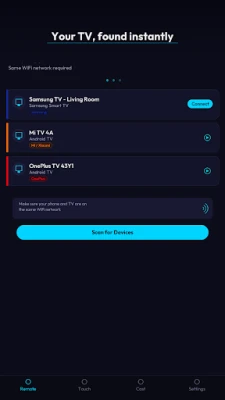
🔍 AUTO-DISCOVERY
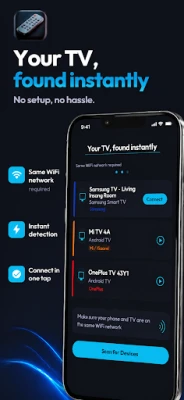
Open the app. Your TVs appear. Tap to connect. That's it.
No IP addresses. No port numbers. No "WiFi vs IR" toggles. No confusing menus. TV Remote scans your network and identifies your TV brand automatically, then selects the correct connection protocol behind the scenes.
🌙 DESIGNED FOR YOUR EYES
AMOLED-friendly dark interface with carefully chosen contrast ratios. Every button is large enough to tap without looking. Every label is readable. The remote you'll actually want to use in a dark room at night.
━━━━━━━━━━━━━━━━━━━━━
🔌 HOW TO CONNECT
Step 1: Connect your phone and TV to the same WiFi network
Step 2: Open TV Remote — your TV appears automatically
Step 3: Tap your TV name to connect
Step 4: Samsung — select "Allow" on your TV screen
Step 5: Android TV — enter the 6-character code shown on your TV
Step 6: Done. Start controlling your TV.
After first pairing, reconnection is instant. Open the app and you're in control.
━━━━━━━━━━━━━━━━━━━━━
❓ COMMON QUESTIONS
Q: My TV doesn't appear in the app?
A: Both devices must be on the same WiFi. Make sure your TV is powered on, not just in standby. Some TVs need Settings → Remotes & Accessories → Pair remote to be open.
Q: Does this work without WiFi?
A: TV Remote connects over your local WiFi network. Both your phone and smart TV must be on the same network. No internet is required — everything stays local.
Q: Which Samsung models work?
A: All Samsung Smart TVs from 2016 onwards running Tizen OS — including M, N, R, T, AU, BU, CU, DU series and newer.
Q: Does it work with my Mi TV?
A: Yes. All Xiaomi smart TV devices are supported — Mi TV 4A, 4X, 5A, 5X, Mi Box, Mi TV Stick, and Redmi Smart TV.
Q: My brand isn't listed — will it still work?
A: If your TV runs Android TV or Google TV as its operating system, it will work regardless of the hardware brand. This covers most smart TVs sold in India after 2019.
Q: Is my data safe?
A: TV Remote operates entirely on your local WiFi network. Zero data leaves your device. No accounts. No tracking. No analytics. We don't even have a server.
━━━━━━━━━━━━━━━━━━━━━
📺 WORKS WITH 25+ BRANDS
Samsung Smart TV (2016 and newer)
Mi / Xiaomi TV, Mi Box, Mi TV Stick
OnePlus TV — all models
Realme Smart TV
TCL Smart TV and Google TV
VU Smart TV — all models
Haier Smart TV
Kodak Smart TV
Nokia Smart TV
Motorola Smart TV
Thomson Smart TV
BPL Smart TV
Sansui Smart TV
Panasonic Android TV
Toshiba Android TV
Hisense Smart TV
Any TV running Android TV or Google TV OS
━━━━━━━━━━━━━━━━━━━━━
🎮 FULL REMOTE CONTROL
Everything you need when the physical remote is lost, broken, or across the room:
D-Pad navigation with OK button — move through menus smoothly
Back, Home, Menu, and Power buttons
Volume up, volume down, and mute
Channel up and channel down
Touchpad mode — swipe your phone screen to navigate like a laptop trackpad
Works instantly after connecting — no lag, no delay
🚀 ONE-TAP APP LAUNCH
Open your favourite streaming apps directly from the remote:
Netflix, YouTube, Amazon Prime Video, Disney+
Hotstar, JioCinema, Zee5, SonyLIV
Voot, MX Player, and more
Correct deep links for both Samsung Tizen and Android TV. Apps open instantly, not through a slow home screen search.
😴 SLEEP TIMER
Set your TV to turn off automatically after 15, 30, 45, 60, or 90 minutes. No more waking up at 3 AM with the TV still blaring. The most requested feature in remote apps — and we actually built it.
📺 MULTIPLE TVs
Living room, bedroom, kitchen — switch between TVs instantly with a dropdown. No re-pairing needed. Each TV remembers its connection.
🔍 AUTO-DISCOVERY
Open the app. Your TVs appear. Tap to connect. That's it.
No IP addresses. No port numbers. No "WiFi vs IR" toggles. No confusing menus. TV Remote scans your network and identifies your TV brand automatically, then selects the correct connection protocol behind the scenes.
🌙 DESIGNED FOR YOUR EYES
AMOLED-friendly dark interface with carefully chosen contrast ratios. Every button is large enough to tap without looking. Every label is readable. The remote you'll actually want to use in a dark room at night.
━━━━━━━━━━━━━━━━━━━━━
🔌 HOW TO CONNECT
Step 1: Connect your phone and TV to the same WiFi network
Step 2: Open TV Remote — your TV appears automatically
Step 3: Tap your TV name to connect
Step 4: Samsung — select "Allow" on your TV screen
Step 5: Android TV — enter the 6-character code shown on your TV
Step 6: Done. Start controlling your TV.
After first pairing, reconnection is instant. Open the app and you're in control.
━━━━━━━━━━━━━━━━━━━━━
❓ COMMON QUESTIONS
Q: My TV doesn't appear in the app?
A: Both devices must be on the same WiFi. Make sure your TV is powered on, not just in standby. Some TVs need Settings → Remotes & Accessories → Pair remote to be open.
Q: Does this work without WiFi?
A: TV Remote connects over your local WiFi network. Both your phone and smart TV must be on the same network. No internet is required — everything stays local.
Q: Which Samsung models work?
A: All Samsung Smart TVs from 2016 onwards running Tizen OS — including M, N, R, T, AU, BU, CU, DU series and newer.
Q: Does it work with my Mi TV?
A: Yes. All Xiaomi smart TV devices are supported — Mi TV 4A, 4X, 5A, 5X, Mi Box, Mi TV Stick, and Redmi Smart TV.
Q: My brand isn't listed — will it still work?
A: If your TV runs Android TV or Google TV as its operating system, it will work regardless of the hardware brand. This covers most smart TVs sold in India after 2019.
Q: Is my data safe?
A: TV Remote operates entirely on your local WiFi network. Zero data leaves your device. No accounts. No tracking. No analytics. We don't even have a server.
Rate the App
Add Comment & Review
User Reviews
Based on 0 reviews
No reviews added yet.
Comments will not be approved to be posted if they are SPAM, abusive, off-topic, use profanity, contain a personal attack, or promote hate of any kind.










More »

Popular Apps

phpFoxPHPFOX LLC

Moon Chai StoryOlha Dobel

World War Heroes — WW2 PvP FPSAzur Interactive Games Limited

Govee LiteGovee

Viking Clan: RagnarokKano Games

Build World AdventureExplore city in cube world

Vikings: War of ClansPlarium LLC

Asphalt 9: LegendsGameloft SE

AvSeaAvionics Electronics Geeks!

Dawn of Zombies: Survival GameRoyal Ark
More »
Editor's Choice

Grim Soul: Dark Survival RPGBrickworks Games Ltd

Craft of Survival - Gladiators101XP LIMITED

Last Shelter: SurvivalLong Tech Network Limited
Dawn of Zombies: Survival GameRoyal Ark

Merge Survival : WastelandStickyHands Inc.

AoD Vikings: Valhalla GameRoboBot Studio
Viking Clan: RagnarokKano Games
Vikings: War of ClansPlarium LLC
Asphalt 9: LegendsGameloft SE

Modern Tanks: War Tank GamesXDEVS LTD