

Latest Version
Update
November 07, 2026
November 07, 2026
Developer
vigu labs
vigu labs
Categories
Productivity
Productivity
Platforms
Android
Android
Downloads
0
0
License
Free
Free
Package Name
app.plume.notes
app.plume.notes
Report
Report a Problem
Report a Problem
More About Plume: Private Notes, Offline
Catch the thought. Keep it yours.
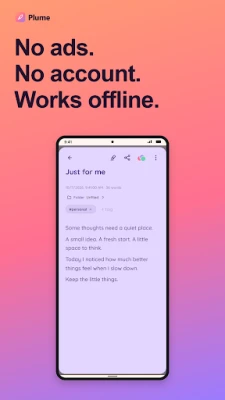
Plume is a private, offline notepad for quick ideas, checklists and notes you want to develop. Capture a thought, give it room to grow, and find it when you need it.
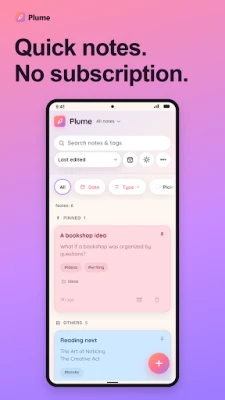
No ads. No account. No subscription. Core note-taking features are free. Plume Pro is an optional one-time purchase for extra appearance, export and backup features.
⚡ QUICK NOTES, BEFORE THEY DISAPPEAR
A shopping list, a journal fragment, a meeting note or a half-formed idea: give it a place in Plume. Enable free Jot mode in Settings to open straight into a blank note when you launch the app.
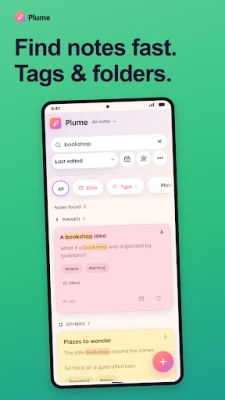
🔍 FIND NOTES FAST
Search your notes and #tags. Group ideas into folders, pin what matters, and filter your board by color or date. Prefer a denser list? Free Compact cards show smaller cards with plain-text previews.
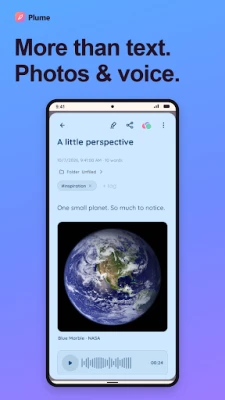
📝 MORE THAN TEXT
Add photos, drawings and voice recordings to your notes. Crop, rotate, mark up or mosaic an image, and play recordings in place. Write with headings, lists, quotes, highlights, code blocks and dividers in the visual editor, or switch to Markdown source mode. Render inline and block LaTeX for math notes.
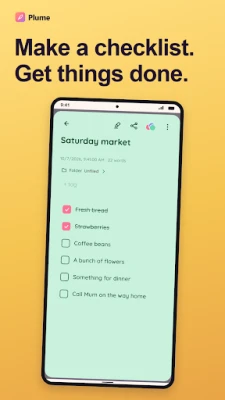
✅ CHECKLISTS THAT MOVE WITH YOUR DAY
Turn plans into tasks and watch your progress. Tick items on default cards, or open a checklist from Compact cards. Completed tasks stay visible with a strikethrough. Add one-time or repeating reminders, with optional full-screen alerts.
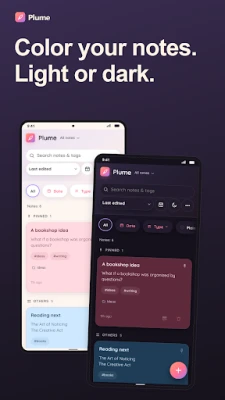
🎨 COLOR YOUR NOTES
Choose from eight free note colors and switch between Light and Dark themes. Give your ideas a little personality while keeping your board easy to scan.
🪶 SHARE A THOUGHT
Share a note as an image, plain text or Markdown. Send a checklist, an idea or a moment worth keeping to someone who needs it. Image sharing is free; Pro removes the Plume attribution from shared note images.
📦 FILES YOU CAN KEEP
Create a complete .plumebackup file with your notes, checklists, photos, drawings, recordings, tags, colors and settings. Add optional password protection, then keep the file wherever you choose. Restore checks the backup before you choose Replace or Merge. Manual password-protected backup and all restore options are free, including backups created with Pro.
🏠 PRIVATE, OFFLINE, ON YOUR DEVICE
Your notes stay on your device. No Plume account, no Plume server and no automatic cloud sync. Capture, organize and read your notes offline.
🛡️ Photos use Android's system picker or camera app. Microphone access is for voice recordings; notification and alarm access is for reminders. Other note-taking features work if you decline those permissions. An independent check of detected tracking libraries is available from Exodus Privacy:
https://reports.exodus-privacy.eu.org/en/reports/app.plume.notes/latest/
MORE FREE TOOLS
Full-screen reading, multi-select, PIN lock, widgets, Archive, Trash, Undo and On This Day.
💎 PLUME PRO: ONE PURCHASE, NO RENEWAL
Optional Pro adds premium themes, a custom accent color, four extra note colors, PDF export, offline HTML export and a browsable offline notes site with attachments. It also adds automatic encrypted backups to a folder you choose, Daily or Weekly. No recurring subscription.
A FEW THINGS TO KNOW
Plume does not offer collaboration or cloud sync between devices. To move to a new phone, export a backup and import it there. Reminder delivery depends on your phone's alarm, notification and battery settings. Keep the password for encrypted backups: it cannot be recovered by Plume.
No ads. No account. No subscription. Core note-taking features are free. Plume Pro is an optional one-time purchase for extra appearance, export and backup features.
⚡ QUICK NOTES, BEFORE THEY DISAPPEAR
A shopping list, a journal fragment, a meeting note or a half-formed idea: give it a place in Plume. Enable free Jot mode in Settings to open straight into a blank note when you launch the app.
🔍 FIND NOTES FAST
Search your notes and #tags. Group ideas into folders, pin what matters, and filter your board by color or date. Prefer a denser list? Free Compact cards show smaller cards with plain-text previews.
📝 MORE THAN TEXT
Add photos, drawings and voice recordings to your notes. Crop, rotate, mark up or mosaic an image, and play recordings in place. Write with headings, lists, quotes, highlights, code blocks and dividers in the visual editor, or switch to Markdown source mode. Render inline and block LaTeX for math notes.
✅ CHECKLISTS THAT MOVE WITH YOUR DAY
Turn plans into tasks and watch your progress. Tick items on default cards, or open a checklist from Compact cards. Completed tasks stay visible with a strikethrough. Add one-time or repeating reminders, with optional full-screen alerts.
🎨 COLOR YOUR NOTES
Choose from eight free note colors and switch between Light and Dark themes. Give your ideas a little personality while keeping your board easy to scan.
🪶 SHARE A THOUGHT
Share a note as an image, plain text or Markdown. Send a checklist, an idea or a moment worth keeping to someone who needs it. Image sharing is free; Pro removes the Plume attribution from shared note images.
📦 FILES YOU CAN KEEP
Create a complete .plumebackup file with your notes, checklists, photos, drawings, recordings, tags, colors and settings. Add optional password protection, then keep the file wherever you choose. Restore checks the backup before you choose Replace or Merge. Manual password-protected backup and all restore options are free, including backups created with Pro.
🏠 PRIVATE, OFFLINE, ON YOUR DEVICE
Your notes stay on your device. No Plume account, no Plume server and no automatic cloud sync. Capture, organize and read your notes offline.
🛡️ Photos use Android's system picker or camera app. Microphone access is for voice recordings; notification and alarm access is for reminders. Other note-taking features work if you decline those permissions. An independent check of detected tracking libraries is available from Exodus Privacy:
https://reports.exodus-privacy.eu.org/en/reports/app.plume.notes/latest/
MORE FREE TOOLS
Full-screen reading, multi-select, PIN lock, widgets, Archive, Trash, Undo and On This Day.
💎 PLUME PRO: ONE PURCHASE, NO RENEWAL
Optional Pro adds premium themes, a custom accent color, four extra note colors, PDF export, offline HTML export and a browsable offline notes site with attachments. It also adds automatic encrypted backups to a folder you choose, Daily or Weekly. No recurring subscription.
A FEW THINGS TO KNOW
Plume does not offer collaboration or cloud sync between devices. To move to a new phone, export a backup and import it there. Reminder delivery depends on your phone's alarm, notification and battery settings. Keep the password for encrypted backups: it cannot be recovered by Plume.
Rate the App
Add Comment & Review
User Reviews
Based on 0 reviews
No reviews added yet.
Comments will not be approved to be posted if they are SPAM, abusive, off-topic, use profanity, contain a personal attack, or promote hate of any kind.







More »

Popular Apps

phpFoxPHPFOX LLC

Moon Chai StoryOlha Dobel

World War Heroes — WW2 PvP FPSAzur Interactive Games Limited

Govee LiteGovee

AvSeaAvionics Electronics Geeks!

Viking Clan: RagnarokKano Games

Vikings: War of ClansPlarium LLC

Build World AdventureExplore city in cube world

Asphalt 9: LegendsGameloft SE

Dawn of Zombies: Survival GameRoyal Ark
More »
Editor's Choice

Grim Soul: Dark Survival RPGBrickworks Games Ltd

Craft of Survival - Gladiators101XP LIMITED

Last Shelter: SurvivalLong Tech Network Limited
Dawn of Zombies: Survival GameRoyal Ark

Merge Survival : WastelandStickyHands Inc.

AoD Vikings: Valhalla GameRoboBot Studio
Viking Clan: RagnarokKano Games
Vikings: War of ClansPlarium LLC
Asphalt 9: LegendsGameloft SE

Modern Tanks: War Tank GamesXDEVS LTD