

Latest Version
Update
August 02, 2026
August 02, 2026
Developer
OneStep Digital Physical Therapy
OneStep Digital Physical Therapy
Categories
Medical
Medical
Platforms
Android
Android
Downloads
0
0
License
Free
Free
Package Name
co.onestep.patientapp
co.onestep.patientapp
Report
Report a Problem
Report a Problem
More About OneStep Move
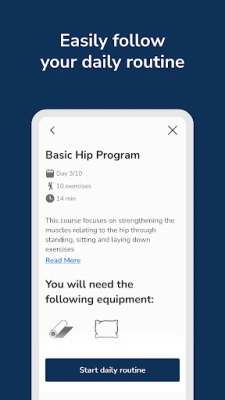
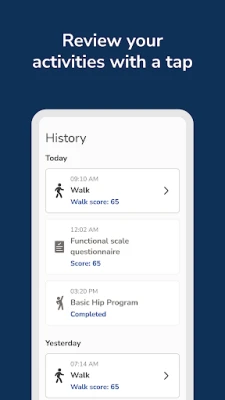
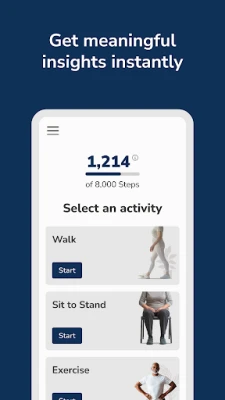
Every step tells a story - we help you and your healthcare provider see it.
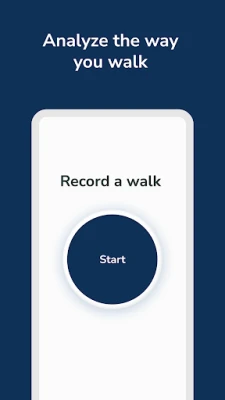
OneStep is the easiest way to see how well you're moving. Just place the phone
in your pocket and take a 30 second walk. That's all it takes. No additional
hardware, no cameras involved.
Our clinically validated app uses your smartphone's sensors to analyze your gait
in seconds - revealing insights about your balance, recovery, and risk of falls.
Whether you're recovering from surgery, managing a health condition, or just
staying active, OneStep helps you track progress and stay connected with your
care provider.
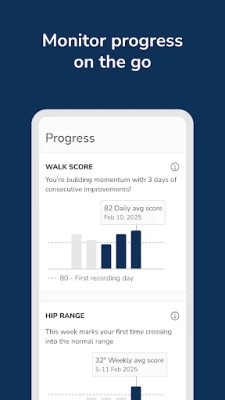
CONTINUOUS ACTIVITY TRACKING
With your permission, OneStep also runs in the background to continuously count
your steps and track your walking activity throughout the day, even when the app
is closed. An ongoing notification shows your live step count, daily goal
progress, and walking score so you can see your activity at a glance. This keeps
your movement data updating while you go about your day, and you can turn
background monitoring off at any time.
GUIDED DUAL-TASK ASSESSMENTS
Some assessments ask you to walk while performing a thinking task out loud - for
example, counting backwards as you walk. During these dual-task tests, OneStep
records audio through your microphone so your spoken responses can be measured
alongside your movement. Recording runs only while the test is active - it starts
when you begin the assessment and stops automatically when it ends - and a
notification is shown the entire time audio is recorded.
Backed by science. Loved by patients. Trusted by leading healthcare providers.
Because we are how we move - and now it's easier than ever to see it.
WHY OneStep USES THESE PERMISSIONS
- Motion / physical activity sensors: to analyze your gait and count your steps.
- Foreground service (health): to continuously track your steps and activity in
the background and show your progress in an ongoing notification.
- Microphone (foreground service): to record your voice only during guided
dual-task walking assessments; recording is limited to the duration of the test.
- Location (optional): to tag where a walk took place, when you allow it.
Please note: Accessing OneStep is only possible via select healthcare providers.
To learn more, ask your provider to contact us by visiting www.onestep.co .
in your pocket and take a 30 second walk. That's all it takes. No additional
hardware, no cameras involved.
Our clinically validated app uses your smartphone's sensors to analyze your gait
in seconds - revealing insights about your balance, recovery, and risk of falls.
Whether you're recovering from surgery, managing a health condition, or just
staying active, OneStep helps you track progress and stay connected with your
care provider.
CONTINUOUS ACTIVITY TRACKING
With your permission, OneStep also runs in the background to continuously count
your steps and track your walking activity throughout the day, even when the app
is closed. An ongoing notification shows your live step count, daily goal
progress, and walking score so you can see your activity at a glance. This keeps
your movement data updating while you go about your day, and you can turn
background monitoring off at any time.
GUIDED DUAL-TASK ASSESSMENTS
Some assessments ask you to walk while performing a thinking task out loud - for
example, counting backwards as you walk. During these dual-task tests, OneStep
records audio through your microphone so your spoken responses can be measured
alongside your movement. Recording runs only while the test is active - it starts
when you begin the assessment and stops automatically when it ends - and a
notification is shown the entire time audio is recorded.
Backed by science. Loved by patients. Trusted by leading healthcare providers.
Because we are how we move - and now it's easier than ever to see it.
WHY OneStep USES THESE PERMISSIONS
- Motion / physical activity sensors: to analyze your gait and count your steps.
- Foreground service (health): to continuously track your steps and activity in
the background and show your progress in an ongoing notification.
- Microphone (foreground service): to record your voice only during guided
dual-task walking assessments; recording is limited to the duration of the test.
- Location (optional): to tag where a walk took place, when you allow it.
Please note: Accessing OneStep is only possible via select healthcare providers.
To learn more, ask your provider to contact us by visiting www.onestep.co .
Rate the App
Add Comment & Review
User Reviews
Based on 0 reviews
No reviews added yet.
Comments will not be approved to be posted if they are SPAM, abusive, off-topic, use profanity, contain a personal attack, or promote hate of any kind.














More »

Popular Apps

phpFoxPHPFOX LLC

Moon Chai StoryOlha Dobel

World War Heroes — WW2 PvP FPSAzur Interactive Games Limited

Govee LiteGovee

Build World AdventureExplore city in cube world

Viking Clan: RagnarokKano Games

Vikings: War of ClansPlarium LLC

Asphalt 9: LegendsGameloft SE

Submarine Car Diving SimulatorSwim with dolphins & penguins

Dawn of Zombies: Survival GameRoyal Ark
More »
Editor's Choice

Grim Soul: Dark Survival RPGBrickworks Games Ltd

Craft of Survival - Gladiators101XP LIMITED

Last Shelter: SurvivalLong Tech Network Limited
Dawn of Zombies: Survival GameRoyal Ark

Merge Survival : WastelandStickyHands Inc.

AoD Vikings: Valhalla GameRoboBot Studio
Viking Clan: RagnarokKano Games
Vikings: War of ClansPlarium LLC
Asphalt 9: LegendsGameloft SE

Modern Tanks: War Tank GamesXDEVS LTD