
Latest Version
Update
April 11, 2026
April 11, 2026
Developer
9INE watchfaces
9INE watchfaces
Categories
Personalization
Personalization
Platforms
Android
Android
Downloads
0
0
License
Free
Free
Package Name
com.ninewatchface.nw090
com.ninewatchface.nw090
Report
Report a Problem
Report a Problem
More About NW090: Hybrid watch face
#Watch face installation
1. Companion App
Access the Companion app on the smartphone > Tap to Download button > Smart watch to installation
2. Install from App
Access the Play store app > Tap to '▼' button > Select the Watch > Tap to price button > Buy
If the watch face cannot be installed, please install the watch face through the play Store web browser or watch.
3. Install from web browser
Access the Play store web browser > Tap to price > Select the Watch > Tap to install > Buy
4. Install from watch
Open the Play Store on the watch > Search for NW077 > Install
-----------------------------------------------------------------------------------------------------------
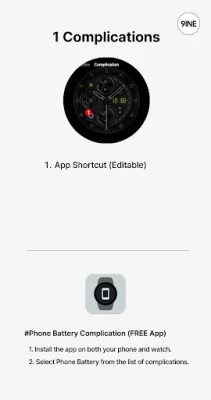
#Phone Battery Level installation
1. Install the Phone Battery Level app on both the phone and the watch.
2. Select Phone Battery Level in Complications.
https://play.google.com/store/apps/details?id=com.weartools.phonebattcomp
-----------------------------------------------------------------------------------------------------------
#SPEC
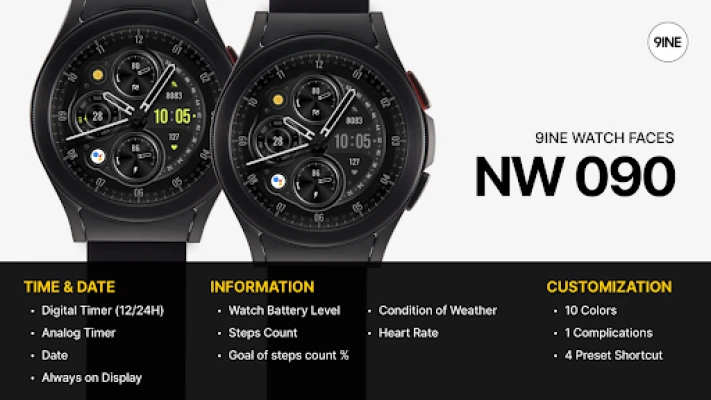
[TIME & DATE]
Digital Timer
Analog Timer
Date
Always on Display
[INFORMATION]
Watch Battery Level
Steps Count
Goal of Steps Count %
Heart Rate
Currently Weather Condition
[CUSTOMIZATION]
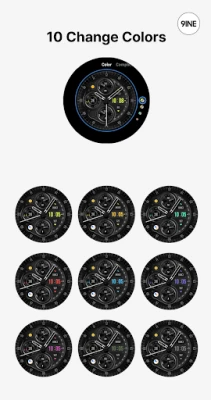
10 Colors
1 Complications
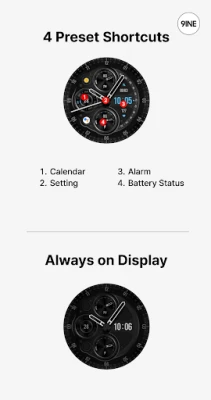
4 Preset Shortcut
This watch face supports Wear OS devices.
Access the Companion app on the smartphone > Tap to Download button > Smart watch to installation
2. Install from App
Access the Play store app > Tap to '▼' button > Select the Watch > Tap to price button > Buy
If the watch face cannot be installed, please install the watch face through the play Store web browser or watch.
3. Install from web browser
Access the Play store web browser > Tap to price > Select the Watch > Tap to install > Buy
4. Install from watch
Open the Play Store on the watch > Search for NW077 > Install
-----------------------------------------------------------------------------------------------------------
#Phone Battery Level installation
1. Install the Phone Battery Level app on both the phone and the watch.
2. Select Phone Battery Level in Complications.
https://play.google.com/store/apps/details?id=com.weartools.phonebattcomp
-----------------------------------------------------------------------------------------------------------
#SPEC
[TIME & DATE]
Digital Timer
Analog Timer
Date
Always on Display
[INFORMATION]
Watch Battery Level
Steps Count
Goal of Steps Count %
Heart Rate
Currently Weather Condition
[CUSTOMIZATION]
10 Colors
1 Complications
4 Preset Shortcut
This watch face supports Wear OS devices.
Rate the App
Add Comment & Review
User Reviews
Based on 0 reviews
No reviews added yet.
Comments will not be approved to be posted if they are SPAM, abusive, off-topic, use profanity, contain a personal attack, or promote hate of any kind.







More »

Popular Apps

Moon Chai StoryOlha Dobel

phpFoxPHPFOX LLC

Govee LiteGovee

World War Heroes — WW2 PvP FPSAzur Interactive Games Limited

Build World AdventureExplore city in cube world

Viking Clan: RagnarokKano Games

Vikings: War of ClansPlarium LLC

Asphalt 9: LegendsGameloft SE

Submarine Car Diving SimulatorSwim with dolphins & penguins

Union VPN - Secure VPN ProxyPureBrowser
More »
Editor's Choice

Grim Soul: Dark Survival RPGBrickworks Games Ltd

Craft of Survival - Gladiators101XP LIMITED

Last Shelter: SurvivalLong Tech Network Limited

Dawn of Zombies: Survival GameRoyal Ark

Merge Survival : WastelandStickyHands Inc.

AoD Vikings: Valhalla GameRoboBot Studio
Viking Clan: RagnarokKano Games
Vikings: War of ClansPlarium LLC
Asphalt 9: LegendsGameloft SE

Modern Tanks: War Tank GamesXDEVS LTD