

Latest Version
Update
October 10, 2026
October 10, 2026
Developer
Enrovix AI
Enrovix AI
Categories
Productivity
Productivity
Platforms
Android
Android
Downloads
0
0
License
Free
Free
Package Name
com.enrovix.minom
com.enrovix.minom
Report
Report a Problem
Report a Problem
More About Minom: AI Voice Notes
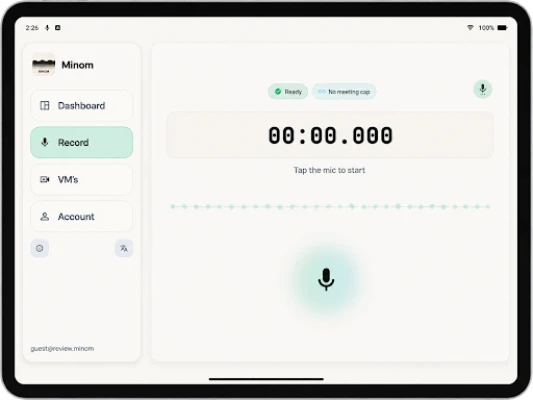
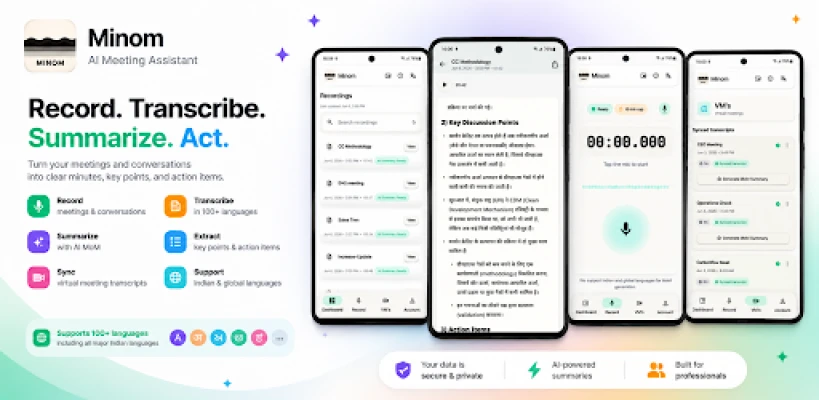
Turn your voice recordings into text and useful AI notes. Minom records conversations, transcribes audio and creates summaries with key points, decisions and action items, so you can focus on listening instead of typing.
VOICE NOTES FOR WORK, STUDY AND EVERYDAY IDEAS
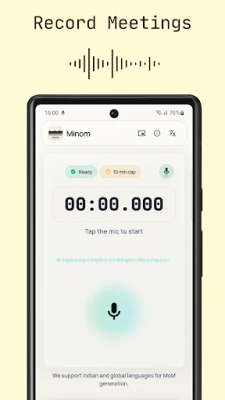
Capture team meetings, lectures, interviews, training sessions and personal voice memos. Record a conversation or import a supported audio file, then request a transcript and AI summary.
FROM SPEECH TO TEXT
Turn recorded audio into a readable transcript. Revisit what was said, find important information and use the summary to get back to the main points without replaying the whole recording.
MEETING MINUTES AND FOLLOW-UPS
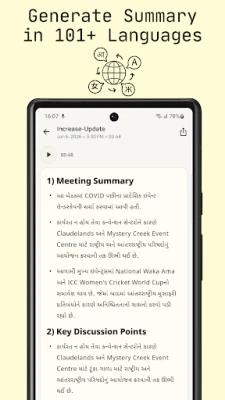
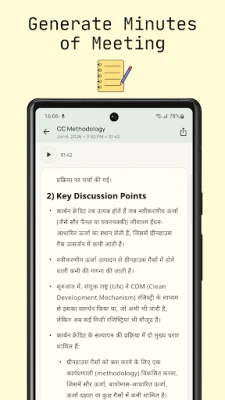
Create minutes of meeting (MoM) from a recorded discussion. Review key decisions, action items and next steps before sharing them with your team.
INDIAN LANGUAGES AND MULTILINGUAL CONVERSATIONS
Record Hindi, Gujarati, Marathi, Tamil, Telugu, Kannada, Malayalam, Bengali or Punjabi conversations, including speech mixed with English such as Hinglish. Global-language transcription is also available. Supported languages depend on the transcription option you select.
KEEP YOUR NOTES USEFUL
Find saved recordings and summaries in your history. Search your notes, listen to recordings and share or export summaries as PDF or Word documents.
HOW IT WORKS
1. Record audio or choose a supported audio file.
2. Select the appropriate transcription and summary language.
3. Let Minom process your recording in the background.
4. Open your transcript and summary when they are ready.
IMPORTANT TO KNOW
On Android, transcription and AI summaries require an internet connection and are processed online. Recording and transcription allowances depend on your plan; paid plans offer additional minutes. AI can make mistakes, so review names, numbers and important details before relying on or sharing a summary. Record other people only with their consent.
Support: [email protected]
Privacy: https://minom.in/privacy
Terms: https://minom.in/terms
Capture team meetings, lectures, interviews, training sessions and personal voice memos. Record a conversation or import a supported audio file, then request a transcript and AI summary.
FROM SPEECH TO TEXT
Turn recorded audio into a readable transcript. Revisit what was said, find important information and use the summary to get back to the main points without replaying the whole recording.
MEETING MINUTES AND FOLLOW-UPS
Create minutes of meeting (MoM) from a recorded discussion. Review key decisions, action items and next steps before sharing them with your team.
INDIAN LANGUAGES AND MULTILINGUAL CONVERSATIONS
Record Hindi, Gujarati, Marathi, Tamil, Telugu, Kannada, Malayalam, Bengali or Punjabi conversations, including speech mixed with English such as Hinglish. Global-language transcription is also available. Supported languages depend on the transcription option you select.
KEEP YOUR NOTES USEFUL
Find saved recordings and summaries in your history. Search your notes, listen to recordings and share or export summaries as PDF or Word documents.
HOW IT WORKS
1. Record audio or choose a supported audio file.
2. Select the appropriate transcription and summary language.
3. Let Minom process your recording in the background.
4. Open your transcript and summary when they are ready.
IMPORTANT TO KNOW
On Android, transcription and AI summaries require an internet connection and are processed online. Recording and transcription allowances depend on your plan; paid plans offer additional minutes. AI can make mistakes, so review names, numbers and important details before relying on or sharing a summary. Record other people only with their consent.
Support: [email protected]
Privacy: https://minom.in/privacy
Terms: https://minom.in/terms
Rate the App
Add Comment & Review
User Reviews
Based on 0 reviews
No reviews added yet.
Comments will not be approved to be posted if they are SPAM, abusive, off-topic, use profanity, contain a personal attack, or promote hate of any kind.




More »

Popular Apps

phpFoxPHPFOX LLC

Moon Chai StoryOlha Dobel

World War Heroes — WW2 PvP FPSAzur Interactive Games Limited

Govee LiteGovee

Viking Clan: RagnarokKano Games

Build World AdventureExplore city in cube world

Vikings: War of ClansPlarium LLC

AvSeaAvionics Electronics Geeks!

Asphalt 9: LegendsGameloft SE

Dawn of Zombies: Survival GameRoyal Ark
More »
Editor's Choice

Grim Soul: Dark Survival RPGBrickworks Games Ltd

Craft of Survival - Gladiators101XP LIMITED

Last Shelter: SurvivalLong Tech Network Limited
Dawn of Zombies: Survival GameRoyal Ark

Merge Survival : WastelandStickyHands Inc.

AoD Vikings: Valhalla GameRoboBot Studio
Viking Clan: RagnarokKano Games
Vikings: War of ClansPlarium LLC
Asphalt 9: LegendsGameloft SE

Modern Tanks: War Tank GamesXDEVS LTD