
Latest Version
Update
October 25, 2026
October 25, 2026
Developer
DarkRock
DarkRock
Categories
Auto & Vehicles
Auto & Vehicles
Platforms
Android
Android
Downloads
0
0
License
Free
Free
Package Name
com.mechanicai.mechanic
com.mechanicai.mechanic
Report
Report a Problem
Report a Problem
More About Mechanic AI - OBD2 Diagnostic
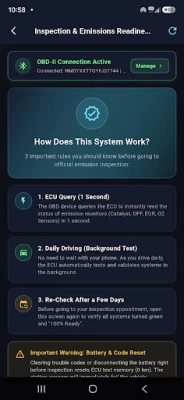
Mechanic AI is a next-generation automotive diagnostic application powered by artificial intelligence and OBD-II / ELM327 Bluetooth adapters.
Connect to your car's On-Board Diagnostics port and transform your smartphone into a comprehensive automotive diagnostic computer.
KEY FEATURES:
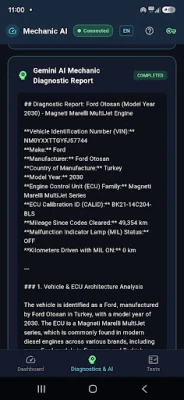
🤖 AI-Powered Diagnostics (Google Gemini):
Go beyond cryptic error codes. Mechanic AI cross-analyzes active DTCs with real-time sensor metrics and freeze-frame data to provide actionable diagnostic explanations, urgency levels, and repair guidance in plain language.
⚡ Real-Time Live Telemetry:
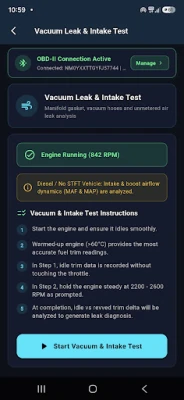
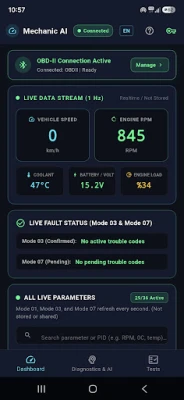
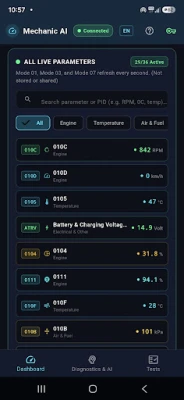
Monitor Engine RPM, Vehicle Speed, Coolant Temperature, Throttle Position, Intake Air Temp, Manifold Absolute Pressure (MAP), Mass Air Flow (MAF), Fuel Trims (STFT/LTFT), and Battery Voltage in real-time.
🔍 Advanced OBD-II Mode Support:
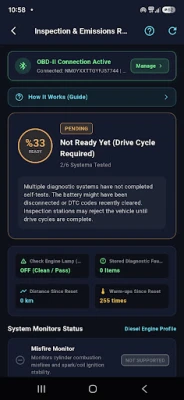
- Mode 03 (Confirmed DTCs): Read and identify fault codes that trigger the Check Engine light.
- Mode 07 (Pending DTCs): Catch intermittent or developing faults before they trigger permanent dashboard warnings.
- Mode 02 (Freeze Frame): Inspect engine operating parameters captured at the exact instant a fault occurred.
🌐 Multi-Language Architecture:
Full localized interface and AI analysis in 5 major languages: English, Turkish, Spanish, Chinese, and Russian.
🔑 Custom API Key Support:
Seamlessly plug in your own Google Gemini API Key for uninterrupted, high-quota diagnostic analysis.
How to Use:
1. Plug your ELM327 Bluetooth adapter into your car's OBD-II port.
2. Turn the ignition on (or start the engine).
3. Pair with the OBD adapter in your phone's Bluetooth settings.
4. Launch Mechanic AI, select your device, and connect.
KEY FEATURES:
🤖 AI-Powered Diagnostics (Google Gemini):
Go beyond cryptic error codes. Mechanic AI cross-analyzes active DTCs with real-time sensor metrics and freeze-frame data to provide actionable diagnostic explanations, urgency levels, and repair guidance in plain language.
⚡ Real-Time Live Telemetry:
Monitor Engine RPM, Vehicle Speed, Coolant Temperature, Throttle Position, Intake Air Temp, Manifold Absolute Pressure (MAP), Mass Air Flow (MAF), Fuel Trims (STFT/LTFT), and Battery Voltage in real-time.
🔍 Advanced OBD-II Mode Support:
- Mode 03 (Confirmed DTCs): Read and identify fault codes that trigger the Check Engine light.
- Mode 07 (Pending DTCs): Catch intermittent or developing faults before they trigger permanent dashboard warnings.
- Mode 02 (Freeze Frame): Inspect engine operating parameters captured at the exact instant a fault occurred.
🌐 Multi-Language Architecture:
Full localized interface and AI analysis in 5 major languages: English, Turkish, Spanish, Chinese, and Russian.
🔑 Custom API Key Support:
Seamlessly plug in your own Google Gemini API Key for uninterrupted, high-quota diagnostic analysis.
How to Use:
1. Plug your ELM327 Bluetooth adapter into your car's OBD-II port.
2. Turn the ignition on (or start the engine).
3. Pair with the OBD adapter in your phone's Bluetooth settings.
4. Launch Mechanic AI, select your device, and connect.
Rate the App
Add Comment & Review
User Reviews
Based on 0 reviews
No reviews added yet.
Comments will not be approved to be posted if they are SPAM, abusive, off-topic, use profanity, contain a personal attack, or promote hate of any kind.




More »

Popular Apps

phpFoxPHPFOX LLC

Moon Chai StoryOlha Dobel

World War Heroes — WW2 PvP FPSAzur Interactive Games Limited

Govee LiteGovee

AvSeaAvionics Electronics Geeks!

Viking Clan: RagnarokKano Games

Build World AdventureExplore city in cube world

Vikings: War of ClansPlarium LLC

Asphalt 9: LegendsGameloft SE

Dawn of Zombies: Survival GameRoyal Ark
More »
Editor's Choice

Grim Soul: Dark Survival RPGBrickworks Games Ltd

Craft of Survival - Gladiators101XP LIMITED

Last Shelter: SurvivalLong Tech Network Limited
Dawn of Zombies: Survival GameRoyal Ark

Merge Survival : WastelandStickyHands Inc.

AoD Vikings: Valhalla GameRoboBot Studio
Viking Clan: RagnarokKano Games
Vikings: War of ClansPlarium LLC
Asphalt 9: LegendsGameloft SE

Modern Tanks: War Tank GamesXDEVS LTD