

Latest Version
Update
August 03, 2026
August 03, 2026
Developer
LensCue
LensCue
Categories
Productivity
Productivity
Platforms
Android
Android
Downloads
0
0
License
Free
Free
Package Name
ai.lenscue.app
ai.lenscue.app
Report
Report a Problem
Report a Problem
More About LensCue: Floating Teleprompter
Read your script while recording video—without switching back to notes.
LensCue is a teleprompter app and video script reader for Android that keeps your script on screen while you film. Use it as a floating teleprompter over compatible camera and video apps, a camera script reader for mobile recording, or a simple in-app script reader for rehearsal, presentation practice, and content planning.
Made for creators and professionals
LensCue helps YouTubers, TikTok creators, coaches, educators, founders, marketers, and business owners speak with a clearer plan. Keep hooks, intros, talking points, lesson notes, and full scripts visible while recording videos for YouTube, Shorts, TikTok, Reels, courses, product demos, sales videos, client updates, and social media.
Floating teleprompter for video recording
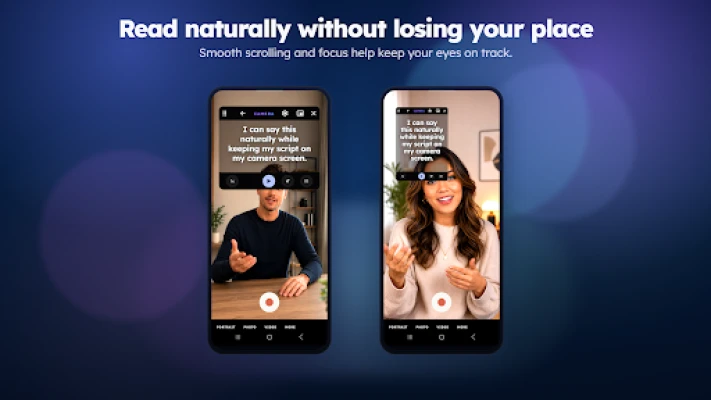
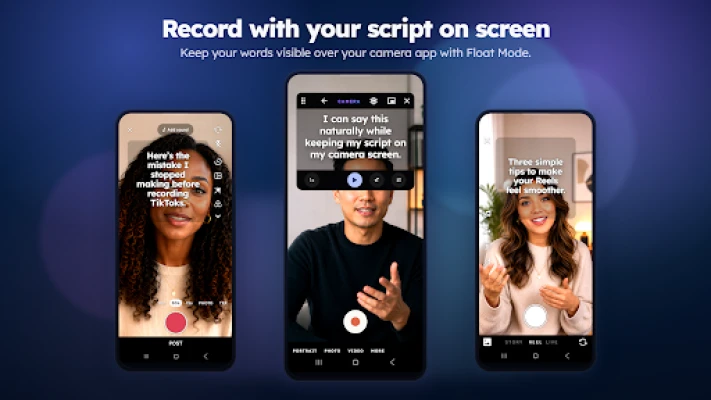
Float Mode displays your script in a movable overlay above the apps you already use. Open your script in LensCue, start the floating script, then switch to your camera app or another compatible recording app. Your words stay visible so you can look closer to the lens, reduce memorization pressure, and keep your recording session moving.
Teleprompter and script reader tools
• Move and resize the floating script overlay
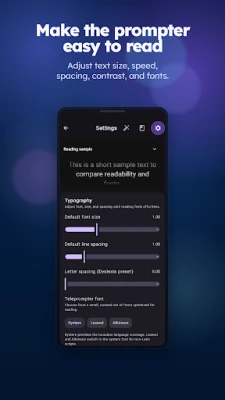
• Adjust text size for comfortable reading
• Control scroll speed to match your speaking pace
• Use portrait or landscape workflows when supported
• Keep talking points on screen while recording in compatible apps
• Rehearse inside LensCue before opening Float Mode
Script tools for creators
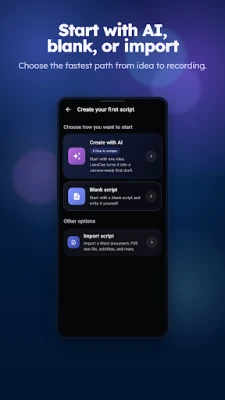
• Write and edit video scripts in the app
• Save scripts for YouTube videos, TikTok videos, Reels, vlogs, tutorials, ads, and lessons
• Create reusable outlines for hooks, intros, calls to action, coaching videos, and presentations
• Turn notes into clearer talking points
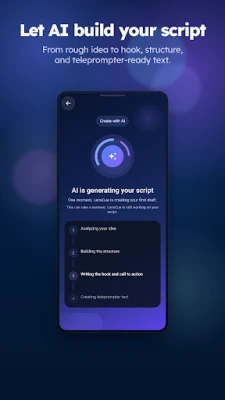
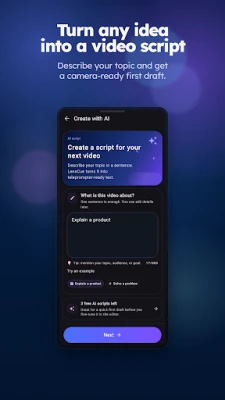
• Use AI-assisted script help to draft ideas, improve wording, or structure a video script
Use LensCue for
• Talking-head videos and creator content
• YouTube Shorts, TikTok videos, Instagram Reels, and vlogs
• Online courses, tutorials, webinars, and lessons
• Business updates, product demos, sales videos, and founder videos
• Coaching videos, client messages, and training content
• Speech, presentation, and public speaking practice
Built for Android workflows
LensCue uses Android overlay permission for Float Mode, allowing your script to appear above compatible apps. You control the overlay size, position, readability, and scrolling experience. Feature availability may vary by Android version, device support, app compatibility, and selected settings.
Simple and private by design
No account is required for the core workflow. Saved scripts stay on your device. Whether you are recording a quick social video or preparing a longer presentation, LensCue helps you keep your script in view and speak with more confidence.
Write your script, open your recording app, and stay on cue with LensCue.
Made for creators and professionals
LensCue helps YouTubers, TikTok creators, coaches, educators, founders, marketers, and business owners speak with a clearer plan. Keep hooks, intros, talking points, lesson notes, and full scripts visible while recording videos for YouTube, Shorts, TikTok, Reels, courses, product demos, sales videos, client updates, and social media.
Floating teleprompter for video recording
Float Mode displays your script in a movable overlay above the apps you already use. Open your script in LensCue, start the floating script, then switch to your camera app or another compatible recording app. Your words stay visible so you can look closer to the lens, reduce memorization pressure, and keep your recording session moving.
Teleprompter and script reader tools
• Move and resize the floating script overlay
• Adjust text size for comfortable reading
• Control scroll speed to match your speaking pace
• Use portrait or landscape workflows when supported
• Keep talking points on screen while recording in compatible apps
• Rehearse inside LensCue before opening Float Mode
Script tools for creators
• Write and edit video scripts in the app
• Save scripts for YouTube videos, TikTok videos, Reels, vlogs, tutorials, ads, and lessons
• Create reusable outlines for hooks, intros, calls to action, coaching videos, and presentations
• Turn notes into clearer talking points
• Use AI-assisted script help to draft ideas, improve wording, or structure a video script
Use LensCue for
• Talking-head videos and creator content
• YouTube Shorts, TikTok videos, Instagram Reels, and vlogs
• Online courses, tutorials, webinars, and lessons
• Business updates, product demos, sales videos, and founder videos
• Coaching videos, client messages, and training content
• Speech, presentation, and public speaking practice
Built for Android workflows
LensCue uses Android overlay permission for Float Mode, allowing your script to appear above compatible apps. You control the overlay size, position, readability, and scrolling experience. Feature availability may vary by Android version, device support, app compatibility, and selected settings.
Simple and private by design
No account is required for the core workflow. Saved scripts stay on your device. Whether you are recording a quick social video or preparing a longer presentation, LensCue helps you keep your script in view and speak with more confidence.
Write your script, open your recording app, and stay on cue with LensCue.
Rate the App
Add Comment & Review
User Reviews
Based on 0 reviews
No reviews added yet.
Comments will not be approved to be posted if they are SPAM, abusive, off-topic, use profanity, contain a personal attack, or promote hate of any kind.







More »

Popular Apps

phpFoxPHPFOX LLC

Moon Chai StoryOlha Dobel

World War Heroes — WW2 PvP FPSAzur Interactive Games Limited

Govee LiteGovee

Build World AdventureExplore city in cube world

Viking Clan: RagnarokKano Games

Vikings: War of ClansPlarium LLC

Asphalt 9: LegendsGameloft SE

Submarine Car Diving SimulatorSwim with dolphins & penguins

Dawn of Zombies: Survival GameRoyal Ark
More »
Editor's Choice

Grim Soul: Dark Survival RPGBrickworks Games Ltd

Craft of Survival - Gladiators101XP LIMITED

Last Shelter: SurvivalLong Tech Network Limited
Dawn of Zombies: Survival GameRoyal Ark

Merge Survival : WastelandStickyHands Inc.

AoD Vikings: Valhalla GameRoboBot Studio
Viking Clan: RagnarokKano Games
Vikings: War of ClansPlarium LLC
Asphalt 9: LegendsGameloft SE

Modern Tanks: War Tank GamesXDEVS LTD