

Latest Version
Update
August 15, 2026
August 15, 2026
Developer
Wovex
Wovex
Categories
Tools
Tools
Platforms
Android
Android
Downloads
0
0
License
Free
Free
Package Name
com.wovex.mono_cctv
com.wovex.mono_cctv
Report
Report a Problem
Report a Problem
More About IP Camera Viewer - CCTV ONVIF
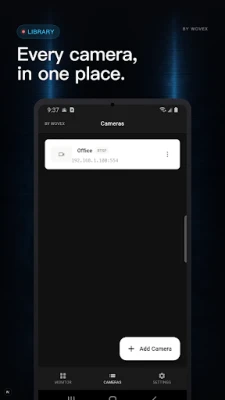
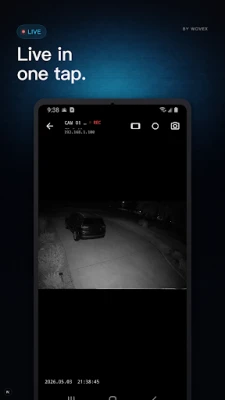
Stream the IP cameras you already own, straight from your phone. If your camera follows the ONVIF standard, the app finds it on your Wi-Fi without you typing an IP address or RTSP URL. Tap a discovered camera and enter its credentials. The live feed appears.
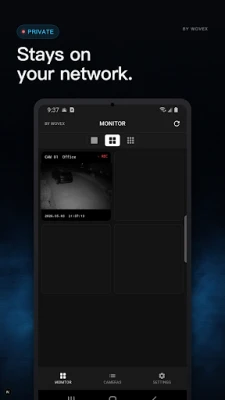
The video flows between your camera and your phone. Nothing routes through a third-party server, so the cameras you bought stay yours to watch on your own network. The first camera usually comes up about 30 seconds after install.
[ Up to 9 Cameras at Once ]
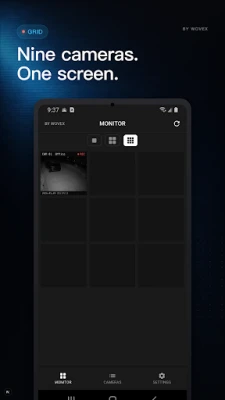
Single-channel fullscreen, 2×2 grid, or 3×3 grid. Grid views automatically use each camera's lower-resolution substream to keep mobile data usage in check, and tapping any cell switches to the main stream in fullscreen. A small shop with eight cameras fits on one screen.
[ PTZ Control ]
On cameras that support PTZ, a joystick overlay handles pan, tilt, and zoom. Move the view from the front door to the register without leaving the couch.
[ Snapshots & Screen Recording ]
Capture a still or record the fullscreen view as video. Both save to your photo library, useful for documenting deliveries, package thefts, or anything you want a timestamped clip of.
[ Main / Sub Stream Auto-Switch ]
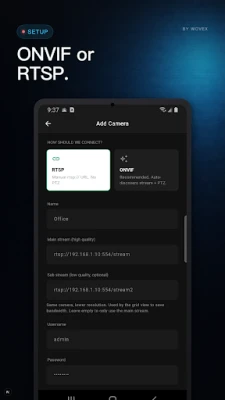
Set both the main (high-resolution) and sub (low-resolution) RTSP URLs once, and the app uses the substream in grid mode and the main stream in fullscreen. Leave the substream blank and the app falls back to main only.
[ Compatible Cameras ]
Most cameras that speak RTSP and ONVIF: Hikvision, Dahua, Reolink, Tapo, Foscam, Amcrest, Ezviz, and many others. An advanced mode lets you paste a custom RTSP URL for cameras that drift from the standard.
Permissions are limited to what the features actually need. Wi-Fi multicast is used for ONVIF discovery, and the photo permission is used for snapshot and recording saves. Location, microphone, and contacts are never requested.
If you wanted an IP camera viewer that just shows the cameras (no monthly subscription, no cloud upload), install it once and the first IP camera comes up in about half a minute. One IP camera or nine, they all show up the same way.
[ Up to 9 Cameras at Once ]
Single-channel fullscreen, 2×2 grid, or 3×3 grid. Grid views automatically use each camera's lower-resolution substream to keep mobile data usage in check, and tapping any cell switches to the main stream in fullscreen. A small shop with eight cameras fits on one screen.
[ PTZ Control ]
On cameras that support PTZ, a joystick overlay handles pan, tilt, and zoom. Move the view from the front door to the register without leaving the couch.
[ Snapshots & Screen Recording ]
Capture a still or record the fullscreen view as video. Both save to your photo library, useful for documenting deliveries, package thefts, or anything you want a timestamped clip of.
[ Main / Sub Stream Auto-Switch ]
Set both the main (high-resolution) and sub (low-resolution) RTSP URLs once, and the app uses the substream in grid mode and the main stream in fullscreen. Leave the substream blank and the app falls back to main only.
[ Compatible Cameras ]
Most cameras that speak RTSP and ONVIF: Hikvision, Dahua, Reolink, Tapo, Foscam, Amcrest, Ezviz, and many others. An advanced mode lets you paste a custom RTSP URL for cameras that drift from the standard.
Permissions are limited to what the features actually need. Wi-Fi multicast is used for ONVIF discovery, and the photo permission is used for snapshot and recording saves. Location, microphone, and contacts are never requested.
If you wanted an IP camera viewer that just shows the cameras (no monthly subscription, no cloud upload), install it once and the first IP camera comes up in about half a minute. One IP camera or nine, they all show up the same way.
Rate the App
Add Comment & Review
User Reviews
Based on 0 reviews
No reviews added yet.
Comments will not be approved to be posted if they are SPAM, abusive, off-topic, use profanity, contain a personal attack, or promote hate of any kind.









More »

Popular Apps

phpFoxPHPFOX LLC

Moon Chai StoryOlha Dobel

World War Heroes — WW2 PvP FPSAzur Interactive Games Limited

Govee LiteGovee

Build World AdventureExplore city in cube world

Viking Clan: RagnarokKano Games

Vikings: War of ClansPlarium LLC

Asphalt 9: LegendsGameloft SE

Submarine Car Diving SimulatorSwim with dolphins & penguins

Dawn of Zombies: Survival GameRoyal Ark
More »
Editor's Choice

Grim Soul: Dark Survival RPGBrickworks Games Ltd

Craft of Survival - Gladiators101XP LIMITED

Last Shelter: SurvivalLong Tech Network Limited
Dawn of Zombies: Survival GameRoyal Ark

Merge Survival : WastelandStickyHands Inc.

AoD Vikings: Valhalla GameRoboBot Studio
Viking Clan: RagnarokKano Games
Vikings: War of ClansPlarium LLC
Asphalt 9: LegendsGameloft SE

Modern Tanks: War Tank GamesXDEVS LTD