
Latest Version
Update
September 05, 2026
September 05, 2026
Developer
CodeInFaith
CodeInFaith
Categories
Tools
Tools
Platforms
Android
Android
Downloads
0
0
License
Free
Free
Package Name
com.codeinfaith.hdmimonitor
com.codeinfaith.hdmimonitor
Report
Report a Problem
Report a Problem
More About HDMI Monitor for Tablet
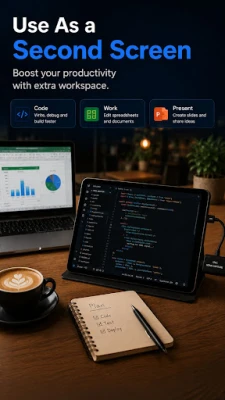
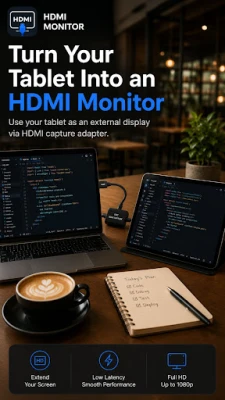
Turn your Android tablet into a portable HDMI monitor.
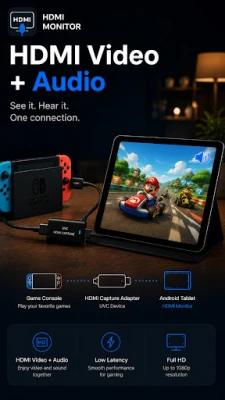
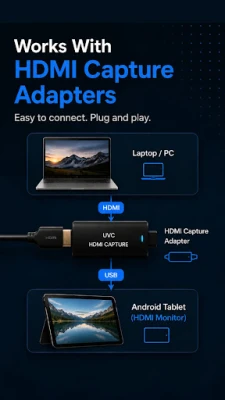
HDMI Monitor lets you view an HDMI signal fullscreen through a USB UVC HDMI capture adapter. Compatible capture adapters can also play HDMI audio through your tablet. Connect your capture card, scan for the device, and start monitoring your HDMI source on your tablet screen.
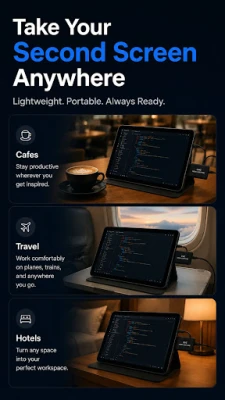
Use it for camera feeds, game consoles, laptops, mini PCs, streaming setups, field work, diagnostics, and any workflow where a lightweight external display is useful.
Key features:
- Fullscreen HDMI signal viewing
- HDMI audio playback through compatible capture adapters
- USB UVC HDMI capture adapter support
- Signal presets for quality, smoothness, and compatibility
- Pinch to zoom and pan the live preview
- Aspect controls for fit, fill, and stretch
- Rotation and flip controls for flexible setups
- Retro CRT Filter (Pro) with scanlines, richer colors, and subtle shading
- Warm fullscreen exit for faster re-entry
- Safe Eject before unplugging your capture device
- Debug diagnostics for troubleshooting UVC connections
HDMI Monitor is built for Android tablets and UVC capture cards. It does not turn a USB-C port into direct HDMI input. A compatible UVC HDMI capture adapter is required.
How it works:
1. Connect a UVC HDMI capture adapter to your Android tablet.
2. Plug your HDMI source into the capture adapter.
3. For audio, select HDMI as the sound output on your source device.
4. Open HDMI Monitor and tap Scan Device.
5. Tap Start to view and hear the signal fullscreen.
Android identifies capture adapter audio as microphone input, so microphone permission is required for HDMI audio.
Use HDMI Monitor when you need a simple, focused external display without carrying a dedicated monitor.
Use it for camera feeds, game consoles, laptops, mini PCs, streaming setups, field work, diagnostics, and any workflow where a lightweight external display is useful.
Key features:
- Fullscreen HDMI signal viewing
- HDMI audio playback through compatible capture adapters
- USB UVC HDMI capture adapter support
- Signal presets for quality, smoothness, and compatibility
- Pinch to zoom and pan the live preview
- Aspect controls for fit, fill, and stretch
- Rotation and flip controls for flexible setups
- Retro CRT Filter (Pro) with scanlines, richer colors, and subtle shading
- Warm fullscreen exit for faster re-entry
- Safe Eject before unplugging your capture device
- Debug diagnostics for troubleshooting UVC connections
HDMI Monitor is built for Android tablets and UVC capture cards. It does not turn a USB-C port into direct HDMI input. A compatible UVC HDMI capture adapter is required.
How it works:
1. Connect a UVC HDMI capture adapter to your Android tablet.
2. Plug your HDMI source into the capture adapter.
3. For audio, select HDMI as the sound output on your source device.
4. Open HDMI Monitor and tap Scan Device.
5. Tap Start to view and hear the signal fullscreen.
Android identifies capture adapter audio as microphone input, so microphone permission is required for HDMI audio.
Use HDMI Monitor when you need a simple, focused external display without carrying a dedicated monitor.
Rate the App
Add Comment & Review
User Reviews
Based on 0 reviews
No reviews added yet.
Comments will not be approved to be posted if they are SPAM, abusive, off-topic, use profanity, contain a personal attack, or promote hate of any kind.









More »

Popular Apps

phpFoxPHPFOX LLC

Moon Chai StoryOlha Dobel

World War Heroes — WW2 PvP FPSAzur Interactive Games Limited

Govee LiteGovee

Viking Clan: RagnarokKano Games

Build World AdventureExplore city in cube world

Vikings: War of ClansPlarium LLC

Asphalt 9: LegendsGameloft SE

Submarine Car Diving SimulatorSwim with dolphins & penguins

Dawn of Zombies: Survival GameRoyal Ark
More »
Editor's Choice

Grim Soul: Dark Survival RPGBrickworks Games Ltd

Craft of Survival - Gladiators101XP LIMITED

Last Shelter: SurvivalLong Tech Network Limited
Dawn of Zombies: Survival GameRoyal Ark

Merge Survival : WastelandStickyHands Inc.

AoD Vikings: Valhalla GameRoboBot Studio
Viking Clan: RagnarokKano Games
Vikings: War of ClansPlarium LLC
Asphalt 9: LegendsGameloft SE

Modern Tanks: War Tank GamesXDEVS LTD