
Latest Version
Update
August 16, 2026
August 16, 2026
Developer
PakSoft Digital Company
PakSoft Digital Company
Categories
Tools
Tools
Platforms
Android
Android
Downloads
0
0
License
Free
Free
Package Name
file.filemanager.fileexplorer.explorer
file.filemanager.fileexplorer.explorer
Report
Report a Problem
Report a Problem
More About File Manager - File Explorer
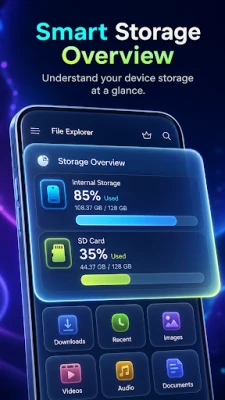
File Manager is a fast, lightweight file explorer for Android. Browse internal storage and SD card, organise documents, photos, videos, music, apps and archives — and open them all without leaving the app.
EVERYTHING SORTED FOR YOU
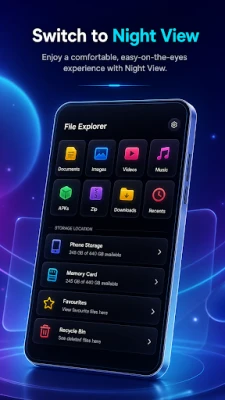
Unlike a plain folder list, this file manager groups your files into categories on the home screen, so you never have to dig for anything: Documents, Images, Videos, Music, Apps and Archives. Tap a category to see it split into albums and folders.
BROWSE ANY STORAGE
• Internal storage and SD card support
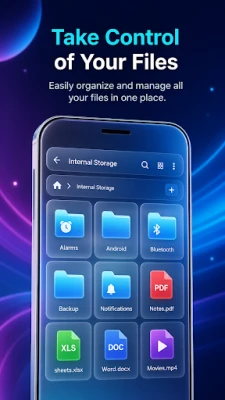
• Classic folder tree with breadcrumb navigation
• List view or grid view — switch with one tap
• Sort by name, size, date or type
• Search across your whole device
MANAGE FILES THE EASY WAY
• Multi-select — act on many files at once
• Copy, cut and paste between folders
• Rename, delete and share
• Locate — jump straight to a file's real folder
• Details — size, path, format and date at a glance
RECYCLE BIN — 30 DAYS TO CHANGE YOUR MIND
Deleted something by accident? Files go to the Recycle Bin first and stay there for 30 days. Restore in one tap, or empty the bin to free up space.
RECENTS AND FAVOURITES
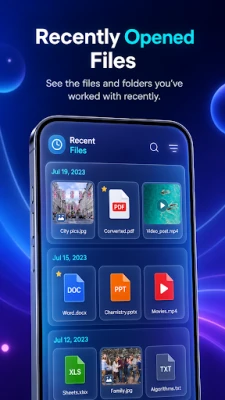
Recents shows what you opened last. Star anything to add it to Favourites, so the files you use most are always one tap away.
BUILT-IN MEDIA PLAYERS
• Photo viewer with zoom and swipe
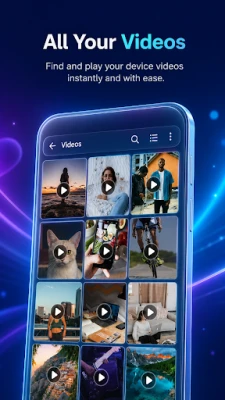
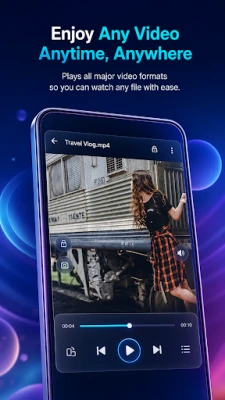
• Video player for your local files
• Music player that keeps playing in the background
The music player runs as a real background service with a media notification, so your track keeps going after you leave the screen. A mini player follows you through the app — control playback from anywhere without losing your place in the file browser.
DOCUMENTS AND ARCHIVES
PDF, Word, Excel, PowerPoint and TXT files are grouped in one place, so you stop hunting through Downloads. Open ZIP archives and extract only the files you need.
INSTALLED APPS
See every app on your device with its size and package name, then share the APK or open its app info page.
A FILE EXPLORER THAT STAYS OUT OF THE WAY
No clutter and no endless menus. This file explorer opens straight into your storage and gets you to the file you want in two or three taps. If you prefer the classic approach, the full folder tree is always one tap away.
WHY THIS FILE MANAGER
• Light on storage and memory
• Works offline — no account, no sign-up
• Clean, modern interface with dark mode
• Available in 19 languages, switchable inside the app
• Free to use — an optional Premium upgrade removes ads
PERMISSIONS
All files access is required so the app can list, open, move and delete files across your device — this is the core function of a file manager. Your files stay on your phone and are never uploaded to our servers.
Download File Manager free and take control of every file on your phone — browse internal storage and SD card, clear out what you don't need, and keep what matters one tap away.
Got a question or a feature request? Get in touch — we read every message and ship updates regularly.
Unlike a plain folder list, this file manager groups your files into categories on the home screen, so you never have to dig for anything: Documents, Images, Videos, Music, Apps and Archives. Tap a category to see it split into albums and folders.
BROWSE ANY STORAGE
• Internal storage and SD card support
• Classic folder tree with breadcrumb navigation
• List view or grid view — switch with one tap
• Sort by name, size, date or type
• Search across your whole device
MANAGE FILES THE EASY WAY
• Multi-select — act on many files at once
• Copy, cut and paste between folders
• Rename, delete and share
• Locate — jump straight to a file's real folder
• Details — size, path, format and date at a glance
RECYCLE BIN — 30 DAYS TO CHANGE YOUR MIND
Deleted something by accident? Files go to the Recycle Bin first and stay there for 30 days. Restore in one tap, or empty the bin to free up space.
RECENTS AND FAVOURITES
Recents shows what you opened last. Star anything to add it to Favourites, so the files you use most are always one tap away.
BUILT-IN MEDIA PLAYERS
• Photo viewer with zoom and swipe
• Video player for your local files
• Music player that keeps playing in the background
The music player runs as a real background service with a media notification, so your track keeps going after you leave the screen. A mini player follows you through the app — control playback from anywhere without losing your place in the file browser.
DOCUMENTS AND ARCHIVES
PDF, Word, Excel, PowerPoint and TXT files are grouped in one place, so you stop hunting through Downloads. Open ZIP archives and extract only the files you need.
INSTALLED APPS
See every app on your device with its size and package name, then share the APK or open its app info page.
A FILE EXPLORER THAT STAYS OUT OF THE WAY
No clutter and no endless menus. This file explorer opens straight into your storage and gets you to the file you want in two or three taps. If you prefer the classic approach, the full folder tree is always one tap away.
WHY THIS FILE MANAGER
• Light on storage and memory
• Works offline — no account, no sign-up
• Clean, modern interface with dark mode
• Available in 19 languages, switchable inside the app
• Free to use — an optional Premium upgrade removes ads
PERMISSIONS
All files access is required so the app can list, open, move and delete files across your device — this is the core function of a file manager. Your files stay on your phone and are never uploaded to our servers.
Download File Manager free and take control of every file on your phone — browse internal storage and SD card, clear out what you don't need, and keep what matters one tap away.
Got a question or a feature request? Get in touch — we read every message and ship updates regularly.
Rate the App
Add Comment & Review
User Reviews
Based on 0 reviews
No reviews added yet.
Comments will not be approved to be posted if they are SPAM, abusive, off-topic, use profanity, contain a personal attack, or promote hate of any kind.












More »

Popular Apps

phpFoxPHPFOX LLC

Moon Chai StoryOlha Dobel

World War Heroes — WW2 PvP FPSAzur Interactive Games Limited

Govee LiteGovee

Build World AdventureExplore city in cube world

Viking Clan: RagnarokKano Games

Vikings: War of ClansPlarium LLC

Asphalt 9: LegendsGameloft SE

Submarine Car Diving SimulatorSwim with dolphins & penguins

Dawn of Zombies: Survival GameRoyal Ark
More »
Editor's Choice

Grim Soul: Dark Survival RPGBrickworks Games Ltd

Craft of Survival - Gladiators101XP LIMITED

Last Shelter: SurvivalLong Tech Network Limited
Dawn of Zombies: Survival GameRoyal Ark

Merge Survival : WastelandStickyHands Inc.

AoD Vikings: Valhalla GameRoboBot Studio
Viking Clan: RagnarokKano Games
Vikings: War of ClansPlarium LLC
Asphalt 9: LegendsGameloft SE

Modern Tanks: War Tank GamesXDEVS LTD