

Latest Version
Update
November 02, 2026
November 02, 2026
Developer
ziofy Virgo
ziofy Virgo
Categories
Communication
Communication
Platforms
Android
Android
Downloads
0
0
License
Free
Free
Package Name
com.dialer.contacts.ai.phonebook.aimanager
com.dialer.contacts.ai.phonebook.aimanager
Report
Report a Problem
Report a Problem
More About Contacts - AI Manager
Make calling and contact management easier with Contacts – Smart Dialer & AI Contact Manager. Find numbers faster, organize your address book, clean up duplicate entries, and use helpful AI-powered tools to simplify everyday tasks.
From smart T9 dialing and contact search to favorites, call history, and AI-assisted organization, everything is designed to help you manage your contacts in one convenient place.
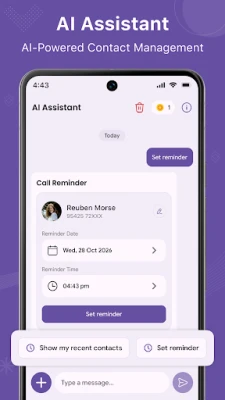
🤖 AI-Powered Contact Management
Manage your address book more efficiently with intelligent tools designed to make everyday contact tasks easier. Use the AI features available in the app to simplify contact-related activities and reduce manual effort.
• Get AI assistance for supported contact-management tasks
• Make finding and organizing contact information easier
• Simplify everyday actions with intelligent assistance
• Save time when managing your address book
AI capabilities may depend on the features enabled in the app and the information you provide.
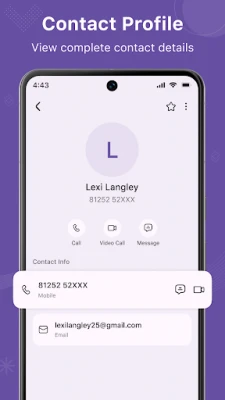
📇 Smart Contact Manager
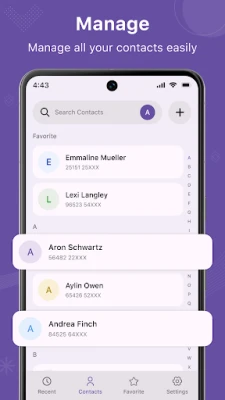
Keep your phone book organized in a clean, easy-to-navigate list. Browse saved names and phone numbers, view contact details, and find the people you need without unnecessary scrolling.
• View, add, and edit contacts
• Search saved names and numbers
• Organize personal and professional contacts
• Access supported contacts from your device, SIM card, or connected accounts
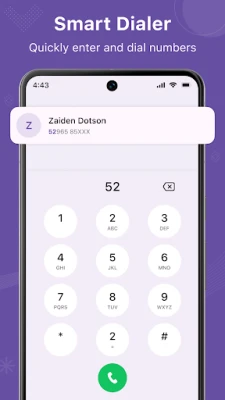
⌨️ Smart T9 Dialer & Quick Calling
Find contacts directly from the numeric keypad using T9 search. Enter a phone number or use matching keypad digits to find contacts by name, where supported.
• Easy-to-use dial pad
• T9 search by name or number
• Quick number entry
• Convenient access to matching contacts
• Calling through your device's supported phone interface
🔍 Fast Contact Search
Find the right person without browsing your entire address book. Search by name or phone number to locate matching contacts quickly and access their saved details.
🕒 Recent Calls & Call History
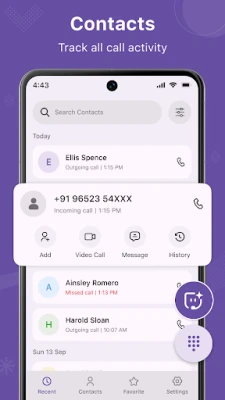
Review recent calling activity and find people you want to contact again. Where supported and permitted, view incoming, outgoing, and missed calls, along with available dates, times, and call durations.
• Review recent calls
• Find missed calls
• Quickly return calls
• Check available call details
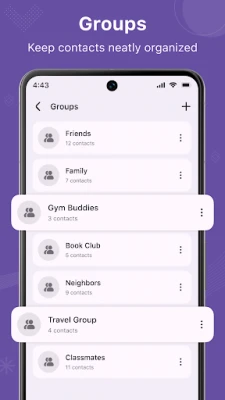
⭐ Favorites & Contact Groups
Keep frequently contacted people close at hand. Add important contacts to Favorites and organize supported contacts into groups for family, friends, colleagues, or other needs.
Spend less time searching and keep your important connections organized.
🧹 Duplicate Contact Cleaner
Make your phone book easier to manage by identifying duplicate contact entries. Review matching records and combine duplicates when supported, helping you maintain a cleaner and more organized address book.
♻️ Deleted Contact Recovery
Need a contact you deleted by mistake? Check the app's supported Trash or recovery feature to restore contacts when a recoverable copy is available. Recovery depends on how contacts were stored and whether the necessary data or backup is available.
➕ Add Contacts & Manage Accounts
Save new contacts with names, phone numbers, email addresses, and other supported information. View available contact sources to manage contacts stored on your device, SIM card, or connected accounts.
📞 Optional After-Call Screen
Access shortcuts to contacts and recent calls after a phone call ends. Enable or disable the feature anytime in the app settings.
The feature is designed to provide convenient access to contact-management tools and does not require call recording.
🔒 Privacy & User Control
Your privacy matters. The app uses permissions needed for the features you choose to use. For AI-powered features, review the relevant in-app information and privacy policy to understand how submitted information is processed.
Please review the app's privacy policy and Google Play Data safety information for details about data collection, use, and sharing.
🤖 AI-Powered Contact Management
Manage your address book more efficiently with intelligent tools designed to make everyday contact tasks easier. Use the AI features available in the app to simplify contact-related activities and reduce manual effort.
• Get AI assistance for supported contact-management tasks
• Make finding and organizing contact information easier
• Simplify everyday actions with intelligent assistance
• Save time when managing your address book
AI capabilities may depend on the features enabled in the app and the information you provide.
📇 Smart Contact Manager
Keep your phone book organized in a clean, easy-to-navigate list. Browse saved names and phone numbers, view contact details, and find the people you need without unnecessary scrolling.
• View, add, and edit contacts
• Search saved names and numbers
• Organize personal and professional contacts
• Access supported contacts from your device, SIM card, or connected accounts
⌨️ Smart T9 Dialer & Quick Calling
Find contacts directly from the numeric keypad using T9 search. Enter a phone number or use matching keypad digits to find contacts by name, where supported.
• Easy-to-use dial pad
• T9 search by name or number
• Quick number entry
• Convenient access to matching contacts
• Calling through your device's supported phone interface
🔍 Fast Contact Search
Find the right person without browsing your entire address book. Search by name or phone number to locate matching contacts quickly and access their saved details.
🕒 Recent Calls & Call History
Review recent calling activity and find people you want to contact again. Where supported and permitted, view incoming, outgoing, and missed calls, along with available dates, times, and call durations.
• Review recent calls
• Find missed calls
• Quickly return calls
• Check available call details
⭐ Favorites & Contact Groups
Keep frequently contacted people close at hand. Add important contacts to Favorites and organize supported contacts into groups for family, friends, colleagues, or other needs.
Spend less time searching and keep your important connections organized.
🧹 Duplicate Contact Cleaner
Make your phone book easier to manage by identifying duplicate contact entries. Review matching records and combine duplicates when supported, helping you maintain a cleaner and more organized address book.
♻️ Deleted Contact Recovery
Need a contact you deleted by mistake? Check the app's supported Trash or recovery feature to restore contacts when a recoverable copy is available. Recovery depends on how contacts were stored and whether the necessary data or backup is available.
➕ Add Contacts & Manage Accounts
Save new contacts with names, phone numbers, email addresses, and other supported information. View available contact sources to manage contacts stored on your device, SIM card, or connected accounts.
📞 Optional After-Call Screen
Access shortcuts to contacts and recent calls after a phone call ends. Enable or disable the feature anytime in the app settings.
The feature is designed to provide convenient access to contact-management tools and does not require call recording.
🔒 Privacy & User Control
Your privacy matters. The app uses permissions needed for the features you choose to use. For AI-powered features, review the relevant in-app information and privacy policy to understand how submitted information is processed.
Please review the app's privacy policy and Google Play Data safety information for details about data collection, use, and sharing.
Rate the App
Add Comment & Review
User Reviews
Based on 0 reviews
No reviews added yet.
Comments will not be approved to be posted if they are SPAM, abusive, off-topic, use profanity, contain a personal attack, or promote hate of any kind.












More »

Popular Apps

phpFoxPHPFOX LLC

Moon Chai StoryOlha Dobel

World War Heroes — WW2 PvP FPSAzur Interactive Games Limited

Govee LiteGovee

AvSeaAvionics Electronics Geeks!

Viking Clan: RagnarokKano Games

Vikings: War of ClansPlarium LLC

Build World AdventureExplore city in cube world

Asphalt 9: LegendsGameloft SE

Dawn of Zombies: Survival GameRoyal Ark
More »
Editor's Choice

Grim Soul: Dark Survival RPGBrickworks Games Ltd

Craft of Survival - Gladiators101XP LIMITED

Last Shelter: SurvivalLong Tech Network Limited
Dawn of Zombies: Survival GameRoyal Ark

Merge Survival : WastelandStickyHands Inc.

AoD Vikings: Valhalla GameRoboBot Studio
Viking Clan: RagnarokKano Games
Vikings: War of ClansPlarium LLC
Asphalt 9: LegendsGameloft SE

Modern Tanks: War Tank GamesXDEVS LTD