

Latest Version
Update
November 08, 2026
November 08, 2026
Developer
Hita Labs FZC
Hita Labs FZC
Categories
Video Players
Video Players
Platforms
Android
Android
Downloads
0
0
License
Free
Free
Package Name
com.captionist.ai
com.captionist.ai
Report
Report a Problem
Report a Problem
More About Captionist: AI Video Studio
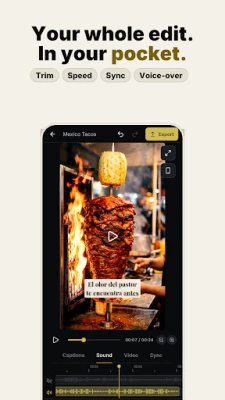
Turn raw footage into polished captioned videos, right from your phone.
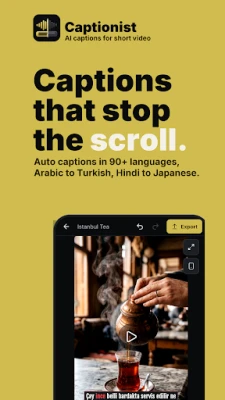
Captionist is an AI video studio for creators who want accurate captions, fast editing, natural translation and optional AI dubbing, without moving an entire project into the cloud.
Captions in 90+ languages
• Automatically transcribe speech into editable, timed captions
• Fine-tune timing and edit individual words
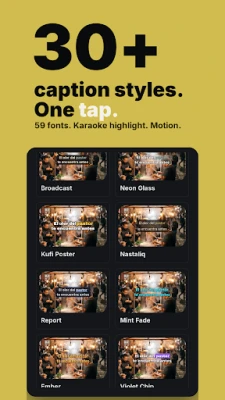
• 30+ caption styles, 59 fonts, karaoke highlight and motion
• Show two languages at once, one under the other
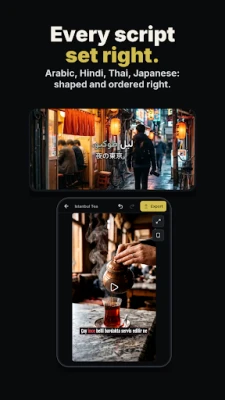
• Scripts shape and order correctly, including Arabic, Persian, Urdu, Hindi, Thai, Japanese and Korean
Translate and dub
• Translate caption tracks and keep the source timing
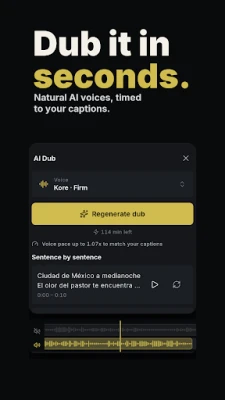
• Dub in 20+ languages with studio voices, timed to your captions
• Record voiceovers and, with explicit consent, create a reusable voice
• Add dubbing minutes when you need more
Edit and check before you post
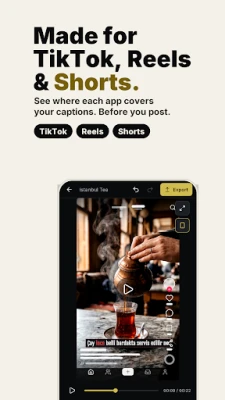
• Preview your video with TikTok, Reels or Shorts layouts over it, so you see what each app will cover
• Trim, split, crop, adjust, filter and arrange clips
• Fine-tune captions and sound on one timeline, with undo and redo
• Export at 720p, 1080p, 1440p or 4K when your source video and device support it
Private by design
Projects and source videos stay on your device. When you choose a cloud AI feature, only the audio or caption text needed for that request is sent securely to service providers for processing. Account and data deletion controls are in the app.
Captionist requires an account. Free tools are available; paid plans unlock higher limits and advanced features.
Captions in 90+ languages
• Automatically transcribe speech into editable, timed captions
• Fine-tune timing and edit individual words
• 30+ caption styles, 59 fonts, karaoke highlight and motion
• Show two languages at once, one under the other
• Scripts shape and order correctly, including Arabic, Persian, Urdu, Hindi, Thai, Japanese and Korean
Translate and dub
• Translate caption tracks and keep the source timing
• Dub in 20+ languages with studio voices, timed to your captions
• Record voiceovers and, with explicit consent, create a reusable voice
• Add dubbing minutes when you need more
Edit and check before you post
• Preview your video with TikTok, Reels or Shorts layouts over it, so you see what each app will cover
• Trim, split, crop, adjust, filter and arrange clips
• Fine-tune captions and sound on one timeline, with undo and redo
• Export at 720p, 1080p, 1440p or 4K when your source video and device support it
Private by design
Projects and source videos stay on your device. When you choose a cloud AI feature, only the audio or caption text needed for that request is sent securely to service providers for processing. Account and data deletion controls are in the app.
Captionist requires an account. Free tools are available; paid plans unlock higher limits and advanced features.
Rate the App
Add Comment & Review
User Reviews
Based on 0 reviews
No reviews added yet.
Comments will not be approved to be posted if they are SPAM, abusive, off-topic, use profanity, contain a personal attack, or promote hate of any kind.















More »

Popular Apps

phpFoxPHPFOX LLC

Moon Chai StoryOlha Dobel

World War Heroes — WW2 PvP FPSAzur Interactive Games Limited

Govee LiteGovee
AvSeaAvionics Electronics Geeks!

Viking Clan: RagnarokKano Games

Vikings: War of ClansPlarium LLC

Build World AdventureExplore city in cube world

Asphalt 9: LegendsGameloft SE

Dawn of Zombies: Survival GameRoyal Ark
More »
Editor's Choice
Grim Soul: Dark Survival RPGBrickworks Games Ltd

Craft of Survival - Gladiators101XP LIMITED

Last Shelter: SurvivalLong Tech Network Limited
Dawn of Zombies: Survival GameRoyal Ark

Merge Survival : WastelandStickyHands Inc.

AoD Vikings: Valhalla GameRoboBot Studio
Viking Clan: RagnarokKano Games
Vikings: War of ClansPlarium LLC
Asphalt 9: LegendsGameloft SE

Modern Tanks: War Tank GamesXDEVS LTD