

Latest Version
Update
August 18, 2026
August 18, 2026
Developer
AZ Screen Recorder
AZ Screen Recorder
Categories
Video Players
Video Players
Platforms
Android
Android
Downloads
0
0
License
Free
Free
Package Name
video.risenapps.video.subtitle.caption
video.risenapps.video.subtitle.caption
Report
Report a Problem
Report a Problem
More About CapFlow: Captions & Subtitles
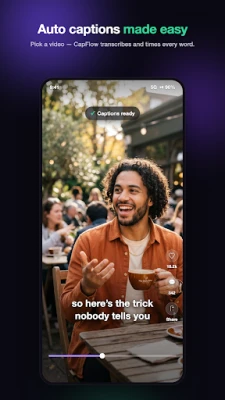
CapFlow makes it easy to add subtitles to any video. It's a subtitle maker and auto caption generator that turns speech into editable, time-synced captions — style them and burn them into the video, or export a subtitle file. No watermark.
Built for TikTok, Reels, and YouTube Shorts creators — and anyone who wants clear, accessible video — CapFlow helps you create and customize captions and subtitles.
WHY CAPFLOW
• Automatic captions with editable, word-level timing
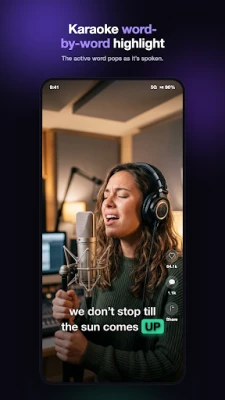
• Karaoke word-by-word highlighting that follows the speaker
• Full control over how your captions look and read
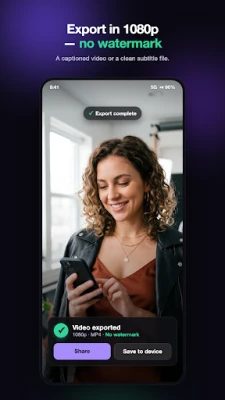
• No watermark on your exported video
• Export a captioned video or a subtitle file (SRT / VTT)
FEATURES
• Automatic subtitles — the AI caption generator creates editable, word-timed captions
• Full caption editor — tap to fix text, split or merge lines, and drag to retime (snaps to words)
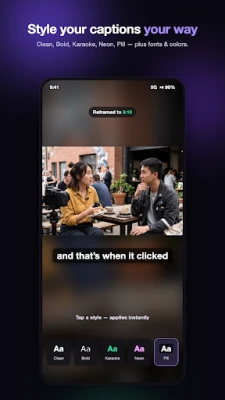
• Caption styles — Clean, Bold Outline, Karaoke, Pill, Minimal, and Neon presets, plus custom fonts, colors, size, and position
• Animated captions — word-by-word karaoke highlight for that viral short-form look
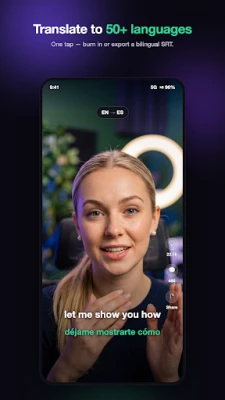
• Translate subtitles — translate captions into 50+ languages, or transcribe-to-English in one tap; export a bilingual SRT
• Reframe for any platform — 9:16, 1:1, or 16:9 canvas with blurred fill for TikTok, Reels, Shorts, and feed videos
• Filler-word cleanup — flag and remove "um" and "uh" with one tap
• Video to text — transcribe any clip and export a clean SRT or VTT for YouTube, editing apps, or your records
PERFECT FOR
• TikTok, Instagram Reels & YouTube Shorts creators
• Podcasters turning audio into captioned clips
• Making videos accessible with closed captions
• Anyone who wants to add subtitles to video
HOW IT WORKS
1. Pick a video (or share one to CapFlow)
2. CapFlow generates captions automatically
3. Style them and fine-tune the wording
4. Export a captioned video or an SRT file
Add subtitles to your next video with CapFlow — the subtitle maker and auto caption generator for creators. Auto captions, karaoke text, styles, and translation in one app.
TikTok, Instagram, Reels, YouTube, and Shorts are trademarks of their respective owners. CapFlow is an independent app and is not affiliated with, endorsed by, or sponsored by any of these platforms.
WHY CAPFLOW
• Automatic captions with editable, word-level timing
• Karaoke word-by-word highlighting that follows the speaker
• Full control over how your captions look and read
• No watermark on your exported video
• Export a captioned video or a subtitle file (SRT / VTT)
FEATURES
• Automatic subtitles — the AI caption generator creates editable, word-timed captions
• Full caption editor — tap to fix text, split or merge lines, and drag to retime (snaps to words)
• Caption styles — Clean, Bold Outline, Karaoke, Pill, Minimal, and Neon presets, plus custom fonts, colors, size, and position
• Animated captions — word-by-word karaoke highlight for that viral short-form look
• Translate subtitles — translate captions into 50+ languages, or transcribe-to-English in one tap; export a bilingual SRT
• Reframe for any platform — 9:16, 1:1, or 16:9 canvas with blurred fill for TikTok, Reels, Shorts, and feed videos
• Filler-word cleanup — flag and remove "um" and "uh" with one tap
• Video to text — transcribe any clip and export a clean SRT or VTT for YouTube, editing apps, or your records
PERFECT FOR
• TikTok, Instagram Reels & YouTube Shorts creators
• Podcasters turning audio into captioned clips
• Making videos accessible with closed captions
• Anyone who wants to add subtitles to video
HOW IT WORKS
1. Pick a video (or share one to CapFlow)
2. CapFlow generates captions automatically
3. Style them and fine-tune the wording
4. Export a captioned video or an SRT file
Add subtitles to your next video with CapFlow — the subtitle maker and auto caption generator for creators. Auto captions, karaoke text, styles, and translation in one app.
TikTok, Instagram, Reels, YouTube, and Shorts are trademarks of their respective owners. CapFlow is an independent app and is not affiliated with, endorsed by, or sponsored by any of these platforms.
Rate the App
Add Comment & Review
User Reviews
Based on 0 reviews
No reviews added yet.
Comments will not be approved to be posted if they are SPAM, abusive, off-topic, use profanity, contain a personal attack, or promote hate of any kind.







More »

Popular Apps

phpFoxPHPFOX LLC

Moon Chai StoryOlha Dobel

World War Heroes — WW2 PvP FPSAzur Interactive Games Limited

Govee LiteGovee

Build World AdventureExplore city in cube world

Viking Clan: RagnarokKano Games

Vikings: War of ClansPlarium LLC

Asphalt 9: LegendsGameloft SE

Submarine Car Diving SimulatorSwim with dolphins & penguins

Dawn of Zombies: Survival GameRoyal Ark
More »
Editor's Choice

Grim Soul: Dark Survival RPGBrickworks Games Ltd

Craft of Survival - Gladiators101XP LIMITED

Last Shelter: SurvivalLong Tech Network Limited
Dawn of Zombies: Survival GameRoyal Ark

Merge Survival : WastelandStickyHands Inc.

AoD Vikings: Valhalla GameRoboBot Studio
Viking Clan: RagnarokKano Games
Vikings: War of ClansPlarium LLC
Asphalt 9: LegendsGameloft SE

Modern Tanks: War Tank GamesXDEVS LTD