

Latest Version
Update
November 13, 2026
November 13, 2026
Developer
Brick LLC
Brick LLC
Categories
Productivity
Productivity
Platforms
Android
Android
Downloads
0
0
License
Free
Free
Package Name
com.brickllc.brick
com.brickllc.brick
Report
Report a Problem
Report a Problem
More About Brick - Ditch Distractions
Make your phone a tool again.
Brick was created because we believe life is better when phones help us do more of what matters, instead of constantly distracting us with things that don't. As two young guys, we were raised on smartphones, so we decided to make something to help us use them the way they were meant to be used.
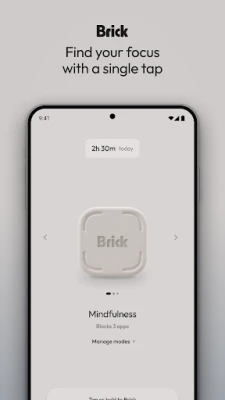
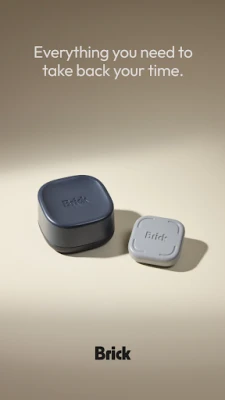
Brick is a combination of software and NFC powered hardware that temporarily removes distracting apps and websites from your phone, leaving only the powerful tools you choose.
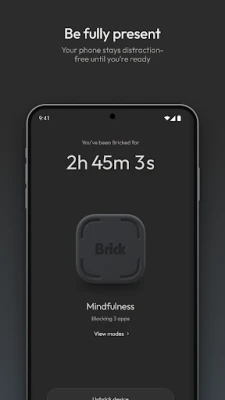
With Brick, simply tap your phone to your Brick device to block all distracting apps. Until you return to the device, you'll be free to engage with what really matters: getting productive work done, spending time with friends and family, or simply going for a walk. Once you're ready to reconnect, just tap the device again to unblock everything.
WHAT YOU CAN DO WITH BRICK
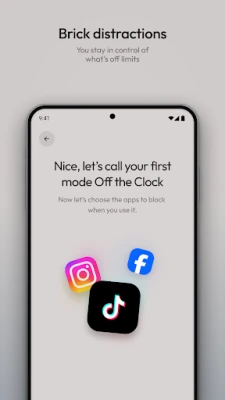
• Block distracting apps and websites with a tap of your Brick device
• Choose exactly what to block, or choose the few apps you want to keep
• Create modes for different parts of your day, like a work mode that keeps only calls, texts and email, or a no social mode that blocks just the feeds that pull you in
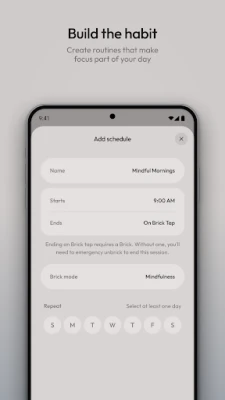
• Set schedules so Brick turns on by itself, right when you need it
• Use Strict Mode so Brick can't be switched off until you tap your Brick again
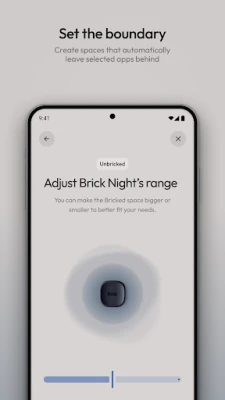
• Pair Brick Night to block the apps in your routine when your phone is in the Brick Night zone, so your evenings and mornings stay yours
• Track your history and watch your undistracted time grow
• Contact the creators with feature requests, ideas and fixes right from the app
WHY A PHYSICAL DEVICE
Timers, grayscale and app limits are easy to ignore when they live on the same phone you're trying to put down. Brick adds a small, real step between you and the scroll. To unblock, you have to get up and go to your Brick. That little bit of friction is often all it takes to stay present.
GETTING STARTED
1. Download the app and pair it with your Brick
2. Choose the apps and websites you want to block, or set a schedule
3. Turn on the Accessibility Service when Brick asks, so blocking can work
4. Tap your phone to your Brick and enjoy the quiet
BUILT FOR REAL LIFE
Brick is for anyone who wants their phone to work for them: students who want to focus, parents who want more present evenings, professionals protecting deep work, and anyone who's tired of losing hours to the scroll. Leave your Brick on your desk, by the door or on your nightstand, and let it hold the line for you.
PRIVACY FIRST
We believe privacy is essential. Brick only uses what it needs to block the apps and websites you choose. See our Privacy Policy for more information: https://getbrick.com/pages/privacy-policy
Questions or feedback? We'd love to hear from you in the app or at getbrick.com.
HOW BRICK USES THE ACCESSIBILITYSERVICE API
Brick uses the Android AccessibilityService API to block the apps and websites you choose. This is core to how Brick works. Without it, Brick can't block anything.
With your permission, the AccessibilityService API lets Brick:
• Detect which app is open on your screen, so it knows when you open an app on your block list
• Read the web address in supported browsers, so it can block websites on your list
• Read text on Android Settings pages for Brick, only to stop Brick from being turned off during Strict Mode
• Show Brick's block screen over blocked apps and sites, and press Back or Home for you to leave them
This information is processed on your phone. It is not sold or shared. Brick never reads your messages, passwords or anything you type.
Brick asks for your consent in the app before turning this on. You can turn it off anytime in Settings > Accessibility > Brick App Blocker. If Strict Mode is on, end your Brick session first.
Brick is a combination of software and NFC powered hardware that temporarily removes distracting apps and websites from your phone, leaving only the powerful tools you choose.
With Brick, simply tap your phone to your Brick device to block all distracting apps. Until you return to the device, you'll be free to engage with what really matters: getting productive work done, spending time with friends and family, or simply going for a walk. Once you're ready to reconnect, just tap the device again to unblock everything.
WHAT YOU CAN DO WITH BRICK
• Block distracting apps and websites with a tap of your Brick device
• Choose exactly what to block, or choose the few apps you want to keep
• Create modes for different parts of your day, like a work mode that keeps only calls, texts and email, or a no social mode that blocks just the feeds that pull you in
• Set schedules so Brick turns on by itself, right when you need it
• Use Strict Mode so Brick can't be switched off until you tap your Brick again
• Pair Brick Night to block the apps in your routine when your phone is in the Brick Night zone, so your evenings and mornings stay yours
• Track your history and watch your undistracted time grow
• Contact the creators with feature requests, ideas and fixes right from the app
WHY A PHYSICAL DEVICE
Timers, grayscale and app limits are easy to ignore when they live on the same phone you're trying to put down. Brick adds a small, real step between you and the scroll. To unblock, you have to get up and go to your Brick. That little bit of friction is often all it takes to stay present.
GETTING STARTED
1. Download the app and pair it with your Brick
2. Choose the apps and websites you want to block, or set a schedule
3. Turn on the Accessibility Service when Brick asks, so blocking can work
4. Tap your phone to your Brick and enjoy the quiet
BUILT FOR REAL LIFE
Brick is for anyone who wants their phone to work for them: students who want to focus, parents who want more present evenings, professionals protecting deep work, and anyone who's tired of losing hours to the scroll. Leave your Brick on your desk, by the door or on your nightstand, and let it hold the line for you.
PRIVACY FIRST
We believe privacy is essential. Brick only uses what it needs to block the apps and websites you choose. See our Privacy Policy for more information: https://getbrick.com/pages/privacy-policy
Questions or feedback? We'd love to hear from you in the app or at getbrick.com.
HOW BRICK USES THE ACCESSIBILITYSERVICE API
Brick uses the Android AccessibilityService API to block the apps and websites you choose. This is core to how Brick works. Without it, Brick can't block anything.
With your permission, the AccessibilityService API lets Brick:
• Detect which app is open on your screen, so it knows when you open an app on your block list
• Read the web address in supported browsers, so it can block websites on your list
• Read text on Android Settings pages for Brick, only to stop Brick from being turned off during Strict Mode
• Show Brick's block screen over blocked apps and sites, and press Back or Home for you to leave them
This information is processed on your phone. It is not sold or shared. Brick never reads your messages, passwords or anything you type.
Brick asks for your consent in the app before turning this on. You can turn it off anytime in Settings > Accessibility > Brick App Blocker. If Strict Mode is on, end your Brick session first.
Rate the App
Add Comment & Review
User Reviews
Based on 0 reviews
No reviews added yet.
Comments will not be approved to be posted if they are SPAM, abusive, off-topic, use profanity, contain a personal attack, or promote hate of any kind.









More »

Popular Apps

phpFoxPHPFOX LLC

Moon Chai StoryOlha Dobel

World War Heroes — WW2 PvP FPSAzur Interactive Games Limited
Govee LiteGovee

AvSeaAvionics Electronics Geeks!

Viking Clan: RagnarokKano Games

Vikings: War of ClansPlarium LLC

Build World AdventureExplore city in cube world

Asphalt 9: LegendsGameloft SE

Dawn of Zombies: Survival GameRoyal Ark
More »
Editor's Choice

Grim Soul: Dark Survival RPGBrickworks Games Ltd

Craft of Survival - Gladiators101XP LIMITED

Last Shelter: SurvivalLong Tech Network Limited
Dawn of Zombies: Survival GameRoyal Ark

Merge Survival : WastelandStickyHands Inc.

AoD Vikings: Valhalla GameRoboBot Studio
Viking Clan: RagnarokKano Games
Vikings: War of ClansPlarium LLC
Asphalt 9: LegendsGameloft SE

Modern Tanks: War Tank GamesXDEVS LTD