

Latest Version
Update
November 15, 2026
November 15, 2026
Developer
piapps
piapps
Categories
Tools
Tools
Platforms
Android
Android
Downloads
0
0
License
Free
Free
Package Name
com.social.autoclicker
com.social.autoclicker
Report
Report a Problem
Report a Problem
More About Auto Clicker - Tap Swipe Hold
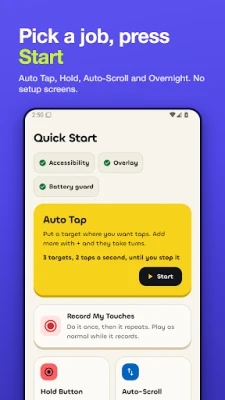
Auto Clicker taps, holds and swipes for you: keep an idle game going overnight, collect daily rewards, or scroll a feed hands-free. Pick a job, press Start, and your phone does the tapping.
Tired of tapping the same spot a thousand times? Add your targets, press Start and let this easy auto tapper do the repetitive part. Stop it any time with Volume Down twice or a shake.
GREAT FOR
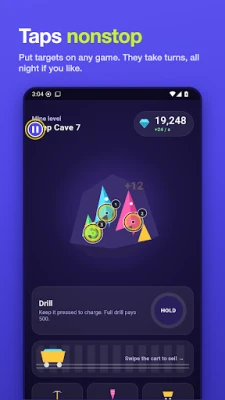
• Idle and clicker games that need constant tapping: a gaming auto clicker that keeps going
• Daily rewards and check-ins you would rather not forget
• Scrolling Shorts, comics or articles hands-free while you cook
• Holding a button down for as long as a task needs
• Sore fingers: a touch assistant for arthritis, limited dexterity or repetitive strain
KEY FEATURES
• Numbered targets: place several and they are tapped in order
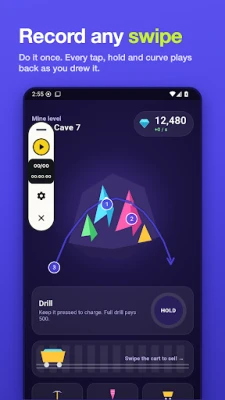
• Gesture recorder: a recorded swipe or curve replays exactly as you drew it
• Hold: press and hold a spot for as long as you need
• Speed: from a slow automatic tap to super fast, or set any gap in ms, seconds or minutes
• Stop conditions: run until stopped, for a set time, until a set time, or for a number of loops
• Floating controls: drag them anywhere; press and hold to pause and open the panel
• Live view: each step's path, a ripple at every tap and a ring while a run is going
• 3-2-1 countdown: start when you are ready
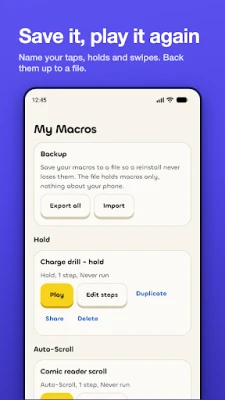
• Macro editor: rename, edit step by step, duplicate, share, export and import saved macros
• Run log: see what happened while you were away
• Auto pause: waits when the screen locks, the battery is low or a system screen is in front
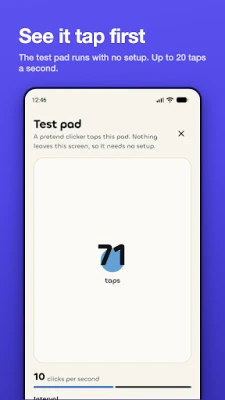
• Test pad: a tap simulator to try it before you turn on any permission
• Battery guides for phones that close apps, plus an auto-start check
ONE-TAP JOBS
• Rapid Tap: one spot, as fast or as slowly as you choose
• Hold Button: press and hold
• Auto Scroll: swipe through a feed, comic or page on repeat
• Overnight AFK: a long, steady run, with a dimmer for OLED screens
• Multi-Point Loop: several numbered targets
• Record My Touches: a macro recorder for taps, holds and swipes
NO SURPRISES
• It keeps running: if a battery saver could end a run, the app says so and shows the fix
• Ads only at breaks: never during a run, over the controls or before you press Start
• One price: Remove Ads is a single payment, shown before you pay, and nothing renews
• Permissions explained: each one is described before Android Settings opens
• Private: no account, and your macros and run log stay on your phone unless you export them. Anonymous usage counts and crash reports never include your macros, taps or screen. Ads come from Google, and where the law asks, you choose first
FREE, WITH ONE OPTIONAL PURCHASE
A simple auto clicker where every job is free: floating controls, emergency stop, unlimited macros, the overnight dimmer, export and import. Ads show only at breaks. Remove Ads takes them away for good with one payment, restored on any phone with your Google account. No subscription.
ACCESSIBILITY SERVICE DISCLOSURE
Auto Clicker uses Android's Accessibility service to do three things only: perform the taps, holds and swipes you set up, at the spots you choose; listen for Volume Down so you can stop a run; and notice which app is in front (its package and class name only), so a run pauses instead of tapping on a settings screen. It never reads what is on your screen and never sees what you type. You turn it on yourself in Android settings, and you can turn it off at any time.
Auto Clicker also asks to display over other apps (for the floating controls) and, optionally, to ignore battery optimisation (so long runs keep going). Each is explained first.
Some apps and games do not allow automated input. Check the rules of anything you use it with. Auto Clicker does not hide itself or get around any app's protections.
A mobile auto clicker for touch automation and tap automation: download the autoclicker and let your phone do the tapping.
GREAT FOR
• Idle and clicker games that need constant tapping: a gaming auto clicker that keeps going
• Daily rewards and check-ins you would rather not forget
• Scrolling Shorts, comics or articles hands-free while you cook
• Holding a button down for as long as a task needs
• Sore fingers: a touch assistant for arthritis, limited dexterity or repetitive strain
KEY FEATURES
• Numbered targets: place several and they are tapped in order
• Gesture recorder: a recorded swipe or curve replays exactly as you drew it
• Hold: press and hold a spot for as long as you need
• Speed: from a slow automatic tap to super fast, or set any gap in ms, seconds or minutes
• Stop conditions: run until stopped, for a set time, until a set time, or for a number of loops
• Floating controls: drag them anywhere; press and hold to pause and open the panel
• Live view: each step's path, a ripple at every tap and a ring while a run is going
• 3-2-1 countdown: start when you are ready
• Macro editor: rename, edit step by step, duplicate, share, export and import saved macros
• Run log: see what happened while you were away
• Auto pause: waits when the screen locks, the battery is low or a system screen is in front
• Test pad: a tap simulator to try it before you turn on any permission
• Battery guides for phones that close apps, plus an auto-start check
ONE-TAP JOBS
• Rapid Tap: one spot, as fast or as slowly as you choose
• Hold Button: press and hold
• Auto Scroll: swipe through a feed, comic or page on repeat
• Overnight AFK: a long, steady run, with a dimmer for OLED screens
• Multi-Point Loop: several numbered targets
• Record My Touches: a macro recorder for taps, holds and swipes
NO SURPRISES
• It keeps running: if a battery saver could end a run, the app says so and shows the fix
• Ads only at breaks: never during a run, over the controls or before you press Start
• One price: Remove Ads is a single payment, shown before you pay, and nothing renews
• Permissions explained: each one is described before Android Settings opens
• Private: no account, and your macros and run log stay on your phone unless you export them. Anonymous usage counts and crash reports never include your macros, taps or screen. Ads come from Google, and where the law asks, you choose first
FREE, WITH ONE OPTIONAL PURCHASE
A simple auto clicker where every job is free: floating controls, emergency stop, unlimited macros, the overnight dimmer, export and import. Ads show only at breaks. Remove Ads takes them away for good with one payment, restored on any phone with your Google account. No subscription.
ACCESSIBILITY SERVICE DISCLOSURE
Auto Clicker uses Android's Accessibility service to do three things only: perform the taps, holds and swipes you set up, at the spots you choose; listen for Volume Down so you can stop a run; and notice which app is in front (its package and class name only), so a run pauses instead of tapping on a settings screen. It never reads what is on your screen and never sees what you type. You turn it on yourself in Android settings, and you can turn it off at any time.
Auto Clicker also asks to display over other apps (for the floating controls) and, optionally, to ignore battery optimisation (so long runs keep going). Each is explained first.
Some apps and games do not allow automated input. Check the rules of anything you use it with. Auto Clicker does not hide itself or get around any app's protections.
A mobile auto clicker for touch automation and tap automation: download the autoclicker and let your phone do the tapping.
Rate the App
Add Comment & Review
User Reviews
Based on 0 reviews
No reviews added yet.
Comments will not be approved to be posted if they are SPAM, abusive, off-topic, use profanity, contain a personal attack, or promote hate of any kind.















More »

Popular Apps

phpFoxPHPFOX LLC

Moon Chai StoryOlha Dobel

World War Heroes — WW2 PvP FPSAzur Interactive Games Limited

Govee LiteGovee

AvSeaAvionics Electronics Geeks!

Viking Clan: RagnarokKano Games

Vikings: War of ClansPlarium LLC

Build World AdventureExplore city in cube world

Asphalt 9: LegendsGameloft SE

Dawn of Zombies: Survival GameRoyal Ark
More »
Editor's Choice

Grim Soul: Dark Survival RPGBrickworks Games Ltd

Craft of Survival - Gladiators101XP LIMITED

Last Shelter: SurvivalLong Tech Network Limited
Dawn of Zombies: Survival GameRoyal Ark

Merge Survival : WastelandStickyHands Inc.

AoD Vikings: Valhalla GameRoboBot Studio
Viking Clan: RagnarokKano Games
Vikings: War of ClansPlarium LLC
Asphalt 9: LegendsGameloft SE

Modern Tanks: War Tank GamesXDEVS LTD