

Latest Version
Update
September 02, 2026
September 02, 2026
Developer
Mobilebiz Systems
Mobilebiz Systems
Categories
Tools
Tools
Platforms
Android
Android
Downloads
0
0
License
Free
Free
Package Name
com.mobilebizco.colortappro
com.mobilebizco.colortappro
Report
Report a Problem
Report a Problem
More About Auto Clicker - ColorTap Pro
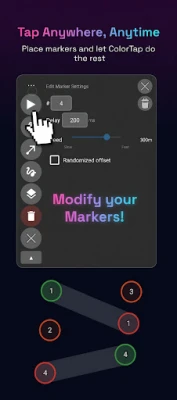
ColorTap is a powerful screen automation tool that taps, drags, and replays custom gestures for you — all controlled from a floating overlay. Whether you're automating repetitive tasks, simplifying workflows, or building reactive automations that respond to what's on your screen, ColorTap gives you precise control with a clean, lightweight interface.
It's the perfect app for games and repetitive systems!
KEY FEATURES
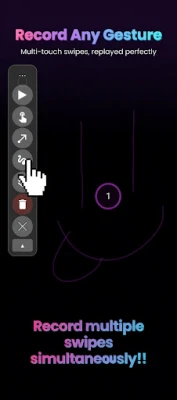
• Tap, drag, and custom gesture automation
Place markers anywhere on screen and configure each one's delay, hold duration, and order. Record your own multi-touch gestures and replay them perfectly.
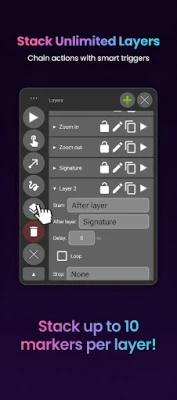
• Multi-layer execution
Organize actions into layers and chain them with start/stop conditions. Run sequences in any order, loop them, or trigger them based on screen state.
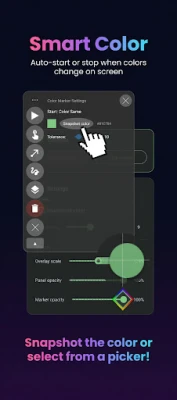
• Color-based triggers
Use the built-in color detector to start or stop a layer when a pixel matches (or stops matching) a target color. Perfect for reacting to app UI, status indicators, or visual cues.
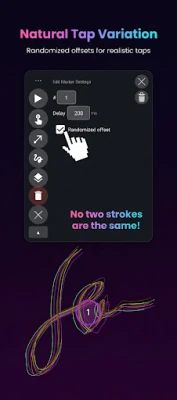
• Anti-detection with randomized offset and delays
Add subtle randomization to tap positions and gesture paths so your automation looks natural — globally or per-marker.
• Floating overlay control panel
Drag, resize, and adjust opacity. Start and stop automation without leaving your current app.
• Import and export
Save your setups as JSON and share them or back them up.
USE CASES
• Repetitive UI tasks across any app
• Mobile gaming automation for repetitive grinding and resource collection
• Accessibility workflows for users who can't perform repeated taps
• QA testing and UI walkthroughs
• Demos and tutorials that need scripted touch input
HOW IT WORKS
1. Grant the two required permissions (Accessibility Service and Display over other apps)
2. Tap "Start Overlay" to launch the floating control panel
3. Add tap, drag, or recorded-gesture markers wherever you need them
4. Configure timing, layers, and color triggers
5. Press play — ColorTap dispatches the gestures for you
PERMISSIONS
ColorTap uses the Android Accessibility Service for two purposes:
1. To dispatch touch gestures (taps, drags, recorded gestures) that you recorded on your behalf — this is the core function of the app.
2. To capture periodic screenshots when you use color-based triggers, so it can sample pixel colors at the marker positions you configured. Screenshots are processed entirely on your device, only the pixel colors at your chosen coordinates are read, and no images are stored, transmitted, or shared.
The Display-over-apps permission is used to show the floating control panel
No ads. No tracking. No accounts. Your data stays on your device.
Need help? Visit https://www.colortap.site/how-to-use for tutorials, or report issues at https://www.colortap.site/bug-report
KEY FEATURES
• Tap, drag, and custom gesture automation
Place markers anywhere on screen and configure each one's delay, hold duration, and order. Record your own multi-touch gestures and replay them perfectly.
• Multi-layer execution
Organize actions into layers and chain them with start/stop conditions. Run sequences in any order, loop them, or trigger them based on screen state.
• Color-based triggers
Use the built-in color detector to start or stop a layer when a pixel matches (or stops matching) a target color. Perfect for reacting to app UI, status indicators, or visual cues.
• Anti-detection with randomized offset and delays
Add subtle randomization to tap positions and gesture paths so your automation looks natural — globally or per-marker.
• Floating overlay control panel
Drag, resize, and adjust opacity. Start and stop automation without leaving your current app.
• Import and export
Save your setups as JSON and share them or back them up.
USE CASES
• Repetitive UI tasks across any app
• Mobile gaming automation for repetitive grinding and resource collection
• Accessibility workflows for users who can't perform repeated taps
• QA testing and UI walkthroughs
• Demos and tutorials that need scripted touch input
HOW IT WORKS
1. Grant the two required permissions (Accessibility Service and Display over other apps)
2. Tap "Start Overlay" to launch the floating control panel
3. Add tap, drag, or recorded-gesture markers wherever you need them
4. Configure timing, layers, and color triggers
5. Press play — ColorTap dispatches the gestures for you
PERMISSIONS
ColorTap uses the Android Accessibility Service for two purposes:
1. To dispatch touch gestures (taps, drags, recorded gestures) that you recorded on your behalf — this is the core function of the app.
2. To capture periodic screenshots when you use color-based triggers, so it can sample pixel colors at the marker positions you configured. Screenshots are processed entirely on your device, only the pixel colors at your chosen coordinates are read, and no images are stored, transmitted, or shared.
The Display-over-apps permission is used to show the floating control panel
No ads. No tracking. No accounts. Your data stays on your device.
Need help? Visit https://www.colortap.site/how-to-use for tutorials, or report issues at https://www.colortap.site/bug-report
Rate the App
Add Comment & Review
User Reviews
Based on 0 reviews
No reviews added yet.
Comments will not be approved to be posted if they are SPAM, abusive, off-topic, use profanity, contain a personal attack, or promote hate of any kind.












More »

Popular Apps

phpFoxPHPFOX LLC

Moon Chai StoryOlha Dobel

World War Heroes — WW2 PvP FPSAzur Interactive Games Limited

Govee LiteGovee

Viking Clan: RagnarokKano Games

Build World AdventureExplore city in cube world

Vikings: War of ClansPlarium LLC

Asphalt 9: LegendsGameloft SE

Submarine Car Diving SimulatorSwim with dolphins & penguins

Dawn of Zombies: Survival GameRoyal Ark
More »
Editor's Choice

Grim Soul: Dark Survival RPGBrickworks Games Ltd

Craft of Survival - Gladiators101XP LIMITED

Last Shelter: SurvivalLong Tech Network Limited
Dawn of Zombies: Survival GameRoyal Ark

Merge Survival : WastelandStickyHands Inc.

AoD Vikings: Valhalla GameRoboBot Studio
Viking Clan: RagnarokKano Games
Vikings: War of ClansPlarium LLC
Asphalt 9: LegendsGameloft SE

Modern Tanks: War Tank GamesXDEVS LTD