
Latest Version
Update
November 04, 2026
November 04, 2026
Developer
Ben Treder
Ben Treder
Categories
Tools
Tools
Platforms
Android
Android
Downloads
0
0
License
Free
Free
Package Name
com.bentreder.applock
com.bentreder.applock
Report
Report a Problem
Report a Problem
More About AppLock
Keep your private apps private with AppLock.
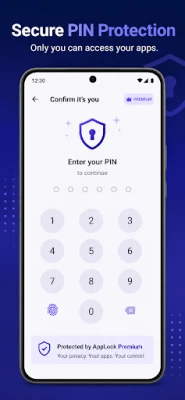
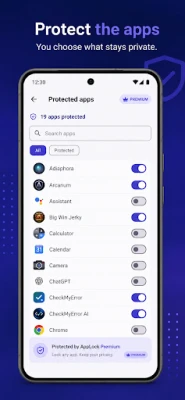
AppLock adds an extra layer of privacy to selected apps on your Android device. Choose the apps you want to protect, and AppLock will require your 6-digit PIN or supported biometric authentication before opening them.
Simple app protection
• Protect as many apps as you want
• Unlock with a 6-digit PIN
• Use supported biometric authentication for faster access
• Search and manage protected apps easily
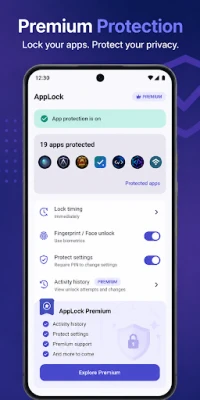
• Choose when apps should lock again
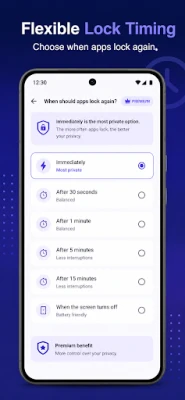
• Lock immediately, after a delay, or when the screen turns off
• Protect access to AppLock settings
Private by design
AppLock is designed around on-device protection. Your PIN verification data, protected-app settings, and AppLock activity stay on your device. AppLock does not require an account and does not include advertising or analytics.
AppLock Premium
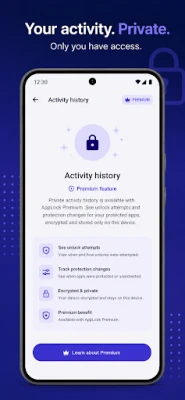
Upgrade with a one-time purchase to unlock Premium features, including encrypted local Activity History. Activity History is stored on your device and helps you review AppLock protection activity.
Easy setup
AppLock walks you through setup step by step, including creating your PIN, enabling biometrics if desired, choosing apps to protect, and enabling the Android Accessibility service required for app detection.
AccessibilityService
AppLock uses Android's AccessibilityService to detect when an app you selected for protection is opened so AppLock can display its authentication screen. AppLock does not use AccessibilityService to read screen content, messages, passwords, or typed text, and Accessibility information is not transmitted off your device.
AppLock is an additional privacy layer. It does not replace Android's device screen lock, and someone with full access to your unlocked device and Android system settings may be able to disable or uninstall AppLock.
Protect the apps that matter to you with straightforward, local-first privacy controls.
Simple app protection
• Protect as many apps as you want
• Unlock with a 6-digit PIN
• Use supported biometric authentication for faster access
• Search and manage protected apps easily
• Choose when apps should lock again
• Lock immediately, after a delay, or when the screen turns off
• Protect access to AppLock settings
Private by design
AppLock is designed around on-device protection. Your PIN verification data, protected-app settings, and AppLock activity stay on your device. AppLock does not require an account and does not include advertising or analytics.
AppLock Premium
Upgrade with a one-time purchase to unlock Premium features, including encrypted local Activity History. Activity History is stored on your device and helps you review AppLock protection activity.
Easy setup
AppLock walks you through setup step by step, including creating your PIN, enabling biometrics if desired, choosing apps to protect, and enabling the Android Accessibility service required for app detection.
AccessibilityService
AppLock uses Android's AccessibilityService to detect when an app you selected for protection is opened so AppLock can display its authentication screen. AppLock does not use AccessibilityService to read screen content, messages, passwords, or typed text, and Accessibility information is not transmitted off your device.
AppLock is an additional privacy layer. It does not replace Android's device screen lock, and someone with full access to your unlocked device and Android system settings may be able to disable or uninstall AppLock.
Protect the apps that matter to you with straightforward, local-first privacy controls.
Rate the App
Add Comment & Review
User Reviews
Based on 0 reviews
No reviews added yet.
Comments will not be approved to be posted if they are SPAM, abusive, off-topic, use profanity, contain a personal attack, or promote hate of any kind.







More »

Popular Apps

phpFoxPHPFOX LLC

Moon Chai StoryOlha Dobel

World War Heroes — WW2 PvP FPSAzur Interactive Games Limited
Govee LiteGovee

AvSeaAvionics Electronics Geeks!

Viking Clan: RagnarokKano Games

Vikings: War of ClansPlarium LLC

Build World AdventureExplore city in cube world

Asphalt 9: LegendsGameloft SE
Dawn of Zombies: Survival GameRoyal Ark
More »
Editor's Choice

Grim Soul: Dark Survival RPGBrickworks Games Ltd

Craft of Survival - Gladiators101XP LIMITED

Last Shelter: SurvivalLong Tech Network Limited
Dawn of Zombies: Survival GameRoyal Ark

Merge Survival : WastelandStickyHands Inc.

AoD Vikings: Valhalla GameRoboBot Studio
Viking Clan: RagnarokKano Games
Vikings: War of ClansPlarium LLC
Asphalt 9: LegendsGameloft SE

Modern Tanks: War Tank GamesXDEVS LTD